
The Logitech C920x has been around for a long time in tech years. And yet, every time someone asks, “What webcam should I buy?” this one still comes up almost immediately.
That made me curious. Is it genuinely still good, or are we all just stuck recommending it out of habit?
I’ve used the C920x on and off for years for video calls, recordings, and the occasional stream. I’ve also tested newer webcams that promise sharper video, smarter autofocus, or better low-light performance. So this review is about whether the C920x still earns its reputation or if it’s finally time to move on.
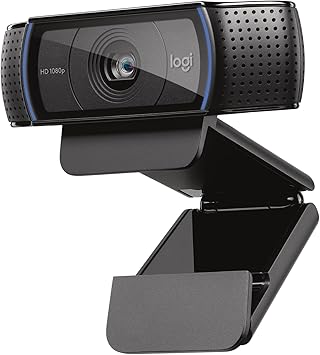
A reliable 1080p webcam with built-in stereo microphones and automatic light correction, ideal for video calls, remote work, and everyday content creation.
Quick overview
The Logitech C920x is a 1080p webcam with autofocus, dual microphones, and USB plug-and-play support. It’s designed for everyday use: Zoom calls, Teams meetings, YouTube videos, online classes, and light streaming.
It’s not flashy. It doesn’t try to be clever. And that’s honestly a big part of why it’s lasted so long.
Design and build quality
This is one of those products that feels more solid than it looks.
The camera body has a rubberized finish that helps it grip your monitor without sliding around. The clip mount works on laptops, thin monitors, and thicker displays, and it hasn’t loosened or cracked on me over time.
It’s not tiny, but it doesn’t feel bulky either. The size is just right for sitting on top of a screen without being distracting.
One small thing I appreciate is the physical pivot. You can tilt the camera up or down easily, and it stays where you set it. That’s something cheaper webcams still mess up.
Video quality in real-world use
On paper, 1080p at 30 frames per second doesn’t sound impressive anymore. In practice, the C920x still delivers clean, natural-looking video.
In good lighting, the image is sharp without looking over-processed. Skin tones look realistic, and the picture doesn’t have that harsh, overly sharpened webcam look.
Autofocus is reliable, not instant. If you move closer or hold something up to the camera, it takes a second to adjust, but it usually lands in the right place. For talking-head video or calls, that’s perfectly fine.
Where the C920x shows its age a bit is in low light. It does brighten the image, but that comes with some grain. It’s usable, but if you’re sitting in a dim room with one lamp on, newer webcams handle that scenario better.
That said, a basic desk lamp or window light still goes a long way here.
Audio performance: better than expected
The dual microphones are surprisingly decent.
I wouldn’t use them for podcasting, but for calls and meetings, they’re clear and natural. Voices come through without sounding thin or metallic, and background noise isn’t aggressively boosted.
If you’re coming from a laptop mic, this will almost certainly sound better. If you already own a dedicated microphone, you’ll still want to use that instead.
Setup and software
This is one of the C920x’s biggest strengths.
You plug it in, and it just works. No drivers. No setup headaches. Every major video app recognizes it instantly.
If you want more control, Logitech’s software lets you tweak exposure, white balance, zoom, and focus manually. Most people won’t touch those settings, but it’s nice to have the option.
I’ve also found it to be very stable across platforms. It behaves the same on Windows and macOS, and it doesn’t randomly disconnect or freeze mid-call.
How it compares to newer webcams
This is where the conversation usually gets interesting.
Newer webcams often advertise higher resolutions, faster autofocus, or AI features. Some of them genuinely look better, especially in challenging lighting.
But here’s the thing: most people don’t need those upgrades.
For standard video calls, online meetings, and casual content creation, the difference between the C920x and a newer mid-range webcam is smaller than you’d expect. The C920x still produces a clean, professional-looking image that doesn’t draw attention to itself, which is exactly what you want on a call.
Where newer models win is in low light, wider fields of view, and smarter exposure adjustments. If those matter to you, upgrading makes sense. If not, the C920x is still doing its job just fine.
Pros and cons
Pros
- Reliable 1080p video quality
- Solid autofocus for everyday use
- Better-than-average built-in microphones
- Easy setup with no fuss
- Proven long-term reliability
Cons
- Struggles a bit in low light
- No 60fps support
- Design hasn’t changed in years
- Not ideal for serious streaming or cinematic video
Who this webcam is for
The Logitech C920x makes the most sense for:
- Remote workers who want to look professional on calls
- Students attending online classes
- Casual YouTubers recording talking-head videos
- Anyone upgrading from a laptop’s built-in webcam
- Streaming regularly on Twitch or YouTube
- Recording high-end video content
- Working in very low-light environments without extra lighting
Long-term reliability and consistency
One reason this webcam keeps getting recommended is simple: it lasts.
I’ve seen C920-series webcams used daily for years without issues. They don’t overheat, the focus motors don’t fail easily, and the mounts don’t fall apart.
That kind of reliability matters more than flashy features, especially if you rely on your webcam for work.
Is the Logitech C920x still worth buying?
Yes, with context.
The Logitech C920x isn’t the best webcam on the market anymore, but it’s still one of the safest choices at an amazing price. It delivers consistent results, it’s easy to use, and it doesn’t surprise you in bad ways.
If you want something that works well out of the box and doesn’t require constant tweaking, this webcam still earns its place.
If you want cutting-edge features or perfect low-light performance, you’ll want to look elsewhere. But for most people, the C920x is more than good enough.
If you’re choosing a webcam you won’t have to think about after you set it up, the Logitech C920x is still a solid pick.
If you’re building or upgrading a streaming or remote work setup, these related articles may help you compare options:
• Best Streaming Gear for Beginners (Mic, Webcam, Controls)
• Blue Yeti vs Other USB Microphones: Is It Still Worth It?
• Best Gaming Accessories That Actually Improve Performance