

Tech gadgets are hardware devices designed to improve productivity, gaming performance, and media consumption through technology-driven features and ergonomic design. The right electronic gadgets can transform a basic desk setup into a focused work environment or an immersive entertainment station. The wrong ones collect dust. Techreviewnerds has tested dozens of these devices firsthand, and the pattern is consistent: buyers who start with a clear need end up satisfied, while those chasing specs or launch-day hype often regret the purchase. This guide covers what to buy, what to skip, and how to build a setup that actually serves you.
What are the main categories of tech gadgets?
Tech gadgets fall into three practical categories: productivity, gaming, and media consumption. Each category targets a different set of daily needs, and understanding the split helps you spend money where it counts.
Productivity gadgets focus on comfort, focus, and output. An ergonomic chair is the single most impactful purchase in this category. A quality home office setup in 2026 costs roughly $1,520–$1,650, with the chair and monitor accounting for 80% of comfort. That ratio tells you where to put your money first. Mechanical keyboards, ergonomic mice, and monitor arms round out the productivity tier.

Gaming gadgets prioritize response time, precision, and immersion. A gaming mouse with a high polling rate and adjustable DPI reduces input lag in fast-paced titles. Mechanical keyboards with low-actuation switches give you faster, more consistent keystrokes. A monitor with a high refresh rate, such as 144Hz or 240Hz, and Adaptive Sync technology eliminates screen tearing during gameplay. These specs are not marketing fluff. You feel the difference within minutes of switching from a standard setup.
Media consumption gadgets center on audio and visual quality. Noise-canceling headphones, smart displays, and quality webcams all belong here. The Anker PowerConf C200 webcam and Elgato Key Light Mini together cost about $120 and deliver professional video call quality without expensive AI-powered cameras. That combination punches well above its price point.
| Category | Example Gadgets | Primary Benefit |
|---|---|---|
| Productivity | Ergonomic chair, 27-inch 1440p monitor, mechanical keyboard | Comfort, focus, and reduced fatigue |
| Gaming | Gaming mouse, high-refresh monitor, mechanical keyboard | Precision, speed, and immersion |
| Media consumption | Noise-canceling headphones, webcam, key light | Clear audio, sharp video, and better calls |
| Connectivity | Laptop docking station, USB-C hub | Unified port access and desk organization |
| Audio/Visual | Streaming microphone, smart display | Richer sound and visual clarity |
How to choose the best tech gadgets for your needs
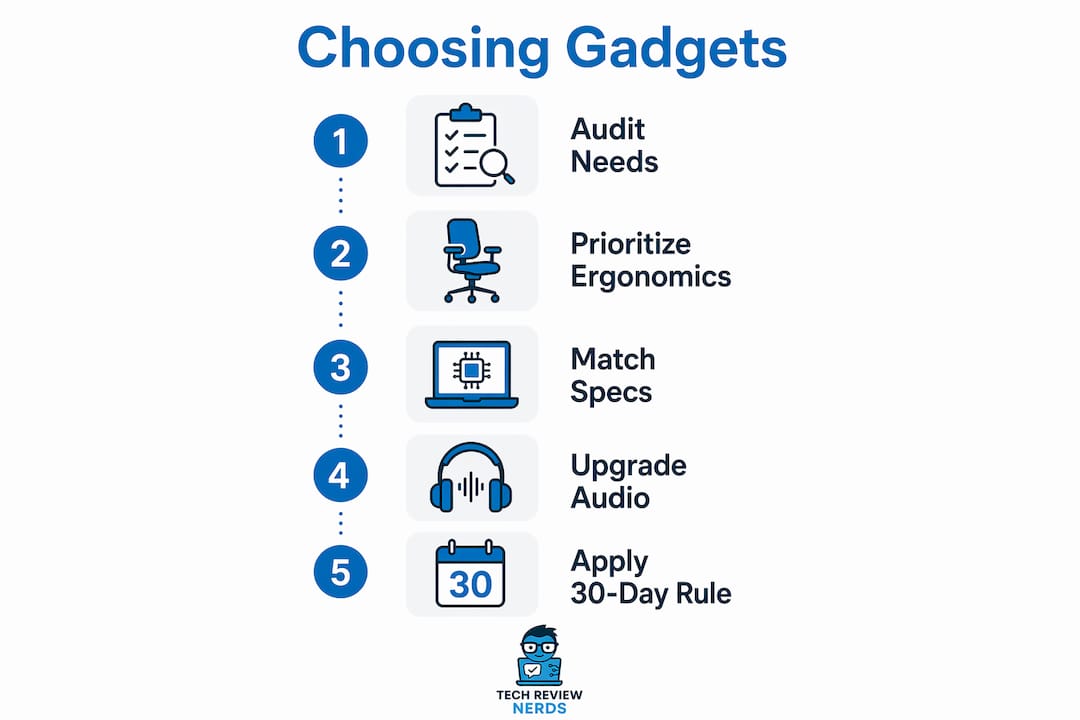
The most common buying mistake is picking a device first and finding a need for it afterward. Audit your daily tasks before you open a single product page. Write down what slows you down, causes discomfort, or breaks your focus. That list becomes your shopping brief.
Start with ergonomics, not specs
For productivity setups, ergonomics outweigh raw performance specs. A poor chair causes back pain within two hours of use. A low-resolution monitor causes eye strain by midday. Ignoring foundational ergonomic elements leads directly to reduced output and physical discomfort. No amount of RAM or processor speed compensates for a setup that hurts to use.
Match specs to your actual use case
Gaming gadgets require a different evaluation lens. A 240Hz monitor matters if you play competitive first-person shooters. It adds almost nothing if you play turn-based strategy games. A gaming mouse with 25,600 DPI is useful for large multi-monitor setups. For a single 27-inch screen, 1,600 DPI is more than enough. Buy to your actual use case, not the ceiling spec.
Upgrade audio and lighting before cameras
For video calls and media, lighting and audio quality matter more than camera resolution. A $30 ring light and a $50 USB microphone improve call quality more than a $200 camera upgrade. The Elgato Key Light Mini is a good example of a targeted, affordable fix that solves a real problem without overspending.
Pro Tip: Apply a 30-day waiting rule to any gadget purchase over $100. If you still want it after 30 days, the need is real. If you’ve forgotten about it, the marketing did its job, not the product.
Many tech purchases fail because buyers are swayed by launch-day excitement rather than genuine need. The 30-day rule filters out that noise effectively.
What are the top tech gadgets to prioritize for a 2026 setup?
Build your setup in sequence. The chair comes first, then the monitor, then peripherals. This order reflects where comfort and performance gains are largest per dollar spent.
Foundational productivity gadgets
An ergonomic chair with lumbar support and adjustable armrests is the single highest-return purchase in any desk setup. Pair it with a 27-inch 1440p monitor for a resolution that balances sharpness and GPU demand. At 27 inches, 1440p hits a sweet spot where individual pixels are invisible at normal viewing distance. A 1080p panel at the same size starts to look soft.
A mechanical keyboard is the next logical step. The Logitech MX Mechanical Wireless Keyboard is a strong example of a productivity-focused board that bridges office and home use. Read the Logitech MX Mechanical review on Techreviewnerds for a full breakdown of its tactile feel and battery life. Pair it with a vertical or ergonomic mouse to reduce wrist rotation during long sessions.
Gaming performance gadgets
For gaming, the monitor refresh rate and mouse response time define the experience more than any other spec. A 144Hz IPS panel with Adaptive Sync is the baseline for smooth gameplay in 2026. Anything below 60Hz feels sluggish once you’ve used a high-refresh display. A gaming mouse with a dedicated optical sensor and programmable side buttons gives you both precision and workflow shortcuts. Check Techreviewnerds’ gaming accessories guide for tested picks across budget and premium tiers.
Audio-visual upgrades for work and media
Noise-canceling headphones serve double duty. They block distractions during focused work and deliver clean audio during media playback. A quality pair with active noise cancellation (ANC) and a 30-hour battery life handles both without compromise. For video calls, the Anker PowerConf C200 and Elgato Key Light Mini combination remains one of the best value upgrades available under $150 total.
Pro Tip: Buy your chair and monitor before any peripheral. Spending $200 on a mechanical keyboard while sitting in a $50 office chair is the wrong order of operations. Comfort drives output more than any accessory.
| Gadget Category | Budget Option | Premium Option | Key Benefit |
|---|---|---|---|
| Ergonomic chair | $200–$350 | $800–$1,200 | Posture support and reduced fatigue |
| 27-inch 1440p monitor | $250–$350 | $500–$800 | Sharp visuals and eye comfort |
| Mechanical keyboard | $80–$120 | $150–$250 | Tactile feedback and durability |
| Gaming mouse | $30–$60 | $80–$150 | Precision and programmable inputs |
| Noise-canceling headphones | $50–$100 | $250–$400 | Focus and audio quality |
| Webcam and key light | $60–$120 | $150–$250 | Professional video call presence |
What to consider when buying used or refurbished tech gadgets
Used gadgets can deliver strong value, but the category carries real risks. The 2-year rule recommends buying used tech no older than two years to ensure at least five more years of software support. This matters most for smartphones and laptops, where operating system updates directly affect security and app compatibility.
Gadgets to avoid buying used
Some devices carry hygiene and durability concerns that make used purchases a bad idea. Consumer advocacy recommends caution with used earbuds, wearables, and large fragile devices like televisions and printers. Earbuds sit in ear canals. Wearables absorb sweat. Printers have complex mechanical parts that degrade with use. These categories are worth buying new.
What to check before buying used
- Battery health: Ask for a screenshot of battery health on smartphones and laptops. Anything below 80% capacity means a replacement is coming soon.
- Return policy: Only buy from sellers who offer at least a 7-day return window. This gives you time to test the device under real conditions.
- Physical inspection: Check ports, hinges, and screens in person when possible. Cracks in display glass often spread over time.
- Software reset: Confirm the device has been factory reset and is not locked to a previous account.
Where to buy used tech safely
Reputable resellers with graded condition ratings (typically “like new,” “good,” and “fair”) give you a clearer picture than private listings. Certified refurbished programs from manufacturers offer the best protection, often including a 90-day warranty and a fresh battery. Private marketplace listings can offer lower prices, but the risk of misrepresented condition is higher.
Pro Tip: Before finalizing any used tech purchase, search the model number alongside “common problems” on Reddit or tech forums. Community feedback 3–6 months after a product’s release reveals durability issues that launch reviews almost never catch.
Key Takeaways
The most effective approach to buying tech gadgets is to audit your real needs first, prioritize ergonomic foundations, and apply a 30-day waiting rule before committing to any purchase over $100.
| Point | Details |
|---|---|
| Audit needs before buying | Identify real daily pain points before researching any specific product. |
| Prioritize chair and monitor | These two items account for 80% of comfort in a desk setup. |
| Apply the 30-day rule | Waiting 30 days separates genuine needs from impulse buys driven by marketing. |
| Follow the 2-year rule for used tech | Buy used devices no older than two years to secure at least five years of software support. |
| Avoid used earbuds and wearables | Hygiene and durability concerns make these categories worth buying new. |
What I’ve learned after years of testing tech gadgets
I’ve tested a lot of gadgets over the years, and the pattern that keeps showing up is this: the people who are happiest with their setups are not the ones who bought the most expensive gear. They’re the ones who bought in the right order.
The ergonomic chair conversation is one I have constantly. Readers will spend $300 on a mechanical keyboard and then tell me their back hurts after four hours at the desk. The chair is not glamorous. It doesn’t have RGB lighting or a spec sheet that impresses anyone. But it is the device you interact with for every single minute you’re at your desk, and its impact on focus and comfort is immediate.
I also think the 30-day rule is underrated as a framework. Marketing around new devices is genuinely good at creating urgency. I’ve caught myself wanting to buy something the day it launches, only to realize three weeks later that I already had a device that did the same job. The wait costs nothing and saves real money.
The other thing I’d push back on is the idea that community reviews are less credible than professional ones. For long-term reliability, a Reddit thread from six months after launch is often more useful than a polished review from launch week. Real users surface battery degradation, firmware bugs, and build quality issues that a one-week review period never catches. I check those threads before every major purchase now, and I recommend you do the same.
Cable management and lighting are two details that most buying guides skip entirely. A well-lit desk with clean cable routing genuinely changes how a setup feels to use. It’s not aesthetic vanity. Clutter creates low-level cognitive friction. Removing it helps.
— K. Connors
Techreviewnerds has the reviews you need before you buy
Sorting through spec sheets and marketing copy takes time you probably don’t have. Techreviewnerds publishes hands-on reviews based on real use, with no paid placements influencing the recommendations.

Whether you’re building a productivity setup from scratch or upgrading your gaming peripherals, the gadget reviews at Techreviewnerds cover the categories that matter most. For readers focused on the laptop side of a setup, the laptop buying guides walk through specs, benchmarks, and real-world performance in plain language. Every review is updated regularly so you’re reading current information, not last year’s picks.
FAQ
What are tech gadgets?
Tech gadgets are hardware devices designed to improve productivity, gaming, or media consumption through technology-driven features. They range from ergonomic peripherals like keyboards and mice to audio devices and smart displays.
How do I choose the right tech gadgets for my setup?
Audit your daily tasks first to identify real pain points, then buy to address those specific needs. Avoid starting with a product and working backward to justify the purchase.
What is the best order to build a tech setup?
Start with an ergonomic chair, then a quality monitor, then peripherals like a keyboard and mouse. Chair and monitor account for the majority of comfort and productivity impact in any desk setup.
Are refurbished tech gadgets worth buying?
Refurbished gadgets from certified programs are worth considering, but follow the 2-year rule: only buy devices no older than two years to ensure continued software support and a usable battery life.
What tech gadgets should I never buy used?
Avoid buying used earbuds, wearables, televisions, and printers. Hygiene concerns apply to earbuds and wearables, while televisions and printers carry durability risks that make used purchases unreliable.