
Technology recommendations are expert-backed guides that match devices and software to your specific needs, budget, and use patterns to prevent costly mistakes. Most buyers approach tech purchases backward. They start with a product they want and then build a justification around it. A sound tech buying guide flips that process: it starts with your actual use case, maps it to a realistic budget, and then identifies the best tools that fit both. This article covers device lifespan planning, performance baselines, budgeting frameworks, and the critical evaluation skills that separate a confident purchase from an expensive regret.
What do technology recommendations actually cover?
Good technology advice covers far more than a ranked list of products. It addresses three core questions: what do you actually need, how long should it last, and what is the real total cost of owning it? Total cost of ownership includes the purchase price, any required subscriptions, accessories, and the cost of replacing the device when its useful life ends. Skipping that calculation is how buyers end up spending $300 on a budget laptop that needs replacing in 18 months, when a $550 model would have lasted four years.
The industry term for this kind of structured guidance is “technology advisory,” though most readers search for it as technology recommendations. Both phrases describe the same process: matching a device or software solution to a defined need, budget, and timeline. Techreviewnerds builds every review and buying guide around this framework, focusing on hands-on testing rather than spec sheets alone.

How do device lifespan and performance standards shape buying decisions?
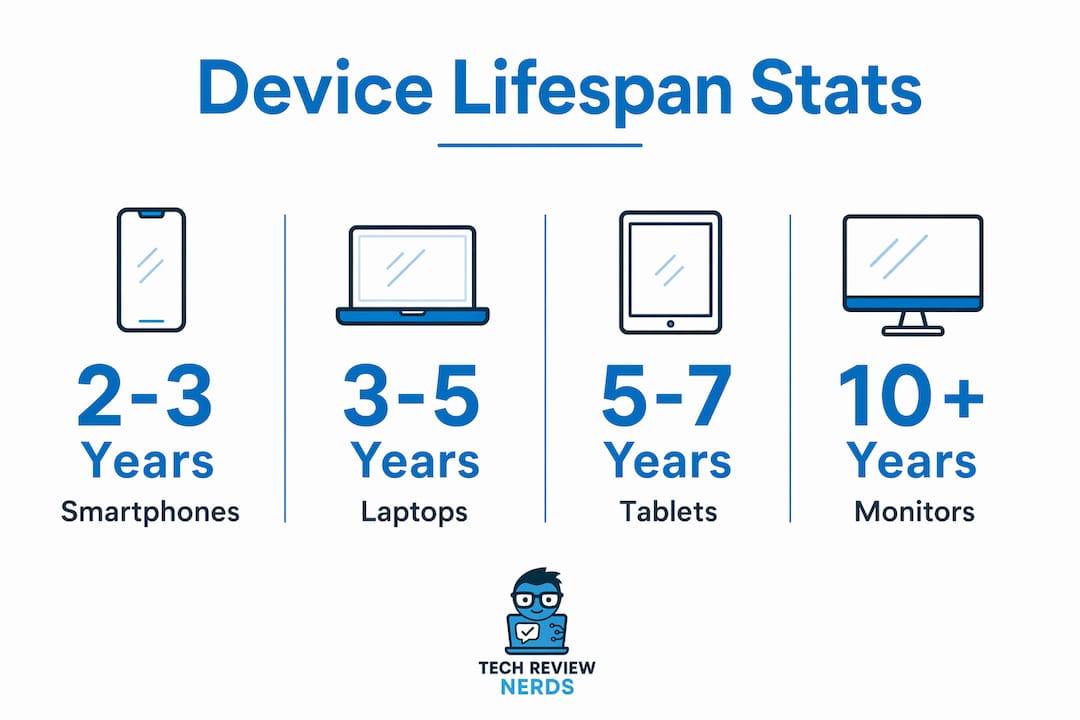
Device lifespan ranges vary significantly by category, and knowing them changes how you budget and when you upgrade. Smartphones typically last 2–3 years, laptops 3–5 years, tablets 4–6 years, smartwatches 2–4 years, and gaming consoles 5–7 years. Those ranges are not arbitrary. They reflect when software support ends, when battery capacity degrades past practical use, and when performance gaps become noticeable in daily tasks.
Lifespan data also sets your performance baseline. A laptop you buy today needs to handle your workload not just now, but in year four of ownership. 16GB of RAM is the current minimum for a laptop expected to stay responsive for five years, since 8GB configurations already struggle with typical browser and productivity workloads. That single spec decision affects whether your purchase ages gracefully or becomes frustrating within two years.
Device lifespan reference by category
| Device category | Typical lifespan | Key longevity factor |
|---|---|---|
| Smartphone | 2–3 years | Battery health, OS update support |
| Laptop | 3–5 years | RAM, thermal management, build quality |
| Tablet | 4–6 years | App compatibility, display durability |
| Smartwatch | 2–4 years | Battery cycle count, sensor accuracy |
| Gaming console | 5–7 years | Exclusive title support, hardware reliability |
Codec support and battery capacity are two specs that rarely appear in marketing materials but matter enormously over a device’s life. A laptop with a poor thermal design will throttle its processor under sustained load, making it feel sluggish long before its hardware is technically outdated. Checking long-lasting laptop examples from real-world testing gives you a clearer picture than any spec comparison alone.
Pro Tip: Before buying any laptop, look up its thermal performance under sustained workloads, not just its peak benchmark score. A chip that runs hot will throttle itself and feel slower than a less powerful chip that stays cool.
What budgeting strategies work best for tech purchases?
Envelope budgeting adapted for technology purchases is one of the most practical frameworks available. The core idea is simple: you assign a dedicated monthly savings amount to each device category based on its expected replacement cost and lifespan. Dividing a $600 phone’s replacement cost by its 12-month expected ownership period gives you a $50 monthly contribution target. That math removes the financial shock of replacement and turns tech spending into a planned expense rather than an emergency.
Here is a practical framework for structuring your tech budget:
- Set budget bands, not fixed prices. A flexible range like $550–$750 gives you room to step up to a meaningfully better product without blowing past your limit. A rigid single-price ceiling often forces a compromise that costs more in the long run.
- Create a dedicated upgrade fund. Treat each device category as its own savings line. Laptop fund, phone fund, and accessories fund stay separate so one purchase does not cannibalize another.
- Build an emergency tech fund. Devices fail unexpectedly. A small buffer of $150–$300 prevents a broken laptop from becoming a credit card problem.
- Apply the 30-day cooling-off rule. Adding a product to a wishlist and revisiting it after 30 days filters out impulse buys. Most purchases that feel urgent in the moment feel optional a month later.
- Account for ongoing costs upfront. Software subscriptions, cloud storage, and required accessories can add $100–$200 annually to a device’s real cost. Factor those in before you commit.
Pro Tip: When you feel the pull of a new product launch, write down exactly which tasks your current device cannot handle. If you cannot fill a full paragraph, you probably do not need the upgrade yet.
Budget flexibility also protects you from a common trap: buying the cheapest option in a category and then replacing it sooner than planned. Budget flexibility enables better choices, and a fixed price point can push you toward a product that falls just short of what you actually need. Spending $80 more upfront to get 16GB of RAM instead of 8GB is almost always the right call for a laptop you plan to use for four years.
How do you evaluate tech products beyond the marketing hype?
The most common mistake buyers make is treating a launch-day review as a complete picture of a product. Initial reviews focus on specs and first impressions, while the real story emerges from users who have lived with the device for three to six months. That is when battery degradation patterns, software bugs, and build quality issues surface. Waiting for post-release assessments is not patience for its own sake. It is a practical filter against hype-driven mistakes.
When evaluating any recommended gadget, focus on these criteria:
- Battery life under real conditions. Manufacturer claims are measured under light use. Look for independent tests that reflect your actual workload, whether that is video streaming, coding, or document editing.
- RAM and storage configuration. For laptops, 16GB RAM is the current floor for longevity. For smartphones, 128GB of storage is the practical minimum if you shoot video regularly.
- Software update commitments. Google’s Pixel line promises up to seven years of security and feature updates. Knowing a brand’s update policy tells you how long a device will stay secure and useful.
- Return rates and user complaints. Negative reviews from buyers who returned a product reveal real-world limitations that positive launch coverage misses. Look for patterns in one-star reviews, not just the average rating.
- Total cost of ownership. A $200 printer that requires $60 ink cartridges every two months costs more than a $350 model with cheaper consumables. The same logic applies to tablets with proprietary accessories and laptops that require paid software.
Focusing on actual use cases rather than status or brand prestige is the single most effective filter in any tech buying guide. Paying a premium for a flagship feature you will never use is not a smart purchase. It is an expensive habit. Techreviewnerds addresses this directly in its real-world testing approach, which prioritizes how a device performs in daily use over how it performs in controlled benchmark conditions.
When is the right time to upgrade your technology?
The right time to upgrade is when your current device can no longer perform a task you need it to do, not when a new model launches. That distinction matters because the tech industry runs on upgrade cycles designed to create desire, not necessity. A laptop that handles your workload reliably, receives security updates, and has a healthy battery is not a candidate for replacement, regardless of how many new features the latest model offers.
Verifying software update status is the first check before any upgrade decision. If your device still receives security patches and feature updates, its functional life is not over. Brands like Google now commit to seven years of updates on flagship devices, which means a three-year-old phone may have years of supported life remaining.
Timing also affects price. Major shopping events like Black Friday, Cyber Monday, and back-to-school season in July and August consistently produce the deepest discounts on laptops and consumer electronics. Product cycle calendars matter too. Buying a laptop two weeks before a manufacturer announces a new generation means you pay full price for hardware that will drop in value immediately.
- Monitor price history using tools that track historical pricing data before committing to a purchase.
- Check manufacturer roadmaps and tech news cycles to anticipate upcoming product releases in your category.
- Assess whether your current device’s limitations are hardware-based or software-based. A slow laptop may need a RAM upgrade, not a full replacement. The laptop performance guide from Techreviewnerds covers exactly this scenario.
- Set a personal upgrade trigger. Define the specific performance threshold your device must fall below before you start shopping. That removes emotion from the decision.
Newer or flagship models do not automatically deliver superior practical value. A mid-range device from 18 months ago often outperforms a new budget model in the same price bracket. Comparing across generations, not just within a current lineup, gives you a more accurate picture of what your money buys.
Key Takeaways
Sound technology recommendations start with use case, lifespan, and total cost, not with the product itself.
| Point | Details |
|---|---|
| Lifespan drives budgeting | Smartphones last 2–3 years; laptops last 3–5 years. Use these ranges to plan replacement savings monthly. |
| 16GB RAM is the current floor | Laptops with 8GB RAM already struggle with typical workloads and will not age well past two years. |
| Budget bands beat fixed prices | A flexible range like $550–$750 prevents suboptimal purchases caused by arbitrary price ceilings. |
| Wait 30 days before buying | Adding a product to a wishlist and revisiting it after 30 days filters out impulse purchases effectively. |
| Upgrade on need, not novelty | Replace a device only when it can no longer perform a required task, not when a new model launches. |
Why I think most tech advice misses the real problem
I’ve spent years testing devices and reading through hundreds of buyer regret stories, and the pattern is consistent. The problem is almost never the product. It is the process the buyer used to choose it. Most people walk into a purchase with a brand preference and a vague budget, then let a salesperson or a launch-day review fill in the rest. That is a recipe for spending money on features you do not need and skipping the specs that actually matter.
The advice I find myself giving most often is deceptively simple: define your use case before you look at a single product. Not “I want a laptop for work,” but “I need a laptop that handles eight browser tabs, video calls, and light photo editing for at least four years, and I want to spend under $800.” That level of specificity immediately eliminates most of the market and points you toward a short list of genuinely suitable options.
I also think the industry undersells the value of patience. Waiting three to six months after a product launches before buying it is not missing out. It is collecting the data that launch reviews cannot provide. Battery degradation curves, software stability, and real-world thermal performance all become clear in that window. The buyers who wait consistently make better decisions than those who pre-order.
The other thing I’ve noticed is that people treat technology as a reflection of identity rather than a set of tools. A $1,200 laptop does not make you a more serious professional. A device that handles your actual workload reliably, fits your budget, and lasts four years does. That mindset shift changes everything about how you shop. You stop chasing specs and start evaluating fit. And fit, in my experience, is what separates a satisfying purchase from an expensive lesson.
— K. Connors
Techreviewnerds has the reviews to back your next purchase
Techreviewnerds publishes hands-on, independent reviews built around real use cases, not sponsored placements or spec-sheet summaries. Every recommendation goes through actual testing before it reaches you.

The laptops category covers the full range from budget picks to productivity workhorses, with detailed breakdowns of RAM, thermal performance, and build quality. If you are narrowing down options by price, the mid-range laptop guide compares trusted sources so you get a complete picture before spending. For gadgets beyond laptops, the productivity and media gadgets section covers recommended devices across the categories that matter most to everyday buyers.
FAQ
What is the minimum RAM for a laptop in 2026?
16GB of RAM is the current minimum for a laptop expected to remain responsive for five years. 8GB configurations already struggle with typical browser and productivity workloads.
How long do smartphones typically last?
Smartphones typically last 2–3 years before battery health and software support become limiting factors. Brands that commit to longer update cycles, like Google with seven years of updates, can extend that useful life.
How do I avoid impulse buying when shopping for tech?
Add the product to a wishlist and wait 30 days before purchasing. Most impulse-driven purchases feel optional after that window passes.
When is the best time of year to buy tech products?
Black Friday, Cyber Monday, and the back-to-school season in july and august consistently offer the deepest discounts on laptops and consumer electronics. Buying just before a new product generation launches is the worst timing for value.
How do I know if a tech product is actually worth buying?
Look for long-term user reviews and return experiences posted three to six months after launch. Those accounts reveal battery degradation, software issues, and build quality problems that initial reviews miss.