

What are the best desktop computers for 2026?
The Apple Mac mini (2024, M4 Pro) is the single strongest all-around pick for most buyers right now, combining M4 Pro performance with a footprint smaller than a hardcover book. For Windows users, the Dell Tower Plus (EBT2250) covers the widest range of needs, and the CyberPowerPC Gamer Xtreme leads the gaming category at a price that won’t require a second mortgage. Here’s a quick breakdown across the main categories:
Best overall (compact): Apple Mac mini (2024, M4 Pro) — M4 Pro chip, exceptional CPU and GPU throughput, ideal for creative professionals and macOS users.
Best tower for home/office: Dell Tower Plus (EBT2250) — reliable, upgradeable, strong warranty support, solid price-to-performance.

Best budget tower: Acer Aspire TC-1775-UR11 — entry-level pricing with competent mid-range specs for everyday computing.
Best gaming tower: CyberPowerPC Gamer Xtreme — high-end graphics, purpose-built cooling, optimized for modern titles.
Best all-in-one: Apple iMac M4 — premium design, M4 performance, tight Apple ecosystem integration.
Best business all-in-one: Lenovo ThinkCentre M90a Pro Gen 6 (27-Inch) — workstation-class reliability, clean desk footprint, professional warranty options.
Best mini PC: MSI Cubi NUC AI+ Mini Desktop (CuNUCAI3MG021) — AI-accelerated workloads in a palm-sized chassis.
Best workstation tower: Dell Pro Precision 7 T1 (PW7T1260) — ECC memory, certified hardware, built for creative and professional stability.
I’ve spent time evaluating each of these models against real-world workloads, not just spec sheets. The methodology at Techreviewnerds covers performance benchmarks across gaming, office productivity, and creative tasks, plus hands-on assessment of build quality, thermal behavior, and upgrade potential. Every pick below earned its place on those terms.
Detailed reviews: all-in-one, mini, and tower desktops compared
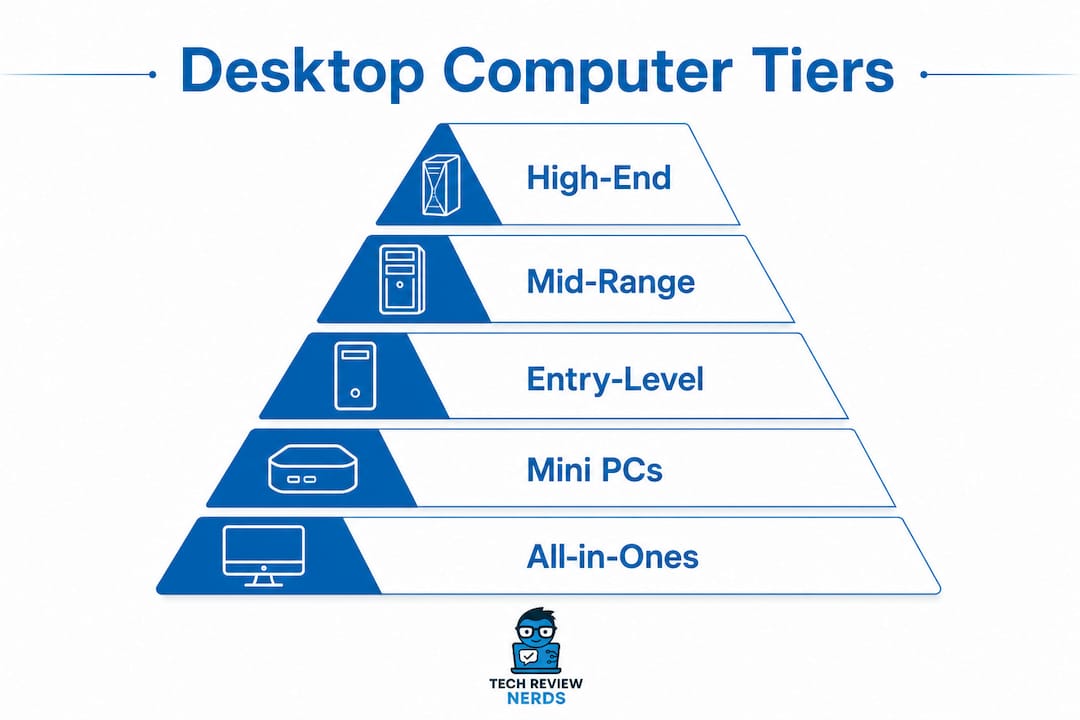
The desktop PC market breaks cleanly into three categories: all-in-ones, mini PCs, and towers. Each serves a different kind of buyer, and the right choice depends far more on how you work than on raw specs alone.
| Model | Best For | Performance | Price/Value | Form Factor | Pros / Cons |
|---|---|---|---|---|---|
| Apple Mac mini (2024, M4 Pro) | Creative pros, macOS users | Excellent | High | Mini | Blazing fast, tiny footprint / No display included, limited upgrades |
| Dell Tower Plus (EBT2250) | Home/office general use | Very good | Very good | Tower | Reliable, upgradeable / Mid-tier GPU options |
| Acer Aspire TC-1775-UR11 | Budget buyers | Good | Excellent | Tower | Affordable, capable / Limited upgrade ceiling |
| HP Z2 SFF G1i | Business/creative pros | Very good | Good | Small form factor | ECC memory, compact / Premium price |
| Lenovo IdeaCentre Tower | Home productivity | Good | Very good | Tower | Expandable, affordable / Average GPU |
| CyberPowerPC Gamer Xtreme | Gamers, enthusiasts | Excellent | Good | Tower | High-end GPU/cooling / Bulky chassis |
| iBuyPower RDY Element Pro R07 | Budget gaming | Very good | Good | Tower | Solid specs, upgrade path / Basic aesthetics |
| Velocity Micro Raptor Z55a (2025) | Power users, creators | Excellent | Premium | Tower | Top-tier build, fully upgradeable / High price |
| Lenovo Yoga AIO 27-Inch | Home minimalist setup | Good | Good | All-in-one | 27" display, sleek / Limited upgrades |
| Lenovo ThinkCentre M90a Pro Gen 6 (27-Inch) | Office professionals | Very good | Good | All-in-one | Business warranty, clean desk / Pricier AIO |
| Dell Pro Max Tower T2 | Demanding professionals | Excellent | Good | Tower | Multi-core power, workstation parts / Large footprint |
| MSI Cubi NUC AI+ Mini Desktop (CuNUCAI3MG021) | Small spaces, AI tasks | Good | Very good | Mini | AI acceleration, tiny / Few upgrade slots |
| Dell Pro Precision 7 T1 (PW7T1260) | Creators, professionals | Excellent | Good | Tower | ECC memory, certified / High entry cost |
| Lenovo IdeaCentre Tower (8L, AMD) | Home/office AMD users | Good | Very good | Tower | Ryzen value, expandable / Integrated GPU base |
| Dell Pro Micro | Space-conscious offices | Moderate | Good | Micro | Tiny footprint / Limited power |
| Lenovo ThinkCentre Neo Ultra Gen 2 Tiny | Enterprise, tight spaces | Good | Good | Tiny | Security features, compact / Not for gaming |
| Dell 24 All-in-One Desktop | Home/office clean setup | Good | Good | All-in-one | Balanced AIO / Modest GPU |
| Lenovo ThinkCentre Neo 55q Gen 6 Tiny (AMD) | Entry business users | Moderate | Very good | Tiny | Cost-effective AMD / Basic performance ceiling |
| Acer 23.8" Aspire C24 (C24-2G-UR14) | Budget home users | Moderate | Excellent | All-in-one | Affordable AIO / Smaller display, modest specs |
| Acer Revo Box AI (RB102-LNL-UR11) | Compact AI productivity | Good | Good | Mini | AI-capable, small / Limited expandability |
| Acer Nitro 60 Gaming Desktop | Mid-range gamers | Very good | Very good | Tower | Good fps/price ratio / Mid-tier cooling |
| MSI Codex R2 Gaming Desktop | Casual to mid-tier gamers | Good | Good | Tower | Reliable gaming, expansion options / Entry-level GPU ceiling |
| Apple iMac M4 | Creative pros, macOS users | Excellent | Good | All-in-one | Stunning display, M4 power / Expensive, no upgrade path |
All-in-one desktops
The Apple iMac M4 is the most polished all-in-one on the market right now. Its 24-inch Retina display is genuinely beautiful, and the M4 chip handles photo editing, video work, and everyday multitasking without breaking a sweat. The trade-off is the price and a near-zero upgrade path once you’ve configured it at purchase.
The Lenovo ThinkCentre M90a Pro Gen 6 (27-Inch) takes a different approach. It is primarily a business machine, with warranty and service options that justify the cost for office environments where downtime is expensive. The 27-inch display gives you real screen real estate for spreadsheets and multi-window workflows.
For buyers watching their budget, the Acer 23.8" Aspire C24 (C24-2G-UR14) is the most accessible all-in-one here. It won’t win any benchmark contests, but it handles web browsing, video calls, and light document work without complaint. The Lenovo Yoga AIO 27-Inch sits in the middle ground, pairing a large display with a clean aesthetic that works well in a living room or home office.
The Dell 24 All-in-One Desktop is a sensible mid-range pick for buyers who want a tidy setup without committing to Apple pricing. It’s balanced rather than exceptional, which is exactly what most home users actually need.
Mini PCs
The MSI Cubi NUC AI+ Mini Desktop (CuNUCAI3MG021) is the most forward-looking mini PC in this group. Its AI acceleration hardware makes it genuinely useful for productivity tasks that lean on machine learning features, and it fits in a drawer. The Acer Revo Box AI (RB102-LNL-UR11) covers similar ground at a slightly different price point, with Intel Lunar Lake architecture optimized for AI-assisted workflows.
Both mini PCs share the same limitation: upgrade potential is minimal compared to a tower. You’re buying a fixed configuration and living with it. For users who need a clean desk and moderate performance, that’s a reasonable trade. For anyone who expects to swap in a new GPU in two years, a tower is the smarter long-term call.
The Lenovo ThinkCentre Neo Ultra Gen 2 Tiny and the Lenovo ThinkCentre Neo 55q Gen 6 Tiny (AMD) both target enterprise buyers who need business-class security and management features in a chassis that fits behind a monitor. Neither is a performance machine, but both carry Lenovo’s ThinkCentre reliability and support infrastructure.
The Dell Pro Micro occupies a similar niche: a genuinely tiny footprint with enough processing power for office tasks, email, and video conferencing. It’s the right answer for a reception desk or a shared workstation where space is the primary constraint.
Tower desktops
Towers are where the real performance lives, and the range here is wide. At the top end, the Velocity Micro Raptor Z55a (2025) is built for buyers who want premium components, meticulous cable management, and a machine that can be upgraded piece by piece for years. It’s the kind of desktop that a serious creator or power user buys once and keeps for a long time.
The Dell Pro Precision 7 T1 (PW7T1260) and Dell Pro Max Tower T2 both target professional workloads. The Precision 7 T1 carries ECC memory and certified hardware configurations, which matters for 3D rendering, simulation, and any workflow where data integrity is non-negotiable. The Pro Max Tower T2 leans harder on multi-core CPU performance for demanding multitasking.
For gaming, the CyberPowerPC Gamer Xtreme and iBuyPower RDY Element Pro R07 are the two most direct competitors. The Gamer Xtreme edges ahead on GPU tier and cooling, while the RDY Element Pro R07 offers a slightly more accessible entry point with a clear upgrade path. If you’re deciding between them, check the specific GPU configuration at the time of purchase, since both brands refresh their builds regularly. The Acer Nitro 60 Gaming Desktop and MSI Codex R2 Gaming Desktop round out the mid-range gaming options, with the Nitro 60 delivering better frames-per-dollar at 1080p and the Codex R2 offering more expansion slots for future upgrades.
The HP Z2 SFF G1i is worth calling out separately. It’s a small form factor workstation, not a consumer desktop, and it shows in the build quality and ECC memory support. For a creative professional or engineer who needs workstation-grade reliability in a compact package, it’s a strong alternative to a full tower.
Pro Tip: When comparing gaming towers, look at the GPU tier first, then the PSU wattage. A high-end GPU paired with an undersized power supply is one of the most common causes of instability in prebuilt gaming desktops. Aim for at least an 80 Plus Bronze certified PSU with headroom above the GPU’s TDP.
The Dell Tower Plus (EBT2250) and Lenovo IdeaCentre Tower remain the most practical choices for general home and office use. Both offer solid expandability, reasonable pricing, and the kind of dependable day-to-day performance that doesn’t require any technical knowledge to maintain. The Lenovo IdeaCentre Tower (8L, AMD) adds a Ryzen CPU option for buyers who prefer AMD’s multi-threaded value, particularly for light content creation alongside everyday productivity.
How do you choose the best desktop computer for your needs?
The single most useful thing you can do before buying is clarify your workload. A desktop that’s perfect for a video editor is overkill for someone who checks email and streams Netflix, and a budget home PC will frustrate a gamer within six months. Getting that match right saves money and avoids regret.
What form factor fits your space and workflow?
Towers offer the best upgrade potential and typically cost less than equivalent all-in-one systems. All-in-ones save desk space and eliminate cable clutter, but you’re largely locked into the configuration you buy. Mini PCs go even further in space savings, though upgrade options are minimal. The right form factor is the one that fits your physical space and your tolerance for future tinkering.
Which components actually matter for longevity?
- CPU: A mid-range processor like an Intel Core i5 or AMD Ryzen 5 handles multitasking, gaming, and light creative work efficiently. You don’t need a flagship chip for most use cases.
- RAM: 16GB is the current sweet spot for most buyers. Professionals doing 4K video editing or complex 3D work should start at 32GB.
- Storage: A 1TB NVMe SSD is the practical minimum for a comfortable experience in 2026. Mechanical hard drives as primary storage are no longer worth considering.
- GPU: Integrated graphics handle everyday tasks and streaming. For gaming or creative work involving 3D rendering, a dedicated GPU is necessary.
- PSU: Never cut corners here. A quality power supply with 80 Plus Bronze certification or higher protects every other component and directly affects system stability.
How should different buyers prioritize?
Gamers should allocate the largest share of their budget to the GPU. A mid-range CPU paired with a strong graphics card will outperform the reverse in every gaming benchmark. Creatives need balanced CPU and RAM, with storage speed mattering more than most people expect. General home and office users can prioritize value and reliability over raw performance, since a Core i5 or Ryzen 5 with 16GB RAM handles everything from spreadsheets to video calls without strain.
Pro Tip: Before buying an extended warranty on a consumer desktop, consider the timing. Most hardware failures happen either in the first year or after the 4–5 year mark. Extended warranties typically cover the middle period when failure rates are actually lowest, which is why extended warranties rarely justify their cost for most buyers.
For buyers comparing gaming desktop options, the GPU-to-budget ratio is the most reliable guide. For anyone weighing a desktop against a laptop, the laptop vs desktop comparison at Techreviewnerds covers the trade-offs in detail.
Availability and buying options
Most of the models in this guide are available through major U.S. retailers including Best Buy, Amazon, Costco, and the manufacturers’ own websites. Refurbished options from Dell Outlet, Lenovo’s certified refurbished store, and Apple’s refurbished section can offer meaningful savings, particularly on business-class machines like the ThinkCentre line or the HP Z2 SFF G1i. For gaming desktops, CyberPowerPC and iBuyPower sell direct, which often means faster configuration options than retail.
What is the real lifespan of a desktop computer?
Desktop computers typically last several years, generally longer than laptops due to better heat management and easier component replacement. Enterprise desktop lifespan estimates vary, often reflecting planned replacement cycles in corporate settings rather than actual hardware limits.
In practice, most desktops last between 5 and 8 years, with well-maintained systems sometimes reaching the higher end of that range. The key variables are thermal management, power supply quality, and how balanced the original component selection was.
What actually kills a desktop early?
The most common culprits are heat and power instability. A high-end CPU paired with inadequate cooling or a low-quality PSU will fail earlier than a mid-range setup with proper thermal management, regardless of the specs on paper. True reliability depends more on thermal management and power stability than on CPU speed alone. Workstations like the HP Z2 SFF G1i and Dell Pro Precision 7 T1 address this with ECC memory and certified component configurations, which is why they tend to outlast consumer desktops in demanding environments.
The failure curve follows a predictable pattern. After the initial period without defects, systems tend to remain stable for some years. Failure risks increase as machines age, so proactive replacement planning before noticeable failure is advisable.
Maintenance practices that extend lifespan
Regular physical maintenance and software upkeep can add years to a desktop’s useful life. The most common mistake is mistaking a slow, dusty machine for an aging one when it actually just needs cleaning and a driver update.
- Clean dust from fans and vents every 6–12 months, more frequently in dusty environments.
- Check CPU and GPU temperatures under load using a monitoring tool. Monitoring CPU temperature on Windows is straightforward with free utilities and gives you early warning before thermal throttling becomes a performance problem.
- Keep the operating system and drivers updated to avoid security vulnerabilities and software-side slowdowns.
- Before assuming a slow desktop needs replacing, diagnose RAM and storage health first. Performance issues often trace back to a failing drive or insufficient RAM rather than the CPU.
Pro Tip: Prioritize component quality over aesthetics when buying. A well-ventilated case with a mesh front panel and a quality PSU will do more for long-term reliability than RGB lighting or a tempered glass side panel.
Lifespan at a glance:
0–3 years: Low risk, normal operation.
4–6 years: Proactive replacement is advisable before risk rises sharply.
7–10 years: High failure risk. Replacement is a matter of when, not if.
Understanding how cooling affects performance is just as relevant for desktops as it is for laptops. Thermal management is the single most controllable factor in long-term reliability, and it costs nothing beyond a can of compressed air and a few minutes every few months.
Techreviewnerds covers more than just desktops

If you’ve worked through this guide and you’re still weighing a desktop against a portable alternative, Techreviewnerds covers the full picture. The site’s independent laptop reviews apply the same hands-on, no-paid-placement approach that shaped every recommendation above, with regularly updated comparisons across budget, mid-range, and high-performance categories.
For buyers who aren’t sure whether a desktop or a laptop better fits their workflow, the 2026 laptop buying guide walks through the same criteria covered here: performance needs, form factor, upgrade potential, and long-term value. The goal at Techreviewnerds is always the same: give you a clear, honest answer based on real use, so you spend your money once and spend it well.
FAQ
Which desktop is best for home use?
The Dell Tower Plus (EBT2250) covers most home use cases well, offering reliable performance, solid expandability, and strong warranty support at a reasonable price. For macOS users, the Apple Mac mini (2024, M4 Pro) is the most capable compact option.
What’s the best all-in-one desktop computer?
The Apple iMac M4 leads the all-in-one category for creative professionals and macOS users, combining M4 performance with a high-quality Retina display. For office environments, the Lenovo ThinkCentre M90a Pro Gen 6 (27-Inch) offers business-class reliability and professional service options.
What is the most reliable desktop computer?
Workstation-class machines like the Dell Pro Precision 7 T1 (PW7T1260) and HP Z2 SFF G1i tend to be the most reliable, thanks to ECC memory, certified components, and thermal designs built for sustained professional workloads. Business-line desktops from Dell, Lenovo ThinkCentre, and HP consistently outlast consumer-grade equivalents.
What is the typical lifespan of a desktop computer?
Desktop PCs typically last 5–8 years with proper maintenance, longer than laptops because of better airflow and easier component replacement. Planning to replace your desktop proactively at the 5–6 year mark avoids costly downtime, since failure rates increase rapidly after that period.
Key Takeaways
The best desktop computers for 2026 reward buyers who match form factor and component quality to their actual workload rather than chasing the highest specs.
| Point | Details |
|---|---|
| Match form factor to workflow | Towers offer the best upgrade potential; all-in-ones save space; mini PCs suit fixed, space-constrained setups. |
| Prioritize PSU and cooling | A quality 80 Plus Bronze PSU and proper airflow matter more for longevity than CPU tier alone. |
| Plan replacement at 5–6 years | Failure probability rises sharply after that mark; proactive replacement avoids costly downtime and data loss. |
| Best overall picks by category | Apple Mac mini (M4 Pro) for compact power, CyberPowerPC Gamer Xtreme for gaming, Dell Pro Precision 7 T1 for professional workloads. |
| Techreviewnerds for ongoing guidance | Techreviewnerds publishes hands-on, bias-free reviews covering desktops and laptops to help you buy right the first time. |