
For gaming and immersive media, OLED is the stronger choice. For bright-room productivity, heavy static UI work, or tight budgets, IPS holds its own. The gap between them has narrowed in 2026, but the right answer still depends on how you actually use your desk.
Here’s the quick breakdown before we get into the details:
- Competitive esports / high-FPS gaming: Fast IPS at 240Hz+ (like the LG UltraGear 27GP850-B) is a solid, affordable option, but OLED at equivalent refresh rates delivers cleaner motion with no overdrive artifacts.
- Immersive single-player and HDR movies: OLED wins clearly. True blacks and per-pixel contrast make dark scenes feel dramatic in a way IPS simply cannot replicate.
- Photo and video editing: QD-OLED for color volume and contrast; IPS for predictable brightness uniformity and easier text-heavy GUI work.
- Office desk with large windows or bright overhead lighting: IPS. Its higher sustained full-screen brightness handles glare conditions better.
- Budget buyer: IPS. A quality 27" 1440p IPS panel costs significantly less than an entry-level OLED, and the image quality gap matters less in a bright room.
Table of Contents
- How do OLED and IPS panels actually produce an image?
- How do OLED and IPS compare on image quality?
- What does each panel type mean for gaming performance?
- Should burn-in stop you from buying an OLED monitor in 2026?
- Which panel is better for photo and video editing?
- How does each panel handle bright rooms and eye comfort?
- What do OLED and IPS monitors cost in the U.S. right now?
- What do long-term tests actually show about OLED burn-in?
- Key Takeaways
- The case for OLED on my desk, and when I’d switch back
- Techreviewnerds has the hands-on reviews to help you choose
- Useful sources
- FAQ
How do OLED and IPS panels actually produce an image?
The core difference is architectural. OLED panels are self-emissive: each pixel generates its own light and can switch off completely. IPS (In-Plane Switching) is an LCD technology that layers liquid crystals over a backlight, using the crystals to control how much of that backlight passes through to your eyes.
That single difference cascades into almost every performance trade-off you’ll read about in this article.
- Black level: OLED pixels turn off entirely, producing true black. IPS backlights stay on, causing a characteristic low-level glow in dark scenes.
- Contrast: OLED contrast is effectively infinite. IPS panels typically land around 1,000:1 native contrast, which looks fine in a lit room but noticeably flat in a dark one.
- Power draw: OLED power consumption scales with content brightness. A mostly dark game or movie uses less power; a white document or bright desktop uses more, which is also why automatic brightness limiters (ABL) kick in on OLED.
- Subpixel layouts: Standard IPS uses an RGB stripe, which renders fine text sharply. QD-OLED (used in monitors like the Samsung Odyssey OLED series and the Alienware AW2725D) uses a triangular RGB subpixel arrangement, which can cause slight text fringing at normal desktop scaling. WOLED (White OLED with a color filter, used in LG’s panels) adds a white subpixel and handles text more like a traditional display.
Understanding this architecture is what makes the rest of the comparison click. Every trade-off, from burn-in to HDR performance, traces back to whether your pixels are generating light or filtering it.
How do OLED and IPS compare on image quality?
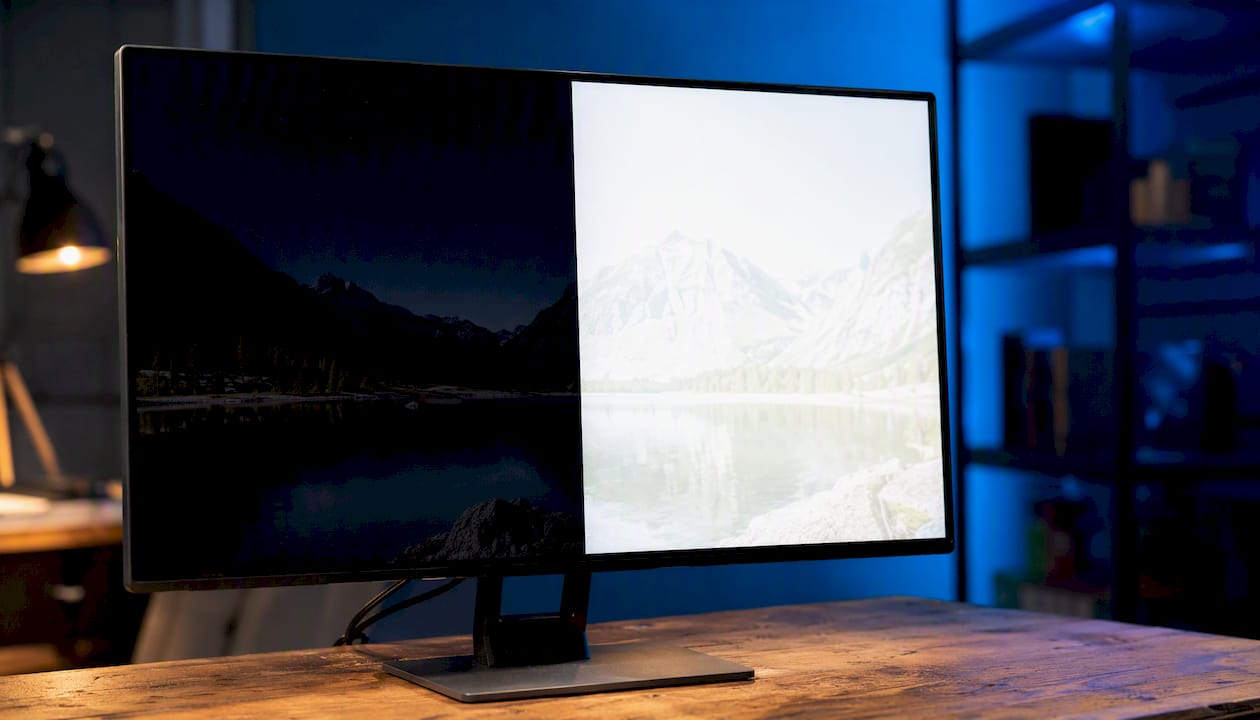
OLED wins on contrast, shadow detail, and HDR highlights. IPS wins on sustained full-screen brightness and uniformity. Neither is universally better; the right answer depends on what you’re watching or working on.
| Dimension | OLED | IPS |
|---|---|---|
| Black level / native contrast | True black; effectively infinite contrast | ~1,000:1 native; visible backlight glow in dark scenes |
| Peak highlight brightness | Very high peak nits on small highlights (HDR specular) | Lower peak on highlights, but higher sustained full-screen nits |
| HDR handling | Per-pixel dimming; no halo artifacts; black crush is rare | Local dimming zones (Mini-LED IPS) reduce halos but can’t match per-pixel precision |
| Color volume | QD-OLED covers a wide color gamut with high saturation at peak brightness; WOLED slightly narrower | Wide color gamut on premium IPS; color volume drops at peak brightness |
| Subpixel / text clarity | QD-OLED triangular layout can cause slight fringing; WOLED closer to RGB stripe | RGB stripe; sharp text at all scaling levels |
The HDR performance gap is where OLED’s advantage feels most visceral. On a QD-OLED like the MSI MPG 321URX, a torch flame in a dark cave scene shows as a pinpoint of light against a genuinely black background. On an IPS panel without local dimming, that same scene has a visible gray wash around the flame. OLED delivers per-pixel true blacks and markedly better shadow detail than standard IPS, and that difference is immediately obvious in any dark-scene content.
IPS glow is a real artifact. It appears as a milky brightening in the corners of a dark screen, most visible when you’re watching something with large black bars. It’s not a defect; it’s a characteristic of the technology. Some panels show it more than others, and matte coatings can diffuse it slightly, but it never disappears entirely.
Statistic callout: RTINGS consistently measures OLED monitors achieving native contrast ratios that are orders of magnitude higher than IPS panels, with IPS typically landing in the 800:1–1,200:1 range while OLED registers as effectively infinite in controlled testing.
QD-OLED and WOLED differ in meaningful ways for color work. QD-OLED (quantum dot layer over blue OLED) achieves a wider color gamut and higher color volume at peak brightness, making it the stronger choice for HDR content and color-critical work. WOLED adds a white subpixel that boosts brightness but slightly dilutes color saturation at high luminance. Both are dramatically better than standard IPS for HDR, but QD-OLED edges ahead for pure color intensity.
What does each panel type mean for gaming performance?
OLED’s pixel response is effectively instantaneous, which translates to cleaner motion at any refresh rate. Even a premium Fast IPS panel with a rated 1ms GtG response shows some overdrive artifacts at high refresh rates. OLED simply doesn’t have that problem because there’s no liquid crystal transition to manage.
- High-FPS esports on a budget: A 240Hz Fast IPS like the LG UltraGear 27GP850-B is still an excellent choice. The motion clarity gap between OLED and Fast IPS narrows as refresh rate climbs, and the price difference is substantial.
The Samsung Odyssey OLED series and the MSI MPG 321URX both demonstrate how far gaming OLED has come. The MPG 321URX pairs a 32" 4K QD-OLED panel with a 240Hz refresh rate, which covers both the resolution-hungry single-player crowd and the high-frame-rate competitive crowd in one monitor.
Pro Tip: Before prioritizing panel type, check whether your GPU can actually push the refresh rate you’re targeting at your chosen resolution. A 4K 240Hz OLED is wasted if your card tops out at 80fps in your main games. Match your GPU’s realistic output to the monitor’s refresh range first, then choose the panel type that fits your use case.
Should burn-in stop you from buying an OLED monitor in 2026?
For most buyers doing mixed gaming and general use, burn-in is a managed risk rather than a deal-breaker. Manufacturer warranties and firmware mitigations have reduced the practical risk significantly, and premium gaming OLEDs now commonly ship with three-year burn-in warranties. That warranty signal alone reflects how much confidence manufacturers have placed in their current panels.
The risk is real but context-dependent:
- Worst-case scenario: Running a static productivity layout in light mode, with a persistent taskbar and fixed app windows, for eight or more hours a day. This is the setup that accelerates wear.
- Typical gaming use: Varied content, dark mode where possible, and normal sleep settings. Burn-in risk under these conditions is low over a typical monitor ownership period.
- Heavy productivity on OLED: Possible with mitigations, but IPS remains the lower-risk choice if your primary use is spreadsheets and document editing for long stretches.
After more than 6,000 hours of worst-case testing, Monitors Unboxed’s long-term OLED test showed increasing burn-in at the two-year mark, concentrated around the taskbar and center-screen elements. That’s a punishing test, not a typical use pattern, but it’s worth knowing the ceiling.
Mitigation checklist for OLED owners:
- Enable dark mode in Windows and your most-used apps.
- Auto-hide the taskbar to eliminate the single biggest static element.
- Set a screen sleep timer (5–10 minutes of inactivity is reasonable).
- Use the panel’s built-in pixel-shifting and logo detection features.
- Run the manufacturer’s panel refresh cycle periodically (most modern OLEDs include this in the OSD).
- Lower peak brightness slightly for daily desktop work; reserve high brightness for HDR content.
Pro Tip: The taskbar is the number-one burn-in culprit on productivity-heavy OLEDs. Auto-hiding it costs you nothing in usability and meaningfully reduces the risk of permanent retention over years of use.
Statistic callout: Engadget’s burn-in explainer notes that burn-in from normal varied content is unlikely, with static elements like taskbars and persistent logos posing the greatest risk over long durations. The consensus across testing labs is that usage pattern matters more than panel age alone.
Which panel is better for photo and video editing?
QD-OLED is excellent for color-critical work when you need accurate, high-saturation color at peak brightness. IPS is often the more practical choice for text-heavy workflows, long editing sessions in bright rooms, and situations where brightness uniformity matters more than contrast depth.
- Color volume: QD-OLED covers a wider gamut with higher saturation at peak brightness than WOLED or standard IPS. For HDR grading or color-critical deliverables, that matters.
- WOLED vs QD-OLED for text: WOLED’s subpixel layout is closer to a traditional RGB stripe, making it easier on the eyes during long text-heavy sessions. QD-OLED’s triangular subpixel arrangement can cause slight fringing on fine text, which some creators find distracting at normal desktop scaling.
- Calibration stability: Premium IPS panels from established manufacturers tend to hold calibration well over time. OLED panels can shift slightly as organic materials age, though this is gradual and often imperceptible without measurement tools.
- Uniformity: IPS panels generally show better brightness uniformity across the screen, which matters for print work and evaluating gradients. OLED uniformity is typically good but can vary by panel.
Buying checks for creators before committing to a panel:
- Confirm factory calibration data is included (Delta E average, color gamut coverage).
- Check whether the monitor supports hardware LUT calibration for your calibration device.
- Look for uniformity compensation in the OSD if you’re doing print-targeted work.
- Decide whether your primary deliverable is HDR (favors QD-OLED) or SDR print/web (IPS is equally capable and often cheaper).
Pro Tip: If you’re color grading HDR content, QD-OLED’s color volume advantage is real and measurable. If you’re editing photos for web or print in SDR, a well-calibrated IPS panel at the same price point will serve you just as well and handle a bright studio better.
How does each panel handle bright rooms and eye comfort?
IPS is the more practical choice for high-ambient-light environments. Its higher sustained full-screen brightness means the image stays legible and punchy even with overhead lights on or a window nearby. OLED’s automatic brightness limiter (ABL) reduces full-screen luminance on bright content, which can make white documents and spreadsheets look dimmer than you’d expect from the peak brightness spec.
- Matte vs glossy: Matte IPS panels diffuse reflections effectively, making them easier to use in uncontrolled lighting. If you’re dealing with office screen glare, a matte IPS is the lower-friction choice.
Pro Tip: For an office setup with a window behind or beside you, position the monitor perpendicular to the window rather than facing it, and use a monitor hood if you’re on a glossy OLED. Alternatively, a matte IPS panel sidesteps the reflection problem entirely without any accessories.
What do OLED and IPS monitors cost in the U.S. right now?
OLED carries a meaningful price premium over IPS at every size, though that gap has narrowed compared to two or three years ago. In 2026, you’re typically paying a significant premium for OLED, and that premium is most justified when you’re buying for gaming or HDR content consumption.
- 27" 1440p IPS (240Hz+): Generally available in the $250–$400 range for quality panels. The LG UltraGear 27GP850-B sits in this tier and represents strong value for high-refresh gaming.
- 32" 4K IPS: Quality options are available in the $400–$600 range. The Samsung Odyssey G7 27-inch tier illustrates what IPS delivers at a premium price.
- Ultrawide OLED: Premium territory, often above $1,000 for quality panels. IPS ultrawides like the INNOCN 45-inch 5K2K offer a more accessible entry point for wide desktop real estate.
Mini-LED IPS is worth considering as a middle ground. It uses thousands of local dimming zones to dramatically improve contrast over standard IPS, getting closer to OLED’s black levels without the burn-in risk or price premium. If you’re on the fence and your primary use is productivity with occasional gaming, a quality Mini-LED IPS panel often makes more sense than a budget OLED.
What do long-term tests actually show about OLED burn-in?
The honest answer from extended testing: visible but gradual wear in worst-case productivity setups; modest impact for typical mixed use. TechSpot’s two-year QD-OLED torture test ran a panel under intentionally harsh productivity conditions and found visible but limited burn-in after 24 months, with the panel judged usable for several more years even under those punishing conditions.
The test methodology matters here. Worst-case setups involve running static apps in light mode with a persistent taskbar and continuous uptime. That’s not how most people use a gaming monitor. It’s a ceiling test, not a prediction.
Monitors Unboxed’s parallel long-term test accumulated over 6,000 hours and found faint but increasing wear concentrated around the taskbar and center-screen elements at the two-year mark. PC Gamer’s synthesis of those results describes the burn-in as noticeable but subjective, meaning it showed up under scrutiny rather than jumping out during normal use.
Practical takeaways for buyers:
- Worst-case torture tests show wear is real but slow, even under conditions most users will never replicate.
- Mixed gaming and media use, with basic mitigations in place, carries materially lower risk than the test setups above.
- QD-OLED panels have shown better resistance to burn-in than older WOLED designs in comparable tests, partly due to the quantum dot layer’s efficiency.
- If you’re buying a gaming OLED primarily for games and movies, the evidence suggests you’ll likely replace it for other reasons (resolution upgrade, new GPU) before burn-in becomes a practical problem.
“After two years and over 6,000 hours of worst-case use, the panel showed visible but limited burn-in and was judged usable for several more years. For typical mixed-use buyers, that result is more reassuring than alarming.” — Synthesis of TechSpot and Monitors Unboxed long-term test findings.
Key Takeaways
OLED wins on contrast, motion, and HDR; IPS wins on brightness, price, and burn-in safety, and the right choice depends entirely on your room, budget, and primary use.
| Point | Details |
|---|---|
| OLED for dark rooms and gaming | True blacks and instant pixel response give OLED a clear edge for immersive gaming and HDR content. |
| IPS for bright rooms and productivity | Higher sustained brightness and matte coatings make IPS the practical choice for lit offices and static UI work. |
| Burn-in is a managed risk | Most premium gaming OLEDs now come with three-year burn-in warranties and include firmware mitigations, so burn-in is unlikely for typical mixed-use buyers who take basic precautions. |
| Mini-LED IPS as a middle ground | Mini-LED IPS improves contrast significantly over standard IPS without the burn-in risk or OLED price premium. |
| Techreviewnerds for model-level picks | Techreviewnerds’s hands-on reviews of specific OLED and IPS panels help you move from this comparison to a confident purchase. |
The case for OLED on my desk, and when I’d switch back
My main monitor is a QD-OLED, and the primary reason is simple: I spend a lot of time in dark-scene games and HDR content, and the contrast difference is not subtle. The first time you see a genuinely black sky with a bright moon on an OLED panel, going back to IPS glow feels like a step backward.
The configuration choices that made it work: dark mode everywhere, taskbar auto-hidden, screen sleep set to eight minutes, and the panel’s built-in refresh cycle running weekly. None of that is burdensome. It takes about ten minutes to set up and then you forget about it.
That said, I’d choose IPS without hesitation in two scenarios. First, if my desk faced a window with no blinds, the glossy OLED coating would be a constant irritant. Second, if my primary use shifted to eight-plus hours of document editing and spreadsheet work, the sustained brightness advantage of IPS and the zero burn-in anxiety would outweigh everything OLED offers for that workflow. The panel type should match the actual use, not the aspirational one.
Techreviewnerds has the hands-on reviews to help you choose
Knowing the panel type is only half the decision. The other half is finding the specific monitor that delivers on the spec sheet in real-world use, and that’s where hands-on testing makes the difference.

Techreviewnerds covers both sides of this comparison with in-depth, real-use reviews. The Samsung Odyssey OLED series review walks through QD-OLED performance in practice, and the best gaming monitors roundup covers the full range from budget IPS to premium OLED so you can compare value tiers side by side. If you’re building or upgrading a full system, the 2026 buying guide pairs monitor recommendations with laptop and component picks. Head to the Techreviewnerds shop to see current top picks and affiliate pricing across both panel types.
Useful sources
- OLED burn-in fear is keeping people on worse monitors for no reason in 2026
- The OLED Burn-In Test: Two Years Later | TechSpot
- After two years and over 6,000 hours, Monitors Unboxed’s long-term OLED gaming monitor test shows increasing burn-in | PC Gamer
- OLED vs IPS: Differences explained
- OLED burn-in risks explained
- IPS vs OLED — The Ultimate Display Comparison
- OLED vs IPS Gaming Monitor in 2026: Which Is Better for Premium 1440p Gaming
FAQ
Is an IPS screen better than OLED?
IPS is better for bright rooms, heavy productivity work, and budget buyers. OLED is better for gaming, HDR content, and dark-room use where contrast and motion clarity matter most.
Is IPS or OLED better for your eyes?
Neither panel type is categorically easier on the eyes. OLED typically avoids PWM flicker at normal brightness levels, which can reduce eye strain for sensitive users. IPS with a matte coating handles glare better in bright environments, which is the more common source of eye fatigue at a desk.
Do OLEDs still burn in 2026?
Yes, but the risk for typical mixed-use buyers is low and manageable. Long-term tests show visible wear only after thousands of hours of worst-case static content. Basic mitigations like dark mode, auto-hiding the taskbar, and sleep timers reduce the risk significantly, and most premium gaming OLEDs now come with three-year burn-in warranties.
Is a 120Hz OLED better than a 240Hz IPS?
For most gaming scenarios, no. A 240Hz IPS delivers smoother motion than a 120Hz OLED at equivalent frame rates, and the higher refresh rate matters more than panel type for fast-paced games. The OLED advantage in motion clarity comes from its near-instant pixel response, but that advantage is most visible at comparable refresh rates, not when there’s a 120Hz gap between them.
Recommended
- Best 27-Inch 1440p Monitor for Gaming and Work (2026) – Tech Review Nerds
- LG UltraGear 27GP850-B Monitor Review: Best 1440p Gaming Monitor Under $400? – Tech Review Nerds
- INNOCN 45 Inch 5K2K 5120 x 1440p 120Hz Ultrawide Curved Gaming Monitor – Tech Review Nerds
- INNOCN 45 5K2K Ultrawide Monitor Review – Tech Review Nerds