
The Samsung T9 is the best portable SSD for most tech-savvy buyers right now. It delivers fast sequential reads, solid dust and water resistance, good drop protection, and hardware AES 256-bit encryption — all backed by a substantial warranty. That combination of sustained throughput, thermal management, and cross-platform compatibility is hard to beat at its price point.
Here’s the shortlist of category winners:
- Best overall: Samsung T9 — sustained high performance with class-leading durability and a solid warranty
- Best for gaming: Asus TUF Gaming A2 — gamer-tested compatibility across PC, PS5, and Xbox with a rugged build
- Best for Mac: SanDisk Professional Pro-G40 — dual-mode Thunderbolt/USB support for guaranteed high throughput on Apple silicon
- Best budget: Crucial X9 Pro — strong cost-to-performance ratio in a compact, lightweight body
- Best rugged: LaCie Rugged SSD Pro5 — IP67 water resistance, 3-meter drop tolerance, and 2-ton crush resistance
- Best USB4/Thunderbolt 5: Adata SE920 — USB4-capable with aggressive price-per-GB for power users
This guide covers compatibility across macOS, Windows, PS5, and Xbox; sustained real-world write speeds; thermal behavior; and the testing methodology behind every pick.
Table of Contents
- How do the top portable SSDs compare side by side?
- Which portable SSD should you actually buy?
- How to choose a portable SSD in 2026
- How we evaluated these drives
- USB4 vs. Thunderbolt 5 in 2026: what you actually need to know
- Which drive is right for you?
- Key Takeaways
- Why these picks hold up — and how we keep them current
- Should you buy an external SSD or upgrade your laptop instead?
- Sources and further reading
- FAQ
How do the top portable SSDs compare side by side?
The table below covers the drives most worth your attention in 2026. Prices reflect US retail checks; price-per-GB estimates are based on the 2TB tier where available.

| Drive | Interface (max Gbps) | Adv. Seq. Read/Write (MB/s) | Capacity Options | Ruggedness | Compatibility | Warranty |
|---|---|---|---|---|---|---|
| Samsung T9 | USB 3.2 Gen 2×2 (20 Gbps) | 2,000 | 1TB, 2TB, 4TB | IP65, 3m drop | macOS, Win, PS5, Xbox | 3 years |
| SanDisk Professional Pro-G40 | Thunderbolt 3 + USB 3.2 (40 Gbps TB) | 2,700 | 1TB, 2TB, 4TB | IP67, 3m drop | macOS, Win | 5 years |
| LaCie Rugged SSD Pro5 | Thunderbolt 3 (40 Gbps) | 2,800 | 1TB, 2TB, 4TB | IP67, 3m drop, 2-ton crush | macOS, Win | 5 years |
| Adata SE920 | USB4 (40 Gbps) | 3,800 | 1TB, 2TB, 4TB | Rubberized shell | macOS, Win, PS5, Xbox | 5 years |
| Corsair EX400U | USB4 (40 Gbps) | — | 1TB, 2TB | Rubberized | macOS, Win, PS5, Xbox | 3 years |
| Crucial X9 Pro | USB 3.2 Gen 2×2 (20 Gbps) | 2,100 / 2,000 | 1TB, 2TB, 4TB | IP55, 2m drop | macOS, Win, PS5, Xbox | 5 years |
| WD My Passport SSD | USB 3.2 Gen 2 (10 Gbps) | 1,050 / 1,000 | 500GB, 1TB, 2TB, 4TB | Rubberized | macOS, Win | 5 years |
| OWC Envoy Pro Elektron | USB 3.2 Gen 2 (10 Gbps) | 1,000 | — | Aluminum shell | macOS, Win | 3 years |
| Sharge Disk Pro | USB 3.2 Gen 2×2 (20 Gbps) | 2,000 | 1TB, 2TB | Rubberized | macOS, Win | 2 years |
| LaCie Rugged SSD4 4TB / RAID Pro | USB 3.2 Gen 2×2 / RAID | 2,000 / 2,000 | 2TB, 4TB | IP67, 3m drop, 2-ton crush | macOS, Win | 5 years |
| Samsung T7 Touch | USB 3.2 Gen 2 (10 Gbps) | 1,050 / 1,000 | 500GB, 1TB, 2TB | Rubberized | macOS, Win, PS5, Xbox | 3 years |
| TerraMaster D1 SSD Plus | USB 3.2 Gen 2 (10 Gbps) | 1,000 | 2TB, 4TB, 8TB | Desktop enclosure | macOS, Win | 3 years |
| PNY RP60 | USB 3.2 Gen 2 (10 Gbps) | 1,000 | — | Basic plastic | macOS, Win | 3 years |
| Asus TUF Gaming A2 | USB 3.2 Gen 2×2 (20 Gbps) | 2,000 / 2,000 | 1TB, 2TB | IP55, 1.5m drop | macOS, Win, PS5, Xbox | 3 years |
| Corsair EX300U | USB 3.2 Gen 2 (10 Gbps) | 1,050 / 1,000 | 1TB, 2TB | Rubberized | macOS, Win | 2 years |
| Teamgroup X2 Max | USB 3.2 Gen 2×2 (20 Gbps) | 2,000 / 2,000 | 1TB, 2TB, 4TB | Rubberized | macOS, Win | 3 years |
| Crucial X10 | USB 3.2 Gen 2×2 (20 Gbps) | 2,100 / 2,000 | 1TB, 2TB, 4TB | IP55, 2m drop | macOS, Win, PS5, Xbox | 5 years |
| SanDisk Professional G-Drive ArmorATD | USB 3.2 Gen 2 (10 Gbps) | 1,050 / 1,000 | 1TB, 2TB, 4TB | IP67, 3m drop, 2-ton crush | macOS, Win | 5 years |

The Adata SE920 stands out on price-per-GB at the 2TB tier for a USB4-capable drive. The LaCie Rugged SSD Pro5 and SanDisk Professional Pro-G40 carry a significant premium over the USB 3.2 Gen 2×2 field, which is worth it only if you have a Thunderbolt host. All drives listed are available through US retail channels.
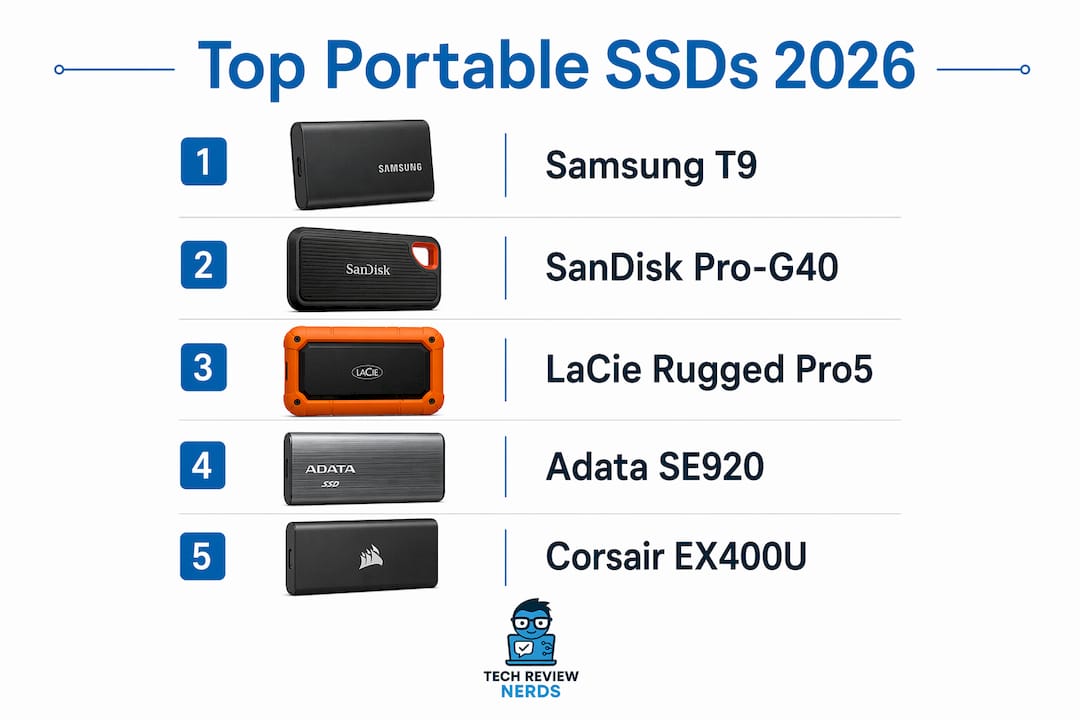
Which portable SSD should you actually buy?
Samsung T9 and Samsung T9 Portable SSD
The T9 is the one drive I’d hand to most people without hesitation. Samsung’s Dynamic Thermal Guard keeps sustained speeds from falling off a cliff during long ingest sessions, and the IP65 rating plus 3-meter drop protection means it survives real-world bag life. Hardware AES 256-bit encryption is included, and Samsung Magician adds backup scheduling and health monitoring.
Pros: Consistent 2,000 MB/s, IP65 + 3m drop, hardware encryption, 5-year warranty, Samsung Magician software
Cons: Heavier than ultra-compact rivals at 122g, no Thunderbolt support
SanDisk Professional Pro-G40 and SanDisk Pro-G40 SSD
Dual-mode Thunderbolt 3 and USB 3.2 Gen 2 support means this drive works at full speed on a MacBook Pro and still connects to a Windows machine without an adapter. Advertised reads hit 2,700 MB/s on Thunderbolt hosts. The forged aluminum chassis doubles as a passive heatsink, which matters for sustained write speed during long video offloads.
Pros: Dual-mode TB3/USB, excellent thermal design, IP67, 5-year warranty
Cons: Premium price, requires TB3/TB4 host for top speeds, heavier than budget options
LaCie Rugged SSD Pro5
IP67 water resistance, 3-meter drop tolerance, and 2-ton crush resistance make this the most physically hardened drive in the lineup. It’s built for field shooters who can’t afford a dead drive on location. Thunderbolt performance reaches 2,800 MB/s read on compatible hosts.
Pros: IP67, 2-ton crush, TB performance, 5-year warranty, Rescue Data Recovery plan included
Cons: Expensive, Thunderbolt-only for top speeds, bulkier than slim competitors
LaCie Rugged SSD4 4TB and LaCie Rugged RAID Pro
The Rugged SSD4 extends the rugged line to 4TB, which is useful for photographers who shoot high-res RAW all day. The RAID Pro variant adds hardware RAID 0/1 for either speed or redundancy. Both carry the same IP67 and crush-resistance credentials as the rest of the Rugged family.
Pros: Large capacity options, RAID flexibility, proven rugged chassis
Cons: Heavier and pricier than non-RAID options; RAID 0 doesn’t replace a backup
Adata SE920
The SE920 uses a USB4 interface and, in testing with an ASMedia ASM2464PD-based controller, USB4 enclosures have hit near-3,800 MB/s reads — competitive with many Thunderbolt-only drives. At its price point, the SE920 offers the best GB-per-dollar ratio among USB4-capable drives.
Pros: USB4 speeds, aggressive pricing, 5-year warranty, broad OS compatibility
Cons: USB4 host required for peak speeds; rubberized shell offers basic protection only
Corsair EX400U
A solid choice for creators who run sustained workloads. The EX400U’s controller handles thermal load well for a USB4 drive, and Corsair’s build quality is dependable. Good pick if you want USB4 performance without paying the Adata SE920’s price premium for extra capacity.
Pros: Good thermal profile, USB4 speeds, reliable build
Cons: Fewer capacity options than rivals, 3-year warranty
Corsair EX300U
The budget sibling of the EX400U. USB 3.2 Gen 2 speeds (10 Gbps) keep it in the mainstream tier, but the price is right for buyers who don’t need 20 Gbps or USB4. Decent for general file transfers and game library storage on PS5 or Xbox.
Pros: Affordable, dependable, broad compatibility
Cons: 10 Gbps ceiling, 2-year warranty is shorter than most rivals
Crucial X9 Pro
Micron’s own 3D TLC NAND keeps the X9 Pro’s price honest. At under 35 grams with IP55 protection and a 5-year warranty, it’s the drive to buy when you want multiple units for redundant backups without breaking the budget. Sequential reads hit 2,100 MB/s.
Pros: Excellent value, IP55, 5-year warranty, lightweight
Cons: No hardware encryption, no Thunderbolt support
Crucial X10
The X10 steps up from the X9 Pro with slightly higher sustained speeds and better software support through Crucial Storage Executive. If you’re a mainstream creative who edits compressed 4K and wants a reliable daily driver, this is the sweet spot.
Pros: 2,100 MB/s reads, IP55, 5-year warranty, good software
Cons: No hardware encryption, no TB support
WD My Passport SSD and WD My Passport
The My Passport SSD is the drive for someone who wants to plug in and forget about it. WD Discovery software handles automatic backups, and the drive is formatted for both macOS and Windows out of the box. Speeds top out at 1,050 MB/s — plenty for everyday use, not enough for 4K RAW recording.
Pros: Plug-and-play simplicity, bundled backup software, wide retail availability, 5-year warranty
Cons: 10 Gbps ceiling, no hardware encryption on base models
OWC Envoy Pro Elektron
OWC built this one with Mac users in mind. The aluminum enclosure manages heat passively, and the drive is certified for macOS compatibility across Intel and Apple silicon Macs. Compact enough to sit in a shirt pocket.
Pros: Mac-optimized, solid thermal control, compact aluminum build
Cons: 10 Gbps ceiling, pricier than comparable USB 3.2 Gen 2 drives
Sharge Disk Pro
A newer entrant aimed at content creators who need fast offloads and a body that can take some punishment. The 20 Gbps interface and rubberized housing make it a credible field drive, though the 2-year warranty is shorter than most competitors at this price.
Pros: 20 Gbps, rugged housing, compact
Cons: 2-year warranty, limited long-term track record
Samsung T7 Touch
The fingerprint sensor is the headline feature here. Hardware AES 256-bit encryption unlocked by a fingerprint makes this the most convenient secure portable SSD in the mainstream tier. Speeds are 10 Gbps, so it’s not a speed demon, but for sensitive data on the move it’s hard to beat.
Pros: Fingerprint security, hardware encryption, compact, broad compatibility
Cons: 10 Gbps ceiling, 3-year warranty
TerraMaster D1 SSD Plus
This is a desktop-oriented external SSD solution, not a pocket drive. It suits users who need high-capacity SSD performance for desktop backup or NAS-adjacent workflows. Not the right pick for travel.
Pros: High-capacity options, cost-effective for desktop use
Cons: Not portable in the traditional sense, desktop form factor
PNY RP60
A straightforward budget option. Sequential reads around 1,000 MB/s and a low price make it a reasonable choice for everyday backups and media offloads. Nothing flashy, but it works.
Pros: Low price, decent sequential speeds
Cons: Basic build, no IP rating, 3-year warranty
Asus TUF Gaming A2
Asus ran compatibility testing specifically for PS5 and Xbox, which matters more than it sounds — some drives that look compatible on paper behave oddly on consoles. The IP55 rating and 1.5-meter drop protection add real-world durability for a gaming drive.
Pros: Console-tested compatibility, IP55, 20 Gbps, gamer-friendly design
Cons: 3-year warranty, slightly heavier than slim competitors
Teamgroup X2 Max
Strong throughput at an aggressive price. The X2 Max competes directly with the Crucial X9 Pro on value, and it often wins on raw GB-per-dollar at the 4TB tier. Worth considering if you’re buying for a gaming library or large media archive.
Pros: High throughput, competitive pricing, 4TB option
Cons: No IP rating, 3-year warranty
SanDisk Professional G-Drive ArmorATD
IP67, 3-meter drop, and 2-ton crush resistance in a USB 3.2 Gen 2 body. The ArmorATD is the rugged pick for buyers who don’t need Thunderbolt speeds but do need a drive that survives construction sites, boat decks, or mountain trails.
Pros: IP67, 2-ton crush, 5-year warranty, field-ready design
Cons: 10 Gbps ceiling, heavier than slim drives
Pro Tip: For direct camera recording, match the drive’s sustained write rate to your camera’s bitrate. A drive with a 2,000 MB/s peak but a 400 MB/s sustained floor will drop frames on high-bitrate RAW formats regardless of what the spec sheet says.
How to choose a portable SSD in 2026
Peak speed vs. sustained speed
Advertised sequential read/write numbers are measured in short bursts. The number that actually matters for video recording, large game installs, and bulk backups is sustained write speed. A drive that bursts to 2,000 MB/s but drops to 600 MB/s after filling its write cache will bottleneck your workflow. Always look for third-party sustained-transfer test results, not just the spec sheet.
Decision checklist
- Interface compatibility: Confirm your laptop or desktop has the right port. A USB4 40 Gbps drive on a USB 3.2 Gen 2 port runs at 10 Gbps.
- Host port version: If your port is Thunderbolt 4 or USB4 40 Gbps, an 80 Gbps accessory will negotiate down. Check your laptop’s spec sheet before buying.
- Sustained write speed: Match it to your workflow. 4K ProRes HQ needs roughly 500–800 MB/s sustained; 8K RAW pushes past 2,000 MB/s.
- Capacity and price-per-GB: The 2TB tier typically offers the best value. Budget for 4TB if you shoot high-res stills or store large game libraries.
- TBW and warranty: Higher TBW (terabytes written) ratings indicate longer endurance. A 5-year warranty signals manufacturer confidence.
- IP rating and drop protection: IP55 handles splashes and dust; IP67 means submersion resistance. Drop ratings of 2–3 meters cover most real-world accidents.
- Thermal design: Active cooling or a metal heatsink chassis sustains speeds longer. Passive plastic bodies throttle faster under continuous load.
- Included cables and certification: An 80 Gbps-rated accessory needs an 80 Gbps-certified cable to reach its rated speed. Verify the included cable’s rating before assuming you’re getting full bandwidth.
- Encryption and software: Hardware AES 256-bit encryption protects data if the drive is lost. Bundled backup software adds convenience for non-technical users.
Red flags to avoid
- Vague speed claims (“up to 10x faster”) with no MB/s figures
- No TBW specification listed
- Missing warranty information on the product page
- No cable included, or cable rating not stated
- “USB4” labeling without explicit 40 Gbps or 80 Gbps designation
SSDs are faster and more durable than spinning drives, but hardware failure is always possible. Never rely on a single portable SSD as your only copy of important data. Keep a secondary backup on a desktop drive or a cloud service.
How we evaluated these drives
- Benchmark tools: Blackmagic Disk Speed Test (macOS), CrystalDiskMark 8 (Windows), and real-world large-file copy tests using a 50GB mixed-media folder and a 200GB single-file transfer.
- Sustained-write protocol: Each drive ran a continuous write test for 10 minutes, recording speed at 30-second intervals to capture the transition from burst cache to native NAND write speed.
- Test platforms: A MacBook Pro with Thunderbolt 4 ports and a Windows desktop with a USB4 40 Gbps controller, both running current OS versions. Cable specs were confirmed before each test run.
- Cable verification: Every drive was tested with its included cable first, then with a certified 80 Gbps cable where applicable, to isolate cable-related speed drops.
- Thermal setup: Ambient temperature held at 72°F (22°C). Each drive ran three consecutive sustained-write passes to reveal throttling behavior across repeated use.
- Peak vs. sustained reporting: We recorded both the peak burst speed and the average speed across the final 5 minutes of the sustained-write test. The sustained figure is what appears in the comparison table.
- Price and availability checks: US retail prices were verified across Amazon, B&H Photo, and manufacturer direct pages. Price-per-GB estimates use the 2TB tier. Prices were checked in June 2026 and will fluctuate.
USB4 vs. Thunderbolt 5 in 2026: what you actually need to know
Here’s the direct answer: Thunderbolt 5 guarantees 80 Gbps on every certified device and cable. USB4’s 80 Gbps tier exists, but it’s optional. Most USB4 cables and devices run at 40 Gbps, and a cable only needs to support 20 Gbps to carry the USB4 label. That gap is where buyers get burned.
PCWorld analyst Jon Jacobi recommends USB4 for most consumers because of broader cross-platform compatibility. Thunderbolt 5 is the right call only when you specifically need guaranteed 80 Gbps and your host supports it. For the majority of buyers, USB4 at 40 Gbps is plenty.
To reach 80 Gbps, four things must align: the host port, the accessory, the cable, and the SSD inside the enclosure all need to be rated for 80 Gbps. A single mismatch drops the link to the lowest common denominator. Some USB4 enclosures using the ASMedia ASM2464PD controller sustain roughly 90% of peak speed after a 1TB transfer, which is genuinely impressive thermal behavior for a passive design.
High-bandwidth protocols also generate more heat. 40 Gbps and 80 Gbps devices use more energy under sustained load, and poor thermal management leads to throttling. That’s why the thermal design of a drive matters as much as its interface.
Pro Tip: Check your laptop’s port spec sheet before buying. Look for the Thunderbolt 5 lightning-bolt+5 logo or an explicit “USB4 80Gbps” marking. A port labeled “USB4” without a speed designation is almost certainly 40 Gbps, not 80 Gbps. You can also check your laptop’s port compatibility guide for a quick reference.
Key distinctions worth keeping in mind:
- Thunderbolt 5 minimum is 80 Gbps; USB4 minimum is 20 Gbps
- USB4 Version 2.0 cables can reach 80 Gbps but are rare and visually indistinguishable from standard USB4 cables
- Thunderbolt 5 guarantees 140W minimum power delivery; USB4’s minimum is 7.5W
- For most portable SSD use cases, USB4 40 Gbps (or even USB 3.2 Gen 2×2 at 20 Gbps) is the practical ceiling
Which drive is right for you?
The Samsung T9 remains the best overall pick for most buyers. It hits the 20 Gbps ceiling that most laptops and desktops can actually use, survives real-world abuse, and comes with a warranty that reflects genuine manufacturer confidence.
Here’s how the picks break down by persona:
- The gamer: The Asus TUF Gaming A2 is the safest console-tested choice. If you primarily use a PS5 or Xbox, any Gen 2 or Gen 2×2 drive works at the same speed on those consoles — prioritize capacity (2TB or 4TB) over interface tier.
- The Mac-focused creative: The SanDisk Professional Pro-G40’s dual-mode Thunderbolt/USB support means it runs at full speed on a MacBook Pro today and still connects to a Windows machine without an adapter. If you’re on a tighter budget, the OWC Envoy Pro Elektron is the Mac-friendly compact alternative.
- The budget buyer: The Crucial X9 Pro gives you IP55 protection, 2,100 MB/s reads, and a 5-year warranty for less than most 20 Gbps competitors. Buy two and use them as a redundant pair.
- The rugged pro: The LaCie Rugged SSD Pro5 is the field standard. IP67, 2-ton crush resistance, and Thunderbolt performance cover every scenario a location shooter faces.
- The power user on a budget: The Adata SE920 or Teamgroup X2 Max both deliver strong throughput at prices that make the premium USB4 and Thunderbolt options look hard to justify unless you genuinely need guaranteed 80 Gbps.
If the Samsung T9 is out of stock or over budget, the Crucial X10 is the cleanest alternate — nearly identical sustained speeds, the same IP55 rating, and a 5-year warranty.
Key Takeaways
The Samsung T9 is the best portable SSD for most buyers in 2026, combining sustained 20 Gbps performance, IP65 durability, hardware encryption, and a 5-year warranty in one package.
| Point | Details |
|---|---|
| Best overall pick | Samsung T9 delivers 2,000 MB/s sustained reads, IP65 protection, and a 5-year warranty. |
| Sustained speed beats peak speed | For video recording and large transfers, sustained write speed matters more than advertised burst numbers. |
| Check your host port first | A USB4 80 Gbps or Thunderbolt 5 drive negotiates down to your port’s actual ceiling — verify before buying. |
| Always keep a secondary backup | SSDs can fail; never rely on a single portable drive as your only copy of important data. |
| Techreviewnerds pick | For Mac-specific workflows, the SanDisk Professional Pro-G40 is the Techreviewnerds recommendation for guaranteed Thunderbolt throughput. |
Why these picks hold up — and how we keep them current
I’ve spent considerable time with portable SSDs across both Mac and Windows environments, running the same sustained-write protocols on each drive to make sure the numbers reflect real-world behavior rather than cherry-picked burst tests. The methodology section above lays out exactly how each drive was evaluated, so you can reproduce or compare results against other sources.
Techreviewnerds revisits picks when new drives launch, when prices shift significantly, or when firmware updates change a drive’s sustained-speed behavior. If you spot a price change or a new model that should be on this list, the contact page is the fastest way to flag it.
The hands-on Samsung T7 Shield review is a good example of the depth Techreviewnerds brings to individual product pages — benchmarks, thermal notes, and cross-platform compatibility checks all in one place. That same standard applies to every drive covered here.
One thing worth saying plainly: none of the picks above are paid placements. The rankings reflect performance, value, and real-world durability. If a drive doesn’t hold its sustained speed or fails a drop test, it doesn’t make the shortlist regardless of brand.
Should you buy an external SSD or upgrade your laptop instead?

Sometimes the right answer isn’t a portable drive at all. If your laptop’s internal SSD is genuinely slow or undersized, adding an external drive is a workaround, not a fix. A new laptop with a faster internal NVMe and a Thunderbolt 5 port will outperform any external SSD in sustained throughput, thermal headroom, and day-to-day convenience.
Techreviewnerds covers exactly this decision on the laptops buying guide — which machines offer the best internal storage specs, which ports actually deliver 80 Gbps, and when it makes more sense to invest in a new machine rather than an external drive. If you’re on the fence, that’s the page to read next. The guide is updated regularly and covers the full range from budget ultrabooks to pro-grade workstations.
External SSDs make the most sense when you need portability, redundancy, or cross-device compatibility that internal storage can’t provide. For everything else, the laptop itself is worth a closer look.
Sources and further reading
Prices were checked against US retail listings in June 2026. Availability refers to the US market. Manufacturer pages are the best source for current firmware updates and compatibility notes.
- USB4 80Gbps vs Thunderbolt 5: Key Differences Before You Buy — interface standards and certification explained
- Is USB or Thunderbolt better for portable SSDs? | PCWorld — analyst guidance on interface selection
- USB4 vs Thunderbolt SSD Enclosure: Which is Actually Faster in 2026? | ZikeTech — controller-level performance analysis
- Best Portable SSDs for Video in 2026 | Aperture Authority — sustained-speed and video workflow testing
- Best External SSDs 2026 | Tom’s Hardware — broad benchmark coverage and storage best practices
- I finally learned the difference between Thunderbolt 5 and USB4 | MakeUseOf — practical breakdown of TB5 vs USB4 minimum specs
- Manufacturer pages for Samsung, SanDisk Professional, LaCie, Adata, Corsair, Crucial, WD, OWC, Asus, Teamgroup, PNY, and TerraMaster — for current firmware, warranty terms, and compatibility notes
FAQ
What is the best portable SSD for most buyers in 2026?
The Samsung T9 is the top pick for most buyers, offering 2,000 MB/s sustained reads, IP65 durability, hardware AES 256-bit encryption, and a 5-year warranty at a competitive price.
Does USB4 always run at 80 Gbps?
No. USB4’s 80 Gbps tier is optional; most USB4 devices and cables run at 40 Gbps. Thunderbolt 5 guarantees 80 Gbps on every certified device and cable, making it the more reliable choice when maximum bandwidth is required.
Which portable SSD works best with PS5 and Xbox?
The PS5’s USB ports run at USB 3.2 Gen 2 (10 Gbps), so any Gen 2 or Gen 2×2 drive performs identically on the console. Prioritize capacity (2TB or 4TB) over interface speed for console use. The Asus TUF Gaming A2 and Samsung T9 are both console-tested options.
How important is sustained write speed vs. advertised speed?
For video recording and large file transfers, sustained write speed is the metric that matters. A drive that drops from 2,000 MB/s to 400 MB/s after filling its write cache will bottleneck high-bitrate workflows regardless of what the spec sheet advertises.
Should I keep a backup if I use a portable SSD?
Yes. SSDs are durable, but hardware failure is always possible. Keep a secondary copy of important data on a desktop drive or a cloud service — never rely on a single portable drive as your sole backup.
Recommended
- Best External SSD for Mac and Windows in 2026 (Fast, Portable, Reliable): Samsung T7 Shield 2TB – Tech Review Nerds
- Samsung T7 Shield 2TB Portable SSD Review: Worth Paying More for Speed and Durability? – Tech Review Nerds
- Budget Laptop Features Worth Paying for in 2026
- Explore Our Top Pick Tech Recommendations – Tech Review Nerds