
If you’re just getting into streaming, the gear side of things can feel overwhelming fast. There’s no shortage of “must-have” lists that push expensive setups you don’t actually need yet.
The good news is that you can get a clean, professional-looking stream without going overboard. You just need the right basics that work well, are easy to use, and won’t frustrate you while you’re learning.
I’ve helped a few friends set up their first streams, and these three pieces of gear come up every single time. They’re beginner-friendly, widely supported, and good enough that you won’t feel the need to replace them a month later.
|
|

|
|
|
$69.99
|
$59.00
|
What beginners actually need (and what they don’t)
Most new streamers think they need studio-level equipment from day one. In reality, you need three things to start strong:
A microphone that sounds clear without complicated setup.
A webcam that doesn’t look grainy or washed out.
A simple way to control your stream without constantly alt-tabbing.
You do not need an XLR mic with an audio interface, a mirrorless camera, or a control panel with 30 buttons. Those upgrades can come later if streaming becomes a long-term thing.
The goal at the beginning is consistency and confidence, not perfection.
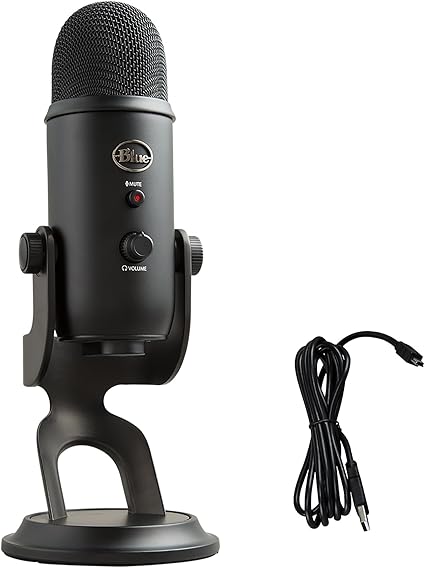
Microphone: Logitech Blue Yeti
The Logitech Blue Yeti has been around forever, and there’s a reason it’s still recommended.
It’s a USB mic, which means you plug it in and it just works. No interfaces. No drivers to wrestle with. Most streaming software recognizes it instantly.
In my experience, the sound quality is noticeably better than headset mics and cheaper USB options. Your voice comes through fuller and more natural, which matters more than people realize. Viewers will forgive a mediocre webcam before they forgive bad audio.
Another reason beginners like the Blue Yeti is the built-in controls. You get a physical gain knob, a mute button, and a headphone jack for monitoring. Being able to mute yourself instantly without digging through software is more useful than it sounds.
It is a sensitive mic, though. If your keyboard is loud or your room echoes, you’ll want to tweak your settings or use filters in OBS. That’s normal and honestly a good learning step.
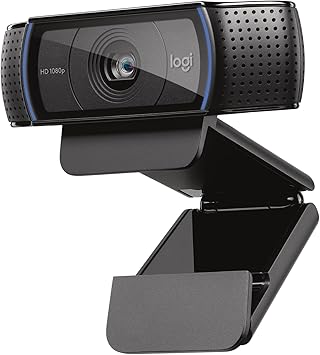
Webcam: Logitech C920x
The Logitech C920x is about as close to a default streaming webcam as it gets.
It shoots in 1080p, handles lighting better than most cheap webcams, and works smoothly with every major streaming platform. You don’t need special software to get a decent image, which is ideal when you’re just starting.
I’ve used this webcam in both bright and less-than-ideal lighting, and while it’s not magic, it’s consistent. Add a basic desk lamp or ring light and it looks surprisingly good.
Autofocus is reliable, colors are fairly accurate, and it doesn’t randomly disconnect mid-stream. That last part matters more than specs when you’re live.
Unless you’re planning to stream full-screen camera content, this webcam is more than enough for a face cam window.
Stream controls: Elgato Stream Deck Mini
The Elgato Stream Deck Mini is one of those tools you don’t realize you need until you use it.
It’s a small control pad with programmable buttons that can trigger actions like switching scenes, muting your mic, starting recordings, or sending chat messages.
For beginners, the biggest benefit is reducing mental load. Instead of remembering hotkeys or clicking through menus, you press a button and move on.
The Mini version has six buttons, which is plenty when you’re starting. You can set up your core actions without feeling overwhelmed by options you don’t use yet.
The software is straightforward, and there are tons of community-made profiles if you don’t want to build everything from scratch.
How this setup works together
What makes this combination beginner-friendly isn’t just the individual products. It’s how smoothly they work together.
The mic plugs in and sounds good with minimal setup.
The webcam works out of the box with OBS or Streamlabs.
The Stream Deck ties it all together so you’re not juggling windows.
You can focus on talking, playing, or creating instead of troubleshooting. That’s the real win.
I’ve seen plenty of new streamers quit not because they lacked talent, but because their setup constantly got in the way. This gear avoids that problem.
Common beginner mistakes to avoid
Even with good gear, a few small mistakes can hurt your stream.
First, placing the microphone too far away. The Blue Yeti works best when it’s closer to your mouth. Don’t be afraid to get it in frame slightly if needed.
Second, relying on room lighting alone. Even a cheap light aimed at your face will make the C920x look dramatically better.
Third, overcomplicating Stream Deck layouts. Start with the basics: mute, scene switch, stream start and stop. Add more later once it feels natural.
Keeping things simple early on makes streaming feel manageable instead of stressful.
Who this setup is best for
This setup is ideal if you’re:
Brand new to streaming and want reliable gear
Streaming on Twitch, YouTube, or Kick
Gaming, chatting, or doing light content creation
On a reasonable budget but still want quality
If you already know you want studio-level audio or cinematic camera quality, you might outgrow this eventually. But for most beginners, this is a strong foundation that lasts longer than expected.
Final recommendation
|
|
|
|
|
|
$69.99
|
$59.00
|
If you’re starting from zero and want gear that’s easy, dependable, and proven, this combination is hard to beat. It gives you good audio, solid video, and simple control without turning streaming into a tech project. It’s the kind of setup that lets you focus on showing up and improving, which is what actually matters at the beginning.
If you’re still evaluating core equipment for your setup, these reviews and comparisons may help narrow your choices:
• Blue Yeti vs Other USB Microphones: Is It Still Worth It?
• Logitech C920x Review: Is This Webcam Still the Go-To Choice?
• Best Gaming Accessories That Actually Improve Performance