
Choosing a laptop in 2026 still feels harder than it should. On one side, you’ve got Apple’s M1-powered MacBook Air, which completely changed how people think about thin-and-light laptops. On the other, there are solid, affordable Windows options like the Lenovo V14 G5 and HP Pavilion 15.6″ that promise flexibility and better value on paper.
Most modern laptops are powerful enough for everyday work, so the real decision comes down to usability, battery life, and long-term comfort
I’ve used all three styles of machines over the years. Some for work, some for everyday life, some because they were simply the best option at the time. This comparison isn’t about specs for spec’s sake. It’s about which one actually makes sense for most people who just want a laptop that works without friction.
Quick Comparison Overview
|

|
|
|
|
$573.44
|
$699.99
|
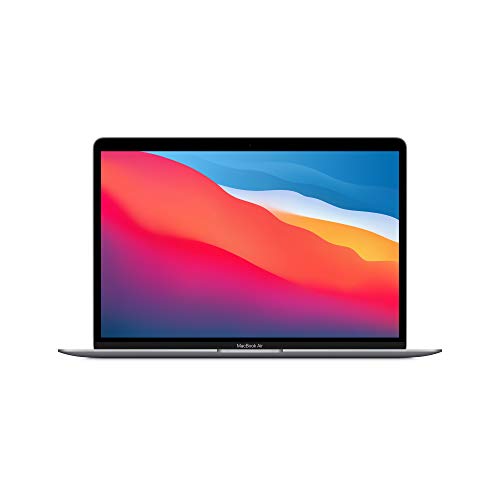
At a high level, this comes down to priorities. The MacBook Air M1 focuses on speed, battery life, and polish. The Windows laptops focus on affordability, compatibility, and flexibility. Neither approach is wrong. They just serve different types of users.
Performance: Day-to-Day Speed vs Raw Flexibility
The biggest reason the MacBook Air M1 got so much attention is simple. It feels fast in real use.
The M1 chip handles everyday tasks with ease. Browsing with a dozen tabs open, editing photos, light video work, and even some coding all feel smooth. What surprised me most when I first used it wasn’t benchmark scores. It was how rarely I noticed the laptop slowing down. Apps open instantly. The system feels responsive even after hours of use.
Windows laptops like the Lenovo V14 G5 and HP Pavilion 15.6″ rely on Intel or AMD processors, which are perfectly capable but feel more traditional. They can absolutely handle office work, web browsing, streaming, and light creative tasks. But once you push them, you’re more likely to hear fans spin up or feel performance dips, especially on lower-cost configurations.
For most people doing everyday work, all three are fast enough. The difference is consistency. The MacBook Air M1 stays smooth almost all the time. Windows laptops vary more depending on specs and workload.
Battery Life: Where the MacBook Pulls Ahead
This is where the MacBook Air M1 really separates itself.
In real-world use, it’s common to get 12 to 15 hours on a charge. I’ve taken it through full workdays without even thinking about the charger. That kind of battery life changes how you use a laptop. You stop planning around outlets.
Windows laptops have improved, but they’re still behind. The Lenovo V14 G5 and HP Pavilion 15.6″ usually land closer to 6 to 9 hours depending on screen brightness and workload. That’s not bad, but it does mean you’ll carry a charger if you’re out all day.
If battery anxiety is something you’ve dealt with before, the MacBook Air M1 feels like a relief.
Design and Build Quality
Apple’s design philosophy is obvious the moment you pick up the MacBook Air. It’s thin, light, and feels solid. The aluminum body doesn’t flex, the hinge is smooth, and everything feels intentional.
The keyboard is comfortable for long typing sessions, and the trackpad is still the best in the business. If you use gestures a lot, this matters more than you might expect.
The Lenovo V14 G5 and HP Pavilion 15.6″ are more practical than premium. They’re usually plastic, a bit thicker, and heavier. That doesn’t make them bad. It just makes them feel like tools rather than objects of desire.
One upside of the Windows laptops is port variety. USB-A, HDMI, and sometimes Ethernet still show up here. On the MacBook Air, you’re working with a couple of USB-C ports and a headphone jack. For some people, that means adapters become part of life.
Software and Ecosystem: macOS vs Windows
This part is personal, and it’s often where people make their final decision.
macOS feels clean and focused. If you already use an iPhone or iPad, everything syncs effortlessly. Messages, photos, notes, AirDrop. It all just works. In my experience, macOS also tends to stay smooth longer over the life of the device.
Windows offers flexibility. You can install almost anything. You’re less likely to run into compatibility issues with older software, specialized programs, or niche hardware. If you use certain business tools, accounting software, or industry-specific apps, Windows may simply be the safer choice.
Gaming is another factor. Casual games are fine on the MacBook Air M1, but serious PC gaming still belongs on Windows.
Display and Audio Experience
The MacBook Air M1 has a sharp, color-accurate display that’s easy on the eyes. It’s not flashy, but it’s consistently good. Watching videos, editing photos, or reading for long periods feels comfortable.
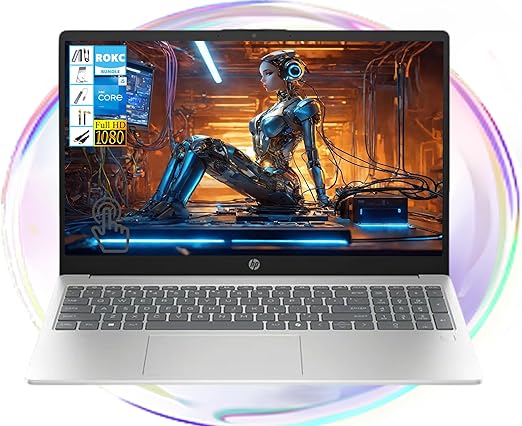
The HP Pavilion 15.6″ offers a larger screen, which some people prefer for multitasking or spreadsheets. However, screen quality varies by configuration, and color accuracy is usually not as strong as Apple’s.
Speakers are another quiet win for Apple. The MacBook Air sounds fuller and clearer than most Windows laptops in this price range. It’s not a replacement for external speakers, but it’s noticeably better for calls and casual media.
Price and Value: What You’re Really Paying For
On paper, Windows laptops win here.
The Lenovo V14 G5 and HP Pavilion 15.6″ are usually significantly cheaper than the MacBook Air M1. If budget is tight, they deliver solid performance for the money. You can also find more configuration options, including extra storage or memory at lower price points.
The MacBook Air M1 costs more upfront, but it holds its value well. It also tends to age better. Many people keep these machines for years without feeling the need to upgrade. That long-term value is easy to overlook when you’re focused on the initial price.
Who Each Laptop Is Best For
The MacBook Air M1 is ideal if you want a laptop that feels effortless. It’s great for students, remote workers, creatives, and anyone who values battery life, portability, and a polished experience. If you’re already in the Apple ecosystem, the choice becomes even easier.
If you want to compare a wider range of options, this guide to the best laptops for work and school breaks down solid picks across different budgets and platforms.
The Lenovo V14 G5 makes sense for practical users. It’s a good fit for office work, students on a budget, and anyone who needs Windows-specific software without spending a lot.
The HP Pavilion 15.6″ is a solid option if you want a bigger screen and don’t plan to travel with your laptop constantly. It works well as a home or desk-based machine for general use.
The Verdict: Which Is Better for Most People?
For most people, the MacBook Air M1 is simply the better overall experience.
It’s faster in everyday use, lasts dramatically longer on a charge, and feels more refined in ways that matter over time. You pay more upfront, but you also get a laptop that stays enjoyable to use years down the line.
That said, Windows laptops still make sense if software compatibility or port selection matter more than polish. They’re not worse. They’re just different.
A lightweight 13.3-inch MacBook Air powered by Apple’s M1 chip, offering smooth everyday performance, long battery life, and a premium feel at a more affordable renewed price.
If you’re still deciding which laptop category fits your needs, these related guides break things down further:
• Best Laptops for Work, School, and Everyday Use (2026)
• Best Budget Gaming Laptops Under $1,000
• How to Speed Up a Slow Laptop Without Replacing It