

The best examples of laptops lasting 4 years include the Lenovo ThinkPad T-series, Dell Latitude 5000/7000, Apple MacBook Pro with Apple Silicon, and Framework’s modular laptops. These machines are built differently from standard consumer models. Business-grade laptops average 5–7 years of reliable use, while typical consumer laptops fall closer to 3–4 years. If you are buying for school, work, or everyday use and want your investment to hold up, the model you choose matters more than any single spec on the box. This article breaks down which machines actually deliver four-year performance and exactly why they do it.
What makes examples of laptops lasting 4 years different?
Four-year laptop longevity is not luck. It comes from specific design choices that most budget and mid-range consumer machines skip entirely. Understanding these features helps you pick a machine that ages well instead of one that slows to a crawl by year two.
Build quality and certification
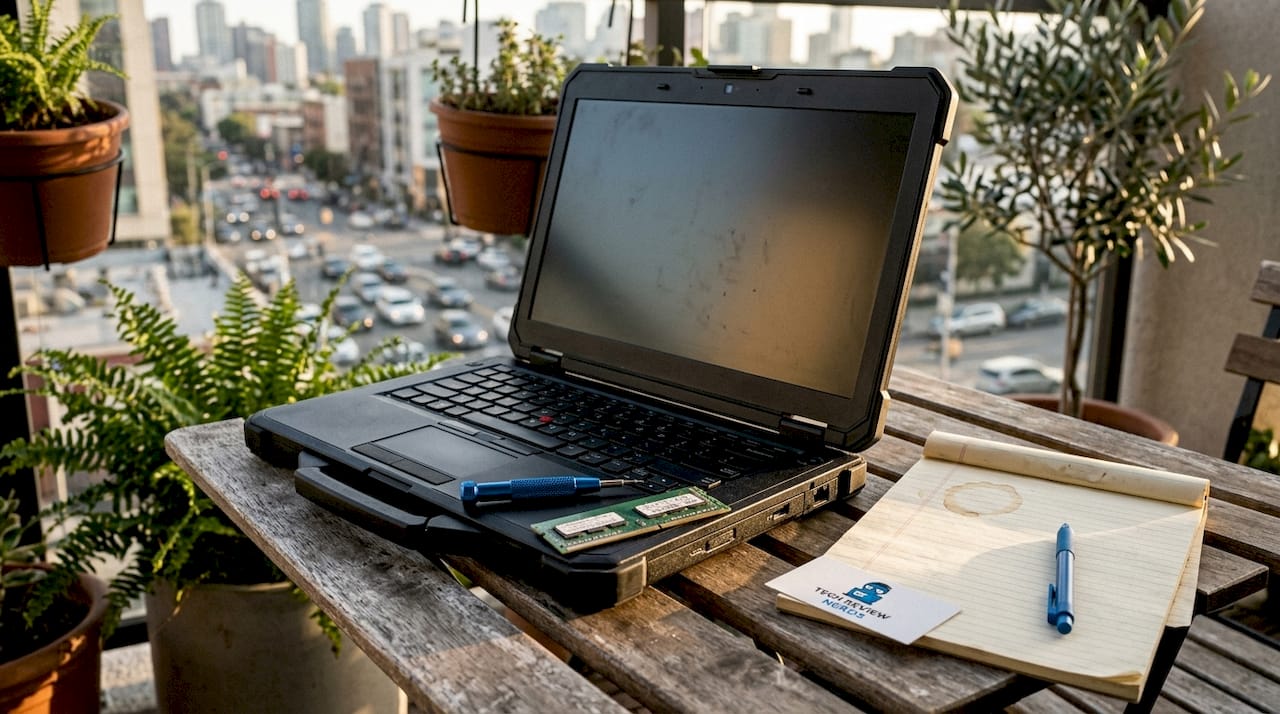
MIL-STD-810H certification is the clearest signal that a laptop is built for multi-year use. This military standard tests resistance to drops, dust, humidity, temperature swings, and vibration. The Lenovo ThinkPad P16s Gen 4 carries this certification, and the ThinkPad line broadly uses it. A laptop that passes these tests is far less likely to develop cracked hinges, warped chassis, or failed ports by year three.
Upgradeable RAM and storage
Performance obsolescence is the primary reason laptops get replaced before they physically fail. Software demands grow every year. A machine with soldered RAM and a non-removable SSD cannot keep pace. Laptops with upgradeable memory and storage slots let you add capacity as needed, which is why RAM upgradeability is one of the most practical longevity features to check before buying.
Battery lifespan and replaceability
Battery degradation is predictable. Most lithium-ion cells lose meaningful capacity after two to three years of daily charging. Laptops with user-replaceable batteries extend their own useful life without a trip to a repair shop. Sealed designs like the MacBook Pro require professional service, which adds cost and inconvenience. Framework laptops sit at the opposite end of that spectrum.
Firmware and OS support duration
A laptop with no software updates is a security risk and a compatibility problem. Apple commits to long macOS update cycles. Microsoft supports Windows 11 on qualifying hardware for years. Chromebooks, by contrast, have a defined Auto Update Expiration date that can cut a machine’s useful life short regardless of its physical condition.
Pro Tip: Before buying, search the manufacturer’s support page for the model’s end-of-life date. A laptop with only two years of OS support remaining is effectively a two-year machine, no matter how fast it runs today.
Top laptop models that reliably last 4+ years
These are the machines that consistently appear in long-term durability rankings, enterprise fleet data, and real-world user reports. Each one earns its place for specific, concrete reasons.
1. Lenovo ThinkPad T14s Gen 6
The ThinkPad T14s Gen 6 carries an expected lifespan of 7 years, making four years feel like the easy part. Lenovo builds the T-series with a reinforced magnesium-aluminum chassis, MIL-STD-810H certification, and a keyboard designed to survive heavy daily use. The T14s Gen 6 supports upgradeable RAM and SSD, which directly addresses the performance obsolescence problem. For students and professionals who type all day, the keyboard alone justifies the premium.
2. Lenovo ThinkPad X1 Carbon
The X1 Carbon pushes the expected lifespan to 8 years in enterprise fleet data. It uses a carbon fiber lid and magnesium chassis that keeps weight low without sacrificing rigidity. The X1 Carbon is a favorite in corporate IT departments precisely because it holds up through multiple users and refresh cycles. Its thin profile does not compromise repairability the way ultrabooks from consumer lines often do.
3. Dell Latitude 5000 and 7000 series
Dell Latitude laptops average approximately 7 years of useful life in professional environments. The 7000 series uses aluminum construction and passes MIL-STD-810H testing. Dell backs these machines with ProSupport enterprise warranties that cover accidental damage and next-business-day on-site repair. That support structure matters enormously for longevity. A cracked screen or failed keyboard on a Latitude gets fixed fast. The same issue on a consumer Inspiron often costs more than the machine is worth.
4. Apple MacBook Pro (M-series)
The MacBook Pro earns an 8-year expected lifespan thanks largely to Apple Silicon’s efficiency. Apple M-series Macs from 2020 are still fully supported and performant in 2026. The M1 chip’s power management reduces battery cycle frequency, which slows degradation. Apple’s macOS update policy keeps these machines secure and compatible with current software for years longer than most Windows competitors. The trade-off is repairability. MacBook Pro batteries require professional service costing $150–$300, and the sealed design limits DIY upgrades. You can read more about the MacBook Air’s durability profile in the MacBook Air M2 review on Techreviewnerds.
5. Framework Laptop 13 and 16
Framework laptops are designed for a lifespan beyond 10 years through component swaps. The battery retains at least 80% capacity after 1,000 charge cycles and is user-replaceable in minutes for $49. The mainboard is swappable, meaning you can upgrade the CPU and GPU without buying a new chassis. Framework commits to chassis compatibility with future mainboards, which is a promise no other major manufacturer makes. For anyone who wants a four-year machine that can become an eight-year machine, Framework is the clearest path.
6. Dell Latitude 9000 series
The Latitude 9000 series sits at the top of Dell’s business lineup with premium materials and the longest enterprise support cycles Dell offers. These machines target executives and field workers who need reliability above all else. The 9000 series includes features like built-in LTE connectivity and self-healing BIOS, which reduces the chance of software-level failures that force premature replacement.
7. HP EliteBook 800 series
HP’s EliteBook 800 series competes directly with the ThinkPad T-series and Dell Latitude 7000 in the business durability space. EliteBooks carry MIL-STD-810H certification and HP’s Sure Start firmware protection. HP backs these machines with multi-year business warranties and a global repair network. The build quality is consistently strong, and the keyboard and display hold up well through years of daily use.
Comparison table: expected lifespan by model
| Model | Expected Lifespan | Key Longevity Feature |
|---|---|---|
| Lenovo ThinkPad T14s Gen 6 | 7 years | MIL-STD-810H, upgradeable RAM/SSD |
| Lenovo ThinkPad X1 Carbon | 8 years | Carbon fiber chassis, enterprise support |
| Dell Latitude 7000 series | ~7 years | Aluminum build, ProSupport warranty |
| Apple MacBook Pro (M-series) | 8 years | Apple Silicon efficiency, long macOS support |
| Framework Laptop 13/16 | 10+ years | Modular mainboard, user-replaceable battery |
| HP EliteBook 800 series | 6–7 years | MIL-STD-810H, Sure Start firmware |
Pro Tip: If you are buying for a four-year college program, match your laptop’s expected lifespan to your graduation date. A ThinkPad T14s or MacBook Pro M-series will still feel fast on day one of year four. A budget consumer laptop likely will not.
How modular design changes the longevity equation
Framework’s approach to laptop design represents a genuine shift in how long a laptop can stay useful. The core idea is simple: replace the part that fails or ages, not the whole machine.
Framework laptops allow users to swap the battery, mainboard, ports, RAM, and SSD without special tools or professional help. The mainboard swap is the most significant feature. When a new generation of processors arrives, Framework users can buy just the new mainboard and drop it into their existing chassis. That is the equivalent of getting a new laptop’s performance without buying a new laptop.
The environmental case for modularity is real. Every laptop that gets repaired instead of discarded reduces electronic waste. Framework frames this explicitly as part of its product philosophy, and the design backs it up. The chassis is built to outlast multiple mainboard generations.
The trade-offs are worth knowing. Framework laptops are not as thin or light as sealed ultrabooks. The build quality is solid but does not match the premium feel of a MacBook Pro or ThinkPad X1 Carbon. Battery life per charge is competitive but not class-leading. What you gain in repairability, you give up in some areas of fit and finish.
“The difference between a durable laptop and a repairable laptop matters. MacBook Pro is durable but sealed. Framework is repairable by design. Both last, but for different reasons and at different costs.” — Most Durable Laptops 2026
For users who want to repair before replacing, Framework removes most of the barriers that make self-service feel intimidating on other machines.
Business-grade vs. consumer laptops: which actually lasts four years?
The gap between business and consumer laptop durability is wider than most buyers expect. ThinkPad T-series laptops last 6–7 years on average, while the IdeaPad line from the same company averages closer to 3–4 years. Dell shows the same pattern: Latitude versus Inspiron is not just a price difference. It is a materials, components, and support difference.
| Feature | Business-grade (ThinkPad, Latitude) | Consumer (IdeaPad, Inspiron) |
|---|---|---|
| Chassis material | Magnesium, aluminum, carbon fiber | Plastic, thin aluminum |
| MIL-STD-810H certification | Standard | Rare |
| RAM upgradeability | Common | Often soldered |
| Warranty options | 3–5 years, on-site available | 1 year, mail-in only |
| Expected lifespan | 6–8 years | 3–4 years |
| Battery replaceability | Often user-accessible | Usually sealed |
Consumer laptops are not bad machines. For light use and a two to three year horizon, an Inspiron or IdeaPad delivers solid value. The problem appears when you push them to four years. The plastic chassis flexes and creaks. The battery degrades with no easy replacement path. Software support may end before the hardware does.
Business-grade machines cost more upfront, but the total cost of ownership over four years often favors them. A $1,200 ThinkPad T14s that lasts seven years costs less per year than a $700 IdeaPad replaced every three. If you want to understand how that math plays out at resale, the laptop resale value guide on Techreviewnerds breaks it down clearly.
Pro Tip: Check whether the laptop you are considering has a user-accessible RAM slot before buying. Soldered RAM is the single biggest limiter of long-term performance, and it is not always obvious from the product page.
If you notice your current machine slowing down before the four-year mark, it may be worth checking signs your laptop needs repair before assuming replacement is the only option.
Key takeaways
The most durable laptops lasting four years or more are business-grade and modular machines that combine certified build quality, upgradeable components, and long-term manufacturer support.
| Point | Details |
|---|---|
| Choose business-grade lines | ThinkPad T-series, Dell Latitude, and MacBook Pro consistently outlast consumer alternatives by 3–4 years. |
| Prioritize upgradeable RAM and SSD | Replaceable components prevent performance obsolescence, the leading cause of early laptop replacement. |
| Check battery replaceability | User-replaceable batteries extend lifespan at low cost; sealed designs add $150–$300 in service fees. |
| Consider Framework for maximum longevity | Modular mainboard swaps allow 10+ year lifespans without discarding the chassis. |
| Verify OS support duration | A laptop with expiring software support is effectively at end-of-life regardless of hardware condition. |
What I’ve learned after years of testing long-lasting laptops
I’ve tested a lot of laptops that claimed to be built for the long haul. Most of them were not. The ones that actually hold up share a pattern that is easy to spot once you know what to look for.
The ThinkPad T-series is the machine I recommend most often to people who ask me what to buy for four years of school or work. Not because it is the fastest or the prettiest, but because it is the most honest. It does what it says. The keyboard still feels good in year three. The chassis does not develop the creaks and flex that cheaper machines show by year two. And when something does go wrong, parts are available and affordable.
I think the Framework laptop is genuinely exciting, but I want to be clear about who it is for. If you are comfortable doing light maintenance and you want a machine that can grow with you over a decade, Framework is the right call. If you want to open the box, set it up, and never think about the hardware again, a ThinkPad or MacBook Pro will serve you better.
The MacBook Pro with Apple Silicon is the most impressive longevity story I have seen in recent years. The M1 chip from 2020 is still fast in 2026. That is not marketing. That is a real engineering achievement. The sealed design is a genuine trade-off, but for most users who are not going to replace their own battery anyway, it matters less than the raw lifespan the machine delivers.
My honest advice: do not buy the cheapest laptop that meets your needs today. Buy the one that will still meet your needs in year four. That usually means spending a bit more upfront on a ThinkPad, Latitude, MacBook Pro, or Framework. The math works out in your favor every time.
— K. Connors
Find your next long-lasting laptop with Techreviewnerds
Choosing a laptop you can count on for four years takes more than reading a spec sheet. Techreviewnerds publishes hands-on, independent reviews that cut through the noise and tell you what actually holds up over time.

The best laptops for work, school, and everyday use guide on Techreviewnerds covers the top picks for 2026 with real-use testing and honest assessments of long-term value. You will also find detailed laptop reviews and comparisons across every category, from budget machines to premium business models. If you want to understand how performance holds up over time before you buy, the laptop benchmark tests guide explains exactly what the numbers mean for real-world durability.
FAQ
Which laptops are known to last 4+ years?
The Lenovo ThinkPad T-series, Dell Latitude 5000/7000, Apple MacBook Pro with Apple Silicon, and Framework laptops are the most reliable examples. Business-grade models from these lines average 6–8 years in enterprise fleet data.
Does a MacBook Pro really last longer than a Windows laptop?
Apple measures at 7 years 7 months in professional fleet data, which is the longest average of any major brand. The Apple Silicon chip’s efficiency reduces battery strain and keeps the machine compatible with current software for years longer than most Windows alternatives.
What is the biggest reason laptops fail before 4 years?
Performance obsolescence is the primary cause. Software demands grow faster than soldered hardware can keep pace. Laptops with upgradeable RAM and SSD avoid this problem by allowing capacity increases without replacing the entire machine.
Is a Framework laptop worth buying for four-year use?
Framework laptops are designed for 10+ year lifespans through modular mainboard and battery swaps. They are the best choice for users who want maximum longevity and are comfortable doing basic self-service maintenance.
How does MIL-STD-810H certification affect laptop lifespan?
MIL-STD-810H certification means the laptop has passed tests for drops, dust, humidity, and temperature extremes. Laptops with this certification, like the ThinkPad P16s Gen 4 and Dell Latitude 7000, are significantly less likely to develop physical failures before the four-year mark.