

A gaming APU is defined as a single chip that combines a central processing unit (CPU) and a graphics processing unit (GPU), enabling gaming and general computing without a separate graphics card. AMD coined the term “Accelerated Processing Unit” and holds it as a trademark, distinguishing these chips from basic integrated graphics found in Intel processors. If you’ve ever wondered what is a gaming APU explained in plain terms, the short answer is this: one chip does the work of two, sharing system memory and cutting costs in the process. That design makes APUs the backbone of budget gaming laptops, mini PCs, and even modern gaming consoles.
What is a gaming APU and how does it work?
An APU places the CPU and GPU on the same piece of silicon, then connects them through a shared memory pool rather than a separate video memory bank. This design complies with Heterogeneous System Architecture (HSA), a standard that lets CPU and GPU cores access the same data without copying it back and forth across a PCIe bus. That matters because data transfers between a traditional CPU and a discrete GPU through PCIe add latency at every step. With an APU, that handoff disappears, and both processors read from the same pool instantly.
How the CPU and GPU share resources
The CPU side of an APU handles game logic, physics calculations, and operating system tasks. The GPU side manages rendering, shading, and frame output. In a traditional desktop setup, these two chips talk through a PCIe lane, which introduces a measurable delay every time one needs data from the other. Inside an APU, shared memory access eliminates that bottleneck, letting both cores pull from the same pool at the same time.

This architecture also reduces the physical footprint of the system. No discrete GPU means no second power connector, no extra cooling solution, and no dedicated VRAM module. The tradeoff is that the GPU borrows from the same memory the CPU uses, so total available bandwidth is split between two demanding workloads.
Why system RAM speed defines APU performance
Memory bandwidth is the single biggest constraint on APU gaming performance. DDR5 dual-channel RAM peaks at 80–100 GB/s, while a discrete GPU’s GDDR6 memory runs at 300–600 GB/s. That gap explains why an APU can handle esports titles smoothly but struggles with texture-heavy AAA games. The GPU inside the APU is starved for data compared to a card with its own dedicated memory.
The practical fix is straightforward: run the fastest RAM your platform supports. DDR5-6000 or faster can significantly boost frame rates compared to slower memory in the same APU system. This is not a minor tweak. It is the most impactful upgrade you can make to an APU build without buying new hardware.
Pro Tip: If you are building or buying an APU system, prioritize DDR5-6000 dual-channel RAM above almost any other component choice. The performance gap between slow and fast RAM in an APU system is larger than most people expect.
Key architectural features of a gaming APU include:
- A unified die containing both CPU cores and GPU compute units
- HSA-compliant shared memory access for low-latency CPU-GPU communication
- Dependence on system RAM for graphics bandwidth, making memory speed critical
- No dedicated VRAM, which limits texture resolution and memory-heavy workloads
- Compact power envelope suited for laptops, mini PCs, and thin systems
What gaming performance can you realistically expect from an APU?
APUs deliver solid performance for esports titles and casual games at 1080p with low to medium settings. Games like Valorant, Rocket League, Minecraft, and League of Legends run well on modern APUs. APUs are limited to esports and casual gaming at 720p or 1080p on lower settings, and demanding AAA titles at high settings or 4K require a discrete GPU. That boundary is real and worth understanding before you commit to an APU-based system.
The AMD Ryzen 7 8700G is a strong example of what a modern APU can do. Paired with DDR5-6000 RAM, it delivers playable frame rates at 1080p in a wide range of games. That is a meaningful achievement for a chip with no discrete graphics card attached.
APU vs GPU: a performance comparison
The table below shows how APU integrated graphics compare to discrete GPU setups across the factors that matter most for gaming decisions.
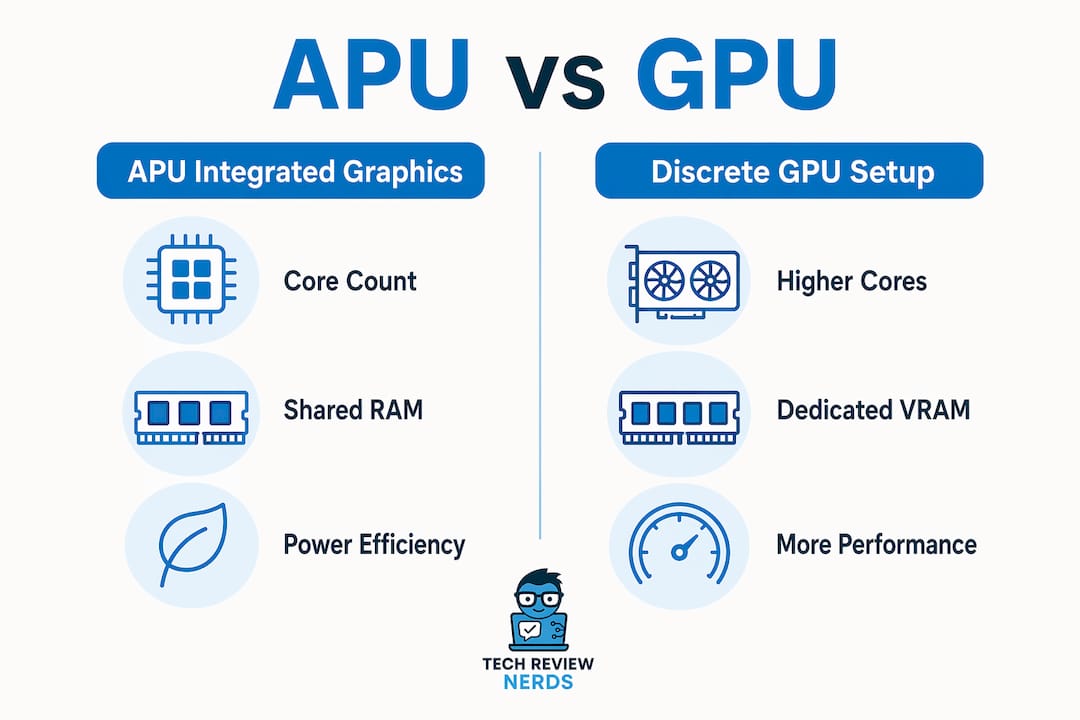
| Performance factor | APU integrated graphics | Discrete GPU setup |
|---|---|---|
| Graphics core count | 12–16 compute units (typical) | 32–80+ compute units |
| Memory bandwidth | 80–100 GB/s (DDR5 shared) | 300–600 GB/s (GDDR6 dedicated) |
| Best game compatibility | Esports, indie, casual titles | All genres including AAA |
| Target resolution | 720p to 1080p, low/medium settings | 1080p to 4K, high/ultra settings |
| Ray tracing capability | Limited or unavailable | Full support on modern cards |
| System cost | Lower, no separate GPU needed | Higher, GPU adds significant cost |
The numbers tell a clear story. An APU trades raw graphics power for affordability and compactness. For a gamer who plays Counter-Strike 2 or Stardew Valley, that trade is perfectly reasonable. For someone who wants to run Cyberpunk 2077 at ultra settings, it is not.
Ray tracing is effectively off the table for most APUs. The compute units inside current APU designs lack the dedicated ray tracing hardware found in discrete cards, and the memory bandwidth constraint makes ray tracing even less practical. This is a known limitation, not a flaw in the design concept.
When does an APU make sense for your gaming setup?
APUs make the most sense for budget builds, compact systems, and gamers who do not need maximum graphical fidelity. APUs power over 60% of consumer laptops, which tells you how widely the market has already voted on their value. The cost savings from skipping a discrete GPU are real and significant, especially at the entry level.
The best use cases for an APU-based gaming system include:
- Budget gaming PCs: An APU eliminates the cost of a discrete GPU, which can represent a large portion of a build’s total price.
- Gaming laptops without discrete graphics: Thin and light laptops often use APUs to balance battery life, heat, and gaming capability.
- Mini PCs and small form factor builds: Many compact cases have no PCIe expansion slot, making the APU the only graphics option available.
- Casual and esports gamers: Players focused on competitive titles at 1080p get strong value from a well-configured APU system.
- Entry-level gamers planning to upgrade: APUs serve as a stepping stone, letting you start with integrated graphics and add a discrete GPU later when budget allows.
If you are putting together a budget-friendly gaming PC and want to understand which scenarios favor an APU over a full discrete GPU setup, the performance table above is a good starting framework.
Adjusting GPU memory allocation in BIOS
One underused setting in APU systems is the integrated GPU memory allocation. This is adjustable from 512 MB to 4 GB in most BIOS or UEFI menus. Increasing this allocation gives the GPU a larger guaranteed slice of system RAM, which can prevent crashes and improve stability in graphics-heavy games.
The tradeoff is that memory reserved for the GPU is unavailable to the CPU and operating system. On a 16 GB system, allocating 4 GB to the GPU leaves 12 GB for everything else. On a 32 GB system, that same allocation is barely noticeable. More total RAM gives you more flexibility here.
Pro Tip: Go into your BIOS and set the integrated GPU memory allocation to at least 2 GB if you are gaming on an APU. The default setting is often 512 MB, which is too low for modern titles and can cause stuttering or crashes.
Small form factor PCs without a PCIe expansion slot are permanently committed to APU-only graphics unless you replace the entire motherboard or case. That is a key consideration before buying a mini PC for gaming. Know your upgrade path before you commit.
How do gaming APUs fit into the future of PC and console gaming?
The architecture behind gaming APUs is moving toward unified memory designs, and that shift is significant. Modern gaming consoles have used unified memory for years, letting the CPU and GPU share a single high-bandwidth pool without the bottleneck of a PCIe connection. Unified memory architectures reduce data bottlenecks between CPU and GPU and increase gaming performance efficiency. PC hardware is now following that same path.
AMD’s Ryzen AI Max series represents the clearest example of this trend in x86 laptops. The Ryzen AI Max employs unified memory designs that improve asset streaming and reduce latency in ways that traditional PCIe-connected discrete GPUs cannot match. This is not a minor refinement. It is a fundamental rethinking of how CPU and GPU resources work together.
The traditional PC gaming setup, with a CPU connected to a discrete GPU through a PCIe slot, carries an inherent inefficiency. Data must travel across that bus every time the GPU needs updated information from the CPU. Unified memory eliminates that trip entirely. The result is lower latency, more consistent frame times, and better performance per watt.
Power efficiency is another area where APUs hold a genuine advantage. A system running an APU draws significantly less power than one running a separate CPU and discrete GPU. For gaming laptops, that translates directly into longer battery life and less heat. For desktop builds, it means lower electricity costs and quieter cooling. These are practical benefits that show up in daily use, not just in spec sheets.
The gap between APU integrated graphics and entry-level discrete GPUs is narrowing with each generation. AMD’s roadmap points toward APUs with more compute units, higher memory bandwidth support, and better ray tracing capability. The Ryzen AI Max series already blurs the line between integrated and discrete graphics in ways that were not possible three years ago. Gamers who dismissed APUs as underpowered should revisit that assumption with current hardware.
Key Takeaways
A gaming APU delivers real gaming capability from a single chip by combining CPU and GPU resources with shared memory, making it the right choice for budget builds, compact systems, and casual gamers who prioritize value over maximum graphical power.
| Point | Details |
|---|---|
| APU definition | An APU combines CPU and GPU on one chip, sharing system RAM instead of using dedicated VRAM. |
| RAM speed is critical | DDR5-6000 dual-channel RAM is the single most impactful upgrade for APU gaming performance. |
| Performance ceiling | APUs handle esports and casual games at 1080p well, but struggle with AAA titles at high settings. |
| BIOS memory allocation | Setting integrated GPU memory to at least 2 GB in BIOS improves stability and reduces crashes. |
| Upgrade flexibility | APU systems with PCIe slots can add a discrete GPU later; mini PCs without slots cannot. |
APUs in 2026: my honest assessment after testing them
I’ve spent a fair amount of time gaming on APU-based systems, and the experience has shifted my thinking considerably. The common assumption is that integrated graphics are a compromise you tolerate until you can afford something better. That framing misses the point for a large portion of gamers.
The memory speed revelation was the biggest surprise for me. I tested the same APU with DDR4-3200 and then with DDR5-6000, and the frame rate difference in Valorant and Rocket League was dramatic. The chip did not change. The RAM did. That single variable had more impact than I expected, and most buyers never hear about it when they are shopping.
Where I think conventional wisdom gets it wrong is in treating APUs as purely entry-level hardware. The Ryzen AI Max series genuinely challenges that label. I’ve seen it handle titles that would have required a mid-range discrete GPU just two years ago. The unified memory architecture is doing real work there, not just marketing work.
My recommendation for anyone considering an APU system: be honest about the games you actually play. If your library is mostly esports titles and indie games, an APU with fast RAM is a genuinely good choice, not a consolation prize. If you want to run the latest open-world AAA games at high settings, a discrete GPU is still the right call. The gaming performance guides at Techreviewnerds break this down by specific game type, which I find more useful than generic benchmark comparisons.
The one thing I would tell every APU buyer: go into the BIOS on day one and adjust that GPU memory allocation. The default settings are conservative and leave performance on the table.
— K. Connors
APU-powered laptops worth checking out
Techreviewnerds tests gaming laptops hands-on, including models built around AMD APUs that punch well above their price point. If you are looking for a capable gaming laptop without paying for a discrete GPU you may not need, the laptop reviews at Techreviewnerds cover a range of APU-equipped options with real-world gaming benchmarks.

The focus at Techreviewnerds is always on what actually performs in practice, not what looks good on a spec sheet. APU laptops have earned their place in the recommendations, particularly for gamers who want solid esports performance, long battery life, and a price under $1,000. The best budget gaming laptops guide is a good starting point if you want curated picks with honest assessments of what each chip can and cannot do.
FAQ
What does APU stand for in gaming?
APU stands for Accelerated Processing Unit. It is an AMD trademark for a chip that combines a CPU and GPU on a single die, sharing system memory for both processing and graphics tasks.
Is an APU good enough for gaming?
An APU handles esports titles and casual games at 1080p with low to medium settings very well. Demanding AAA games at high settings or 4K resolution still require a discrete GPU for acceptable performance.
How does an APU differ from a regular CPU with integrated graphics?
An APU complies with Heterogeneous System Architecture (HSA), allowing CPU and GPU cores to share memory with lower latency than standard integrated graphics. Intel’s integrated graphics do not carry the HSA-compliant architecture that AMD’s APU branding signifies.
Can you add a discrete GPU to an APU system later?
Yes, if the motherboard has a PCIe slot, adding a discrete GPU disables the integrated graphics and takes over rendering. Mini PCs without PCIe expansion slots cannot accept a discrete GPU without replacing the case or motherboard.
What RAM speed should you use with a gaming APU?
DDR5-6000 in dual-channel configuration is the recommended target for modern AMD APUs. Slower RAM significantly reduces graphics performance because the integrated GPU depends entirely on system memory bandwidth for rendering.