
Desktop replacement gaming laptops are defined as large, high-performance portables designed to fully substitute a desktop PC setup for gaming. When you compare desktop replacement gaming laptops, the most important factors are GPU thermal power, display specs, RAM and storage configuration, and real-world upgrade limits. These machines typically ship with 16-inch or 18-inch displays, dedicated GPUs from NVIDIA or AMD, and cooling systems built to sustain heavy workloads. Techreviewnerds has tested dozens of these machines, and the single biggest mistake buyers make is assuming that two laptops with the same GPU chip will deliver the same performance. They often do not, and this guide explains exactly why.
What key specs should you compare in desktop replacement gaming laptops?
The GPU is the most critical component to evaluate, but raw model names tell only part of the story. A laptop’s Total Graphics Power (TGP) rating determines how much wattage the GPU can actually draw during sustained gaming. Two machines can carry the same GPU chip yet deliver very different frame rates because one runs at 100W and the other at 175W.

CPU cores and gaming workloads
Modern games in 2026 use 8–12 CPU cores effectively, so a 14-core or higher mobile processor gives you headroom for both gaming and background tasks. The CPU matters less than the GPU for raw frame rates, but it becomes the bottleneck in open-world titles and games with heavy physics simulation. Look for processors with a base clock above 3.5GHz and a boost clock above 5GHz for the best gaming responsiveness.
RAM and storage minimums
16GB of DDR5 RAM is the floor for desktop replacement gaming laptops in 2026. 32GB is the practical choice if you multitask or stream while gaming. Modern games often exceed 100GB per install, which means 1TB of NVMe SSD storage is the recommended minimum, with 512GB being the absolute floor. Confirm that your target machine uses SO-DIMM slots rather than soldered RAM, because soldered memory cannot be upgraded after purchase.
Display size, resolution, and refresh rate
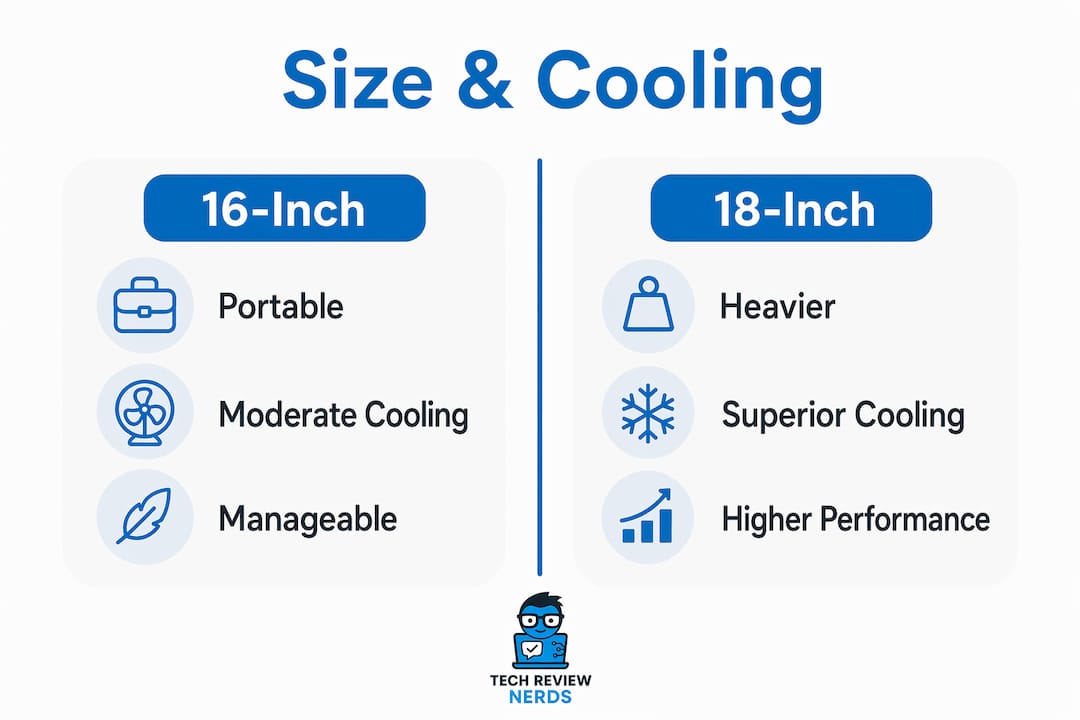
The 16-inch form factor is the sweet spot for cooling and manageable portability, while 18-inch models are mostly stationary replacements that rarely leave a desk. For competitive gaming, a 1080p or 1440p panel at 165Hz or higher gives you the frame-rate ceiling to match a powerful GPU. For cinematic single-player games, a 4K OLED or Mini-LED panel at 120Hz delivers stunning image quality. Adaptive Sync support (either NVIDIA G-Sync or AMD FreeSync) removes screen tearing without a fixed frame-rate cap.
Battery life and portability reality
Desktop replacement laptops are not designed for all-day unplugged use. Most 18-inch models carry power bricks that weigh over 1kg on their own. Expect 2–4 hours of light use on battery and under 1 hour of gaming without the power adapter. If you genuinely need to game away from an outlet, a 16-inch model with a more efficient GPU configuration is a better fit.
| Spec category | Why it matters | Minimum to consider |
|---|---|---|
| GPU TGP | Determines sustained frame rates | 100W (entry), 150W+ (recommended) |
| CPU cores | Handles game logic and background tasks | 8 cores, 3.5GHz+ base |
| RAM | Supports gaming and multitasking | 16GB DDR5, SO-DIMM preferred |
| Storage | Fits modern game libraries | 1TB NVMe SSD |
| Display refresh rate | Reduces motion blur | 144Hz minimum, 165Hz+ preferred |
| Cooling design | Sustains peak GPU wattage | Dual-fan with vapor chamber preferred |
Pro Tip: Before buying, search for the specific laptop model plus “sustained performance” or “TGP” in user forums. Manufacturer spec sheets list peak TGP, but real-world sustained wattage under load is often 15–30% lower in thermally limited designs.
How do thermal design and power delivery affect gaming performance?
Thermal design is the single most misunderstood variable when gamers compare high-performance gaming laptops. Thermal design and chassis volume directly determine the TGP and sustained gaming wattage of identical GPU models across different machines. A laptop with a larger chassis, more heat pipes, and a vapor chamber can run the same GPU chip at 175W continuously. A thinner machine with the same chip may throttle to 80W after 10 minutes of gaming.
Why chassis size changes the equation
An 18-inch laptop with a well-engineered cooling array and a 175W+ TGP can outperform a 16-inch model carrying the same GPU chip but less thermal headroom. The larger chassis allows more fan surface area, longer heat pipes, and better airflow routing. That physical advantage translates directly into higher sustained clock speeds and better average frame rates over a 30-minute gaming session.
Thermal throttling explained
Thermal throttling happens when a laptop’s CPU or GPU reaches its temperature limit and automatically reduces clock speeds to cool down. You will notice it as a sudden drop in frame rates mid-game, often 15–25% below peak performance. Machines with vapor chamber cooling, large exhaust vents, and high-RPM fans are far less likely to throttle under sustained load. Gaming desktops handle this better because their cooling solutions are not constrained by a thin chassis.
The cooling quality gap between models
Not all 18-inch laptops cool equally well. A poorly designed 18-inch chassis can throttle more aggressively than a well-engineered 16-inch machine. Excellent cooling can allow some 16-inch laptops to outperform larger chassis with weaker thermal designs. The lesson is to evaluate the cooling system directly, not just the chassis size. Look for chassis airflow details like vapor chamber confirmation, fan count, and heat pipe configuration in detailed reviews.
Pro Tip: Run a 20-minute stress test using a tool like HWiNFO64 or GPU-Z after purchase to confirm your laptop sustains its rated TGP. If GPU clock speeds drop more than 10% from peak after 15 minutes, the cooling system is underperforming.
What are the upgrade and lifespan trade-offs versus desktops?
Desktop replacement laptops have a fixed performance ceiling from the day you buy them. Upgrade options are limited to SO-DIMM RAM and M.2 SSD slots. The CPU and GPU are soldered to the motherboard and cannot be swapped. This is the sharpest practical difference when you compare gaming laptops vs desktops for long-term value.
Desktops, by contrast, allow you to replace the GPU, CPU, motherboard, and storage independently. That flexibility extends a desktop’s useful gaming life considerably. Gaming laptops have a lifespan of roughly 3–4 years before their fixed GPU becomes a bottleneck for new titles. Desktops can last 6–8 years with a single GPU upgrade. That difference matters when you calculate total cost of ownership over a decade.
Here is a clear breakdown of what you can and cannot upgrade:
- RAM: Upgradeable on most desktop replacement laptops via SO-DIMM slots (confirm before buying)
- Storage: Upgradeable via M.2 NVMe slots; most models have 2 slots
- GPU: Soldered and not upgradeable on any current desktop replacement laptop
- CPU: Soldered and not upgradeable on any current desktop replacement laptop
- Display: Fixed at purchase; cannot be swapped internally
- Cooling system: Cannot be meaningfully upgraded beyond repasting the thermal compound
The resale value picture also favors desktops. A gaming laptop depreciates faster because its GPU ages without any upgrade path. A desktop with a mid-range GPU can be sold, upgraded, or repurposed more flexibly. If you want to track how laptop resale value holds up over time, the pattern is consistent: 3-year-old gaming laptops sell for 30–50% of their original price, while desktops with upgraded GPUs hold value better.
Most gaming laptops let you upgrade RAM and storage, but the CPU and GPU are always soldered to the motherboard. That means the performance you buy on day one is the performance you keep for the machine’s entire life.
How do you decide if a desktop replacement laptop fits your gaming lifestyle?
The core question is whether you actually move your machine. Desktops deliver 30–40% better gaming performance than similarly priced laptops because of superior thermal and power headroom. Laptops carry a 35–40% price premium for equivalent performance. That premium is worth paying only if portability is a genuine, regular part of your life.
Most buyers move 18-inch laptops very rarely. The large weight and oversized power bricks make true portability impractical. If your laptop sits on a desk 95% of the time, you are paying for portability you never use.
A structured decision framework helps cut through the noise:
- Map your actual movement. Count how many days per month you genuinely game away from home. If the answer is fewer than four, a desktop plus a budget secondary laptop covers your needs at lower total cost.
- Set a realistic budget. At the same price point, a desktop will outperform a laptop. Decide whether that performance gap matters for the games you play.
- Check your game list. Competitive shooters at 1080p/240Hz demand less GPU power than 4K open-world titles. A mid-tier desktop replacement handles most competitive titles well; only the most demanding 4K games require top-tier TGP.
- Evaluate hybrid setups. A desktop replacement laptop paired with an external monitor and a docking station gives you a near-desktop experience at your desk and genuine portability when you travel. This hybrid approach is often the best value for gamers who work and play on the same machine.
- Factor in the all-in-one convenience. Gaming laptop convenience is a decisive factor for multi-use machines that blend work and play. If your laptop doubles as your work computer, the portability premium becomes easier to justify.
- Check the best gaming laptops for your size preference before committing, because the 16-inch vs 18-inch choice affects both performance ceiling and daily usability.
Pro Tip: Avoid paying for an 18-inch desktop replacement if you travel fewer than once a month. A well-specced 16-inch model costs less, weighs less, and delivers comparable performance for most gaming scenarios.
Key Takeaways
Choosing the right desktop replacement gaming laptop requires matching thermal design, upgrade limits, and actual portability needs to your budget and gaming habits.
| Point | Details |
|---|---|
| GPU TGP matters more than GPU model | Two laptops with the same GPU chip can perform very differently based on their TGP and cooling design. |
| Upgrade options are limited | Only RAM and SSD can be upgraded; CPU and GPU are soldered at purchase. |
| Laptops carry a performance premium | Desktops deliver 30–40% better performance at the same price; the laptop premium is justified only by real portability needs. |
| Lifespan favors desktops | Gaming laptops last 3–4 years before becoming bottlenecked; desktops can last 6–8 years with a GPU upgrade. |
| Match purchase to actual lifestyle | Buyers who rarely move their machine pay for portability they never use. |
Why I think most buyers get this decision backwards
I’ve spent years reviewing gaming hardware, and the pattern I see most often is buyers choosing an 18-inch desktop replacement because it sounds impressive on paper, then never moving it from their desk. The machine sits next to a monitor, plugged into the wall, running on AC power at all times. At that point, they’ve paid a 35–40% premium over a desktop for exactly zero portability benefit.
The other misconception I keep encountering is the idea that a higher-tier GPU model name guarantees better performance. It does not. I’ve tested 16-inch machines that outperformed 18-inch models carrying a nominally superior GPU, purely because the smaller machine had a better-engineered vapor chamber and higher sustained TGP. The GPU chip is just one variable. The cooling system around it is equally important, and it’s the variable most buyers ignore completely.
What I’d tell any gamer right now is this: be brutally honest about how often you actually move your machine. If the answer is “rarely,” a desktop gives you more performance per dollar, more upgrade flexibility, and a longer useful life. If you genuinely travel, work from different locations, or need one machine for both work and gaming, a well-cooled 16-inch desktop replacement is the smarter buy over an 18-inch model that pretends to be portable.
The best purchase is the one that matches your real life, not the one that matches your aspirational gaming identity. Prioritize cooling quality, confirm SO-DIMM RAM slots, and check laptop lifespan data before committing to any machine in this category.
— K. Connors
Techreviewnerds has the comparisons you need
Techreviewnerds publishes hands-on desktop replacement laptop reviews with real benchmark data, thermal testing, and honest assessments of long-term value. Every review is independent and based on actual use, not manufacturer spec sheets.

If you’re ready to go deeper, the laptop reviews at Techreviewnerds cover the full range of desktop replacement options with updated 2026 testing. You’ll find side-by-side spec breakdowns, sustained performance data, and clear buying recommendations for every budget. For gamers who want to understand how benchmark numbers translate to real gaming sessions, the benchmark testing guide explains exactly what each test measures and why it matters for your purchase decision.
FAQ
What makes a laptop a “desktop replacement”?
A desktop replacement laptop is a large, high-performance portable, typically 16–18 inches, designed to match desktop-level gaming performance without needing a separate tower. These machines prioritize GPU power and display quality over battery life and light weight.
Does a bigger laptop always mean better gaming performance?
Not automatically. An 18-inch chassis typically allows higher TGP and better cooling, but a poorly designed 18-inch model can throttle more than a well-engineered 16-inch machine. Cooling quality and sustained TGP matter more than chassis size alone.
Can I upgrade the GPU in a desktop replacement gaming laptop?
No. The GPU and CPU in all current desktop replacement laptops are soldered to the motherboard and cannot be replaced. Upgrade options are limited to RAM via SO-DIMM slots and storage via M.2 NVMe slots.
How long does a desktop replacement gaming laptop last?
Gaming laptops typically remain competitive for 3–4 years before their fixed GPU becomes a bottleneck for new titles. Desktops can last 6–8 years with a GPU upgrade, making them the better long-term investment for stationary gamers.
Is a desktop replacement laptop worth it over a desktop?
It depends entirely on how often you move your machine. Desktops outperform laptops by 30–40% at the same price. A desktop replacement laptop is worth the premium only if genuine portability is a regular part of your gaming life.