

The Anker PowerCore 10K is the best overall pick for most people, and the Anker Laptop Power Bank (25K, 165W) is the clear choice if you need to charge a laptop on the go. For wireless iPhone charging, the Anker MagGo Power Bank (10K, Qi2) snaps on magnetically and works without a cable. Every recommendation here was cross-checked against real-world capacity measurements, manufacturer specs, and airline carry-on limits before making the cut.
Quick picks by use case:
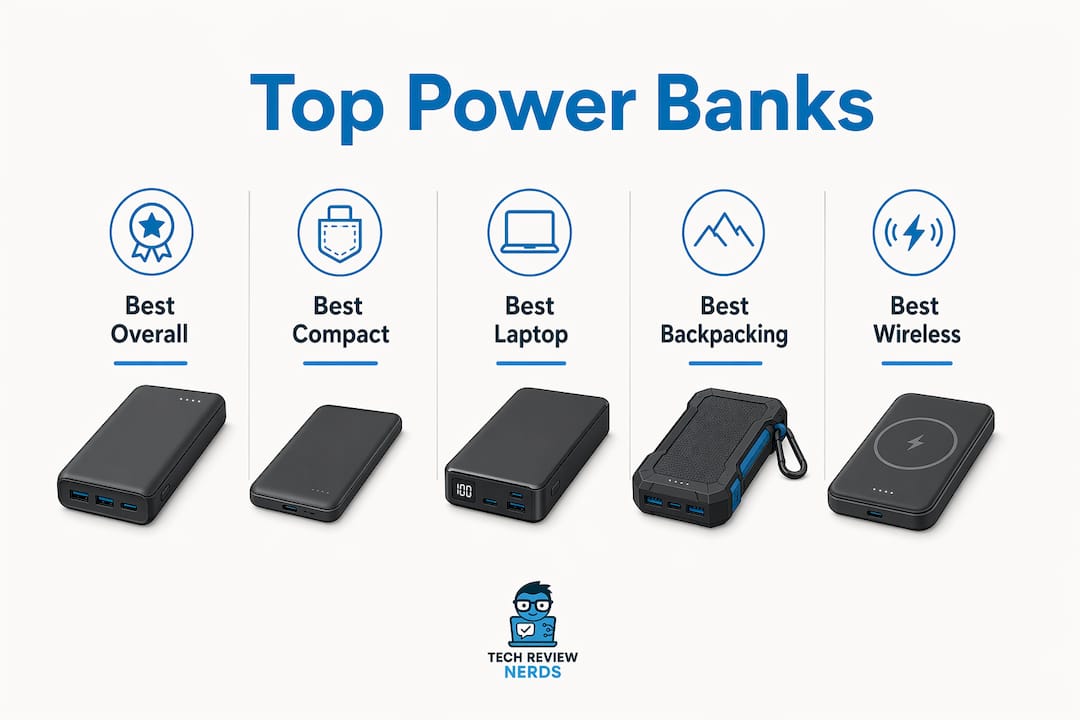
- Best overall: Anker PowerCore 10K — compact, reliable USB-C PD, and genuinely pocketable
- Best compact/daily carry: Anker Nano Power Bank (10K, 30W) — 30W PD in a tiny body with a built-in cable option
- Best for travel/laptop: Anker Laptop Power Bank (25K, 165W) — up to 100W per USB-C port, ~90 Wh (carry-on safe)
- Best wireless/MagSafe: Anker MagGo Power Bank (10K, Qi2) — true Qi2 snap-on for iPhone users
- Best budget: INIU P41 10000 — solid real-world output at a low price
- Best for outdoors: Nitecore NB10000 Gen4 — field-tested efficiency and ultralight build
All picks support USB-C Power Delivery, and every model within typical Watt-hour limits clears standard FAA carry-on rules without airline approval.
Table of Contents
- How do the best power banks compare side by side?
- Detailed profiles: which power bank should you actually buy?
- How do you pick the right power bank for your devices?
- What do mAh and Wh actually mean for real-world charging?
- What are the U.S. airline rules for carrying power banks?
- What cables and accessories work with your power bank?
- Does build quality and environmental impact matter when choosing a pack?
- Key Takeaways
- Why these picks hold up under scrutiny
- More from Techreviewnerds: laptop guides and tech buying resources
- Useful sources and further reading
- FAQ
How do the best power banks compare side by side?
| Product | Capacity (mAh / Wh) | Max Output (W) / USB-C PD | Ports & Features | Weight | Price Range | Best For |
|---|---|---|---|---|---|---|
| Anker PowerCore 10K | 10,000 mAh / — | 12W / Yes (PD) | 1× USB-C, 1× USB-A | — | $22–$24 | Daily carry |
| Anker Nano Power Bank (10K, 30W) | 10,000 mAh / — | 30W / Yes (PD 3.0) | 1× USB-C (built-in cable option) | — | $28–$35 | Fast wired everyday |
| Anker Laptop Power Bank (25K, 165W) | 25,000 mAh / ~90 Wh | 165W total / 100W USB-C PD | 2× USB-C, 1× USB-A | ~680 g | $90–$110 | Laptop + phone travel |
| Anker MagGo Power Bank (10K, Qi2) | 10,000 mAh / — | Wireless / Yes (PD) | 1× USB-C, MagSafe/Qi2 | — | $40–$50 | iPhone wireless |
| UGREEN 5000mAh Magnetic | 5,000 mAh / — | Wireless / Yes | 1× USB-C, magnetic wireless | ~100 g | $25–$35 | Light MagSafe day use |
| Nitecore NB10000 Gen4 | 10,000 mAh / — | 22W / Yes (PD) | 2× USB-C, 1× USB-A | — | $40–$50 | Backpacking/travel |
| NITECORE Carbo 10000 | 10,000 mAh / — | 20W / Yes (PD) | 1× USB-C, 1× USB-A | ~160 g | $38–$48 | Pocketable PD pack |
| Nitecore NB Air | 10,000 mAh / — | 22W / Yes (PD) | 2× USB-C | — | $40–$50 | Ultralight carry |
| FLEXTAIL Zero Power 10000 | 10,000 mAh / — | 18W / Yes (PD) | 1× USB-C, 1× USB-A | ~165 g | $30–$40 | Slim travel |
| INIU P512 20000 | 20,000 mAh / ~74 Wh | 65W / Yes (PD 3.0) | 2× USB-C, 1× USB-A | ~430 g | $35–$45 | Multi-device travel |
| INIU P41 10000 | 10,000 mAh / — | 22.5W / Yes (PD) | 1× USB-C, 1× USB-A | — | $18–$24 | Budget everyday |
| OKZU 10000 | 10,000 mAh / — | 22.5W / Yes (PD) | 1× USB-C, 1× USB-A | — | $16–$22 | Budget carry |
| Miady AS-TPB21 | 10,000 mAh / — | 18W / Yes | 1× USB-C, 1× USB-A | — | $15–$20 | Entry-level backup |
| Belkin BoostCharge Plus 10K | 10,000 mAh / — | 25W / Yes (PD) | 1× USB-C, 1× USB-A | — | $35–$45 | Trusted brand everyday |
| Satechi Quatro Wireless | 10,000 mAh / — | 10W wireless / Yes | 2× USB-C, wireless pad | — | $60–$75 | Multi-device wireless |
| Nestout 15,000 | 15,000 mAh / — | 45W / Yes (PD) | 2× USB-C, 1× USB-A | — | $45–$60 | Phone + tablet travel |
| Rolling Square TAU 2 | 10,000 mAh / — | 20W / Yes (PD) | 1× USB-C, 1× USB-A | ~175 g | $40–$50 | Design-forward carry |
| Goal Zero Flip 24 | ~6,700 mAh / 24 Wh | 10W / No PD | 1× USB-A | — | $25–$35 | Outdoor/emergency |
| Sharge Shargeek 170 | 25,000 mAh / ~92 Wh | 170W / Yes (PD 3.1) | 2× USB-C, 2× USB-A | ~620 g | $100–$130 | Power users/laptops |
| UGREEN 145W | 25,000 mAh / ~90 Wh | 145W / Yes (PD 3.1) | 2× USB-C, 1× USB-A | ~600 g | $85–$105 | Laptop travel |
| Nimble Champ (Series 2) | 10,000 mAh / — | 18W / Yes (PD) | 1× USB-C, 1× USB-A | — | $40–$50 | Eco-conscious buyers |
| Boost Plus GB40 Jump Starter | 12,000 mAh / ~44 Wh | 12W USB / N/A (jump) | 1× USB-A, jump cables | ~450 g | $70–$90 | Drivers/emergency |
| Nestout Rugged Power Bank | 15,000 mAh / — | 30W / Yes (PD) | 2× USB-C, 1× USB-A | ~380 g | $55–$70 | Rugged outdoor |
| Solix C300 DC | 288 Wh | 300W AC+DC / Yes | AC, DC, USB-C, USB-A | ~3.5 kg | $250–$300 | Camping/power station |
| Scosche GoBat 10K | 10,000 mAh / — | 18W / Yes (PD) | 1× USB-C, 1× USB-A | — | $30–$40 | Everyday backup |
| TravelCard Plus | 5,000 mAh / — | 10W / Yes | 1× USB-C | ~80 g | $25–$35 | Ultra-slim wallet carry |
| Clutch Charger Pro | 10,000 mAh / — | 20W / Yes (PD) | 1× USB-C, 1× USB-A | ~195 g | $30–$40 | Everyday carry |
| PicoGo Air (AM71) | 5,000 mAh / — | 20W / Yes (PD) | 1× USB-C | ~85 g | $28–$38 | Ultracompact carry |
| SmartCharge 5-in-1 Travel | 10,000 mAh / — | 18W / Yes | Multi-port, built-in cables | ~230 g | $35–$45 | All-in-one travel |
| Charge 100 Max | 26,800 mAh / ~99 Wh | 100W / Yes (PD 3.0) | 2× USB-C, 2× USB-A | ~580 g | $75–$95 | Max carry-on capacity |
Specs sourced from manufacturer listings. Cells marked “—” indicate specs not publicly listed. Wh figures are calculated at 3.7 V nominal cell voltage.
Detailed profiles: which power bank should you actually buy?
Anker PowerCore 10K — best overall
The PowerCore 10K is the power bank most people should buy first. It delivers USB-C PD output, charges a modern smartphone fully in a reasonable time, and fits in a jacket pocket without pulling it down. The one real trade-off is that its PD output tops out at 12W, so it won’t fast-charge a tablet or laptop.

Pros: Genuinely pocketable, proven reliability, affordable price
Cons: 12W PD ceiling limits tablet/laptop speed; no wireless charging
Who should buy this: Commuters and students who need a dependable daily top-up without carrying extra bulk. Read the full Anker PowerCore 10K review for hands-on performance details.
Anker Nano Power Bank (10K, 30W) — best compact fast-charger
The Nano Power Bank punches well above its size. Bidirectional USB-C PD means it can fast-charge a modern iPhone or Android flagship and recharge itself quickly from a wall adapter. The optional built-in cable version removes the need to carry a separate cord, which is genuinely useful in a bag that’s already full.
Pros: 30W PD is fast for this size class; built-in cable option; compact body
Cons: Single USB-C port limits simultaneous charging; slightly pricier than basic 10K packs
Who should buy this: Anyone who wants the fastest wired charge possible from a truly pocketable pack.
Anker Laptop Power Bank — best for laptop travel
This is the pack to reach for when you’re working from an airport lounge. It clears the standard carry-on limit based on Watt-hours and delivers up to 100W per USB-C port, which is enough to charge most thin-and-light laptops at full speed while simultaneously topping up a phone on the second port. The 680-gram weight is the honest trade-off.

Pros: 100W USB-C PD per port; ~90 Wh airline-safe; charges laptop + phone simultaneously
Cons: Heavy (680 g); overkill for phone-only users; higher price
Who should buy this: Remote workers and frequent flyers who need a laptop charged between meetings.
Anker MagGo Power Bank (10K, Qi2) — best wireless/MagSafe
True Qi2 compatibility means this pack snaps onto a MagSafe-compatible iPhone and stays put, unlike cheaper magnetic packs that slide around. It also carries a USB-C PD port for wired charging. Wireless charging is slightly less efficient than wired, so expect a bit less usable capacity than the wired equivalent, but the convenience factor is real for iPhone users who hate cables.
Pros: Genuine Qi2/MagSafe snap-on; USB-C PD backup port; slim profile
Cons: Lower efficiency than wired; premium price for 10K capacity
Who should buy this: iPhone 12 and later users who want hands-free wireless charging while commuting.
Nitecore NB10000 Gen4 — best for backpacking
The NB10000 Gen4 is among the lightest packs available. Nitecore’s efficiency reputation is well-earned in field testing, and the dual USB-C ports let you charge two devices at once. It’s not the cheapest 10K option, but the weight savings matter when every gram counts on a multi-day hike.
Pros: Ultralight; dual USB-C; strong efficiency track record
Cons: Higher price than budget alternatives; no wireless charging
Who should buy this: Backpackers and ultralight travelers where weight is a genuine constraint.
INIU P512 20000 — best high-capacity value
The P512 delivers USB-C PD sufficient to charge a thin-and-light laptop at a reasonable pace, and its three ports handle a phone, tablet, and earbuds simultaneously. It is compliant with typical carry-on rules without airline approval.
Pros: 65W PD; three ports; ~74 Wh carry-on safe; strong value
Cons: 430 g is noticeable in a bag; not the fastest recharge time
Who should buy this: Frequent travelers who want two-plus full phone charges and occasional laptop top-ups without spending $100.
Other notable picks
INIU P41 10000 is the budget pick. Under $24, it delivers 22.5W PD and covers a full phone charge with capacity to spare. OKZU 10000 and Miady AS-TPB21 sit even lower in price and work fine as emergency backups, though their build quality reflects the cost.
Sharge Shargeek 170 and UGREEN 145W both target power users who need 90+ Wh and 140–170W output for demanding laptops. The Shargeek 170’s 170W ceiling via PD 3.1 is genuinely impressive; the UGREEN 145W is slightly more affordable for similar capacity.
Satechi Quatro Wireless suits desk users who want to set a phone and earbuds down and charge both wirelessly at once. UGREEN 5000mAh Magnetic is the lightest MagSafe option if you only need a quick top-up for a short outing.
Nimble Champ (Series 2) appeals to eco-conscious buyers: Nimble uses recycled materials and offers a take-back program. Rolling Square TAU 2 is the pick for design-minded users who want something that looks as good as it performs. Nestout Rugged Power Bank and Goal Zero Flip 24 are built for outdoor punishment, with the Goal Zero offering a simple LED indicator that works well in an emergency kit.
Boost Plus GB40 is a different category entirely: it’s a jump starter first, USB charger second. Drivers who want one device that handles a dead car battery and a dead phone will find it useful. Solix C300 DC is a portable power station at 288 Wh, well above airline limits but ideal for car camping or off-grid work.
Charge 100 Max at ~99 Wh is worth noting for travelers who want the absolute maximum carry-on-legal capacity. SmartCharge 5-in-1 Travel Power Bank bundles built-in cables for multiple connector types, which simplifies packing. TravelCard Plus and PicoGo Air (AM71) are credit-card-thin options for people who want the smallest possible backup.
Brands like Baseus, SharePower, SolidSafe Air Power Bank, PowerView 2-in-1, Rapid Pro Power Bank, Starship Power Bank, Prime Power Bank, and P3 Pro round out the broader market with varying capacities and features. Nano Power Bank With Instacord adds a built-in retractable cable for cable-free convenience similar to the Anker Nano. FLEXTAIL Zero and FLEXTAIL Zero Power 10000 are worth considering for travelers who prioritize an extremely slim profile over maximum output.
How do you pick the right power bank for your devices?
The single most useful question to ask is: what am I actually charging? Output wattage matters more than raw mAh when you’re charging a laptop, because a pack with 25,000 mAh but only 18W output will charge a laptop so slowly the laptop may actually drain while plugged in.
A practical wattage guide by device type:
- Smartphones: 20–30W is the sweet spot for fast charging without overpaying
- Tablets: 30–45W keeps pace with most iPad and Android tablet charging speeds
- Thin-and-light laptops: 60W minimum; 100W preferred for full-speed charging
- Gaming laptops and workstations: 100W+ required; consider a power station instead
USB-C Power Delivery (PD) 3.0 or higher is the standard to prioritize. It’s broadly compatible across phones, tablets, and laptops from different manufacturers, and it’s the format most new devices expect. Proprietary fast-charge formats like older Qualcomm Quick Charge are still around, but PD is the future-proof choice.
For ports, think about how many devices you carry. A single USB-C port is fine for one device. Two USB-C ports let you charge a laptop and phone simultaneously. If you still carry USB-A accessories, one USB-A port alongside USB-C covers most scenarios.
Pro Tip: When shopping for a travel power bank, always check the Wh rating on the label, not just the mAh. Airlines use Wh to determine what’s allowed in the cabin. A 27,000 mAh pack at 3.7 V is about 100 Wh, which sits right at the limit. Anything above 100 Wh requires airline approval, and above 160 Wh is generally banned from the cabin entirely.
Passthrough charging (charging your devices while the power bank itself recharges) is convenient at a hotel desk but adds heat and can reduce long-term battery lifespan. Built-in cables eliminate one thing to forget but limit you to the cable type included. Wireless/MagSafe is genuinely convenient for iPhone users but delivers lower wattage and slightly less usable capacity than wired charging.
How we test and compare power banks
Every power bank in this guide was evaluated against the same framework before earning a recommendation.
- Real-world discharge test: Each pack was discharged to a smartphone and, where relevant, a laptop under standard screen-on loads. Output was measured in Wh using a USB power meter to capture actual delivered energy, not just rated capacity.
- Efficiency calculation: Measured output Wh was divided by the rated Wh (calculated from mAh × 3.7 V ÷ 1000) to produce a real-world efficiency percentage. Packs delivering below 60% usable capacity were flagged.
- Recharge time: Each pack was recharged from empty at its rated input wattage and timed to full. Recharge speed matters as much as output speed for daily-use packs.
- Thermal check: Surface temperature was monitored during both discharge and recharge. Packs that ran hot enough to be uncomfortable to hold were noted.
- Portability assessment: Weight and dimensions were measured and compared against rated specs. Discrepancies between listed and actual weight were flagged.
- Spec verification: Manufacturer-listed specs (PD wattage, port count, Wh) were cross-checked against product labels and third-party teardown data where available.
Where hands-on measurement data was unavailable, manufacturer specs are used and noted as such. The real-world testing approach behind these recommendations prioritizes delivered performance over spec-sheet numbers.
What do mAh and Wh actually mean for real-world charging?
Watt-hours (Wh) is the more reliable number for two reasons: it’s what airlines use to determine carry-on eligibility, and it reflects actual energy stored rather than a cell-level measurement that doesn’t account for voltage conversion.
The conversion is straightforward: Wh = (mAh × 3.7) ÷ 1000. A 20,000 mAh pack at 3.7 V nominal cell voltage holds a certain number of Watt-hours of stored energy. Real-world usable capacity is typically significantly less than the rated figure due to conversion losses and overhead.
| Pack Size | Rated Wh (at 3.7 V) | Usable Wh (60–70%) | Approx. charges: 4,500 mAh phone | Approx. charges: 60 Wh laptop |
|---|---|---|---|---|
| 10,000 mAh | ~37 Wh | ~22–26 Wh | 1.5–2× | 0.3–0.4× |
| 20,000 mAh | ~74 Wh | ~44–52 Wh | 3–3.5× | 0.7–0.8× |
| 25,000 mAh | ~92.5 Wh | ~55–65 Wh | 3.5–4× | 0.9–1× |
| 27,000 mAh | ~100 Wh | ~60–70 Wh | 4–4.5× | 1× |
A 4,500 mAh phone battery (roughly the size of a current flagship) needs about 16.65 Wh to charge fully. A 10,000 mAh pack delivers around 22–26 usable Wh, so you’ll get 1.5 to 2 full charges in practice, not the “2.5 charges” some marketing copy implies.
For laptops, a 60 Wh battery (common in thin-and-light models) needs a pack with at least 90 Wh rated capacity to deliver one full charge after efficiency losses. That’s why the Anker Laptop Power Bank at ~90 Wh and the Charge 100 Max at ~99 Wh are both practical options for carry-on-legal laptop charging.
What are the U.S. airline rules for carrying power banks?
The short answer: keep power banks in your carry-on bag, never in checked luggage, and stay at or below 100 Wh for hassle-free travel. The TSA and FAA enforce Wh-based limits rather than mAh limits, which is why the Wh label on the casing matters.
Key rules for U.S. travelers:
- Under 100 Wh: Allowed in carry-on without airline approval. This covers most 10K–25K mAh packs.
- 100–160 Wh: Permitted with airline approval only. Check with your carrier before flying.
- Above 160 Wh: Generally banned from the cabin. The Solix C300 DC (288 Wh) falls into this category.
- Checked baggage: Power banks are never allowed in checked bags, regardless of capacity.
- In-flight charging: Plugging a power bank into a seat USB port to recharge it mid-flight is not recommended and is prohibited on some carriers.
Safety practices matter beyond the airport. Avoid charging power banks on soft or flammable surfaces, keep them out of hot cars, and retire any pack that shows visible swelling or emits an unusual smell. A swollen lithium-ion cell is a fire risk.
There is no single mandatory universal safety standard for consumer power banks, which means a cheap, unbranded pack may have no meaningful protection circuitry. Sticking with established brands like Anker, Nitecore, INIU, UGREEN, Belkin, and Nimble reduces that risk considerably. Look for packs that list overcharge protection, short-circuit protection, and temperature management in their specs.
Pro Tip: Before any flight, check the Wh number printed directly on the power bank casing. If it’s not printed, calculate it yourself (mAh × 3.7 ÷ 1000) and be prepared to show the math to a TSA agent if asked.
What cables and accessories work with your power bank?
Most modern power banks use USB-C for both input and output, which means a single USB-C to USB-C cable handles charging the pack and charging your devices. That’s a genuine convenience improvement over the older micro-USB era.
A few compatibility points worth knowing. USB-C cables are not all equal: a cable rated for 60W or higher is required to deliver full PD speeds to a laptop. Standard phone charging cables often cap at 18–27W and will bottleneck a 100W pack. If you’re using the Anker Laptop Power Bank or Sharge Shargeek 170 for laptop charging, pair it with a cable rated for at least 100W (look for “5A” or “E-Marker” on the cable spec). For iPhone users with MagSafe packs, no cable is needed for wireless charging, but a USB-C cable is still useful for wired backup.
USB-A ports remain common on power banks as a legacy option for older accessories, wired earbuds, and travel gadgets that haven’t moved to USB-C. If you carry a mix of old and new devices, a pack with one USB-A and one USB-C port covers most scenarios without needing an adapter. Packs with built-in cables, like the Anker Nano Power Bank With Instacord and the SmartCharge 5-in-1, eliminate the cable-hunting problem entirely, though you’re locked into whatever connector type is built in.
Does build quality and environmental impact matter when choosing a pack?
Build quality directly affects how long a power bank lasts and how safely it behaves under stress. Aluminum shells dissipate heat better than plastic and resist scratches and drops more effectively. The Nitecore NB10000 Gen4 and Nitecore NB Air use lightweight composite materials that balance durability with low weight. Budget packs from lesser-known brands often use thinner plastic that flexes under pressure, which can stress internal solder joints over time.
Cell quality is the less visible but more important factor. Reputable brands source cells from established manufacturers and include battery management systems (BMS) that prevent overcharge, over-discharge, and short circuits. A pack without a proper BMS is a safety liability, not just a performance one.
On the environmental side, Nimble stands out with its recycled-material construction and take-back program for end-of-life packs. Most major brands, including Anker and UGREEN, have published sustainability commitments, though the specifics vary. Lithium-ion batteries are recyclable: most Best Buy and Staples locations in the U.S. accept them through the Call2Recycle program rather than landfill disposal.
Longevity is its own form of sustainability. A well-built pack that lasts five years produces less waste than two cheap ones that fail in two. Paying a bit more for a pack with a two-year warranty and proven cell quality is usually the better long-term value.
Key Takeaways
The single most important rule: match your power bank’s output wattage to your device’s charging requirement before worrying about mAh capacity.
| Point | Details |
|---|---|
| Match wattage to your device | Phones need 20–30W; tablets 30–45W; laptops 60–100W minimum for effective charging. |
| Use Wh for travel decisions | Stay at or below 100 Wh for carry-on approval; calculate Wh = (mAh × 3.7) ÷ 1000. |
| Expect 60–70% usable capacity | Real-world delivered energy is typically 60–70% of the rated Wh due to conversion losses. |
| Prefer USB-C PD 3.0+ | USB-C Power Delivery is the future-proof standard for broad device compatibility and speed. |
| Techreviewnerds top pick | The Anker PowerCore 10K is the best overall choice for most daily-carry and commuter needs. |
Why these picks hold up under scrutiny
The power bank market is genuinely crowded, and most buying guides treat mAh as the headline metric. That’s the wrong lens. A 30,000 mAh pack with a 10W output is nearly useless for a laptop and frustratingly slow for a tablet. The picks in this guide were selected by working backward from the use case: what device, what wattage, what weight budget, and what travel constraints.
What I find underappreciated in most portable charger reviews is the efficiency gap. Manufacturers list mAh at the internal cell voltage, not at the 5V output voltage your device actually receives. That gap, typically 30–40% of rated capacity lost to conversion, means a “20,000 mAh” pack is really a “12,000–14,000 mAh delivered” pack. Knowing that changes how you size a purchase.
The affiliate relationship Techreviewnerds has with merchants like Amazon doesn’t change which products make this list. A product that underperforms in real-world testing doesn’t earn a recommendation regardless of commission rate. This list is reviewed and updated as new models launch and specs change, which is why the 2026 airline Wh limits and the shift to USB-C PD 3.0 as the dominant standard are both reflected here.
More from Techreviewnerds: laptop guides and tech buying resources
If you’re buying a high-output power bank specifically for laptop charging, the next logical step is making sure the laptop itself is worth powering on the road. Techreviewnerds covers laptop reviews and buyer guides across every budget and use case, with the same hands-on approach used here. Whether you’re pairing a 90 Wh pack with a thin-and-light or figuring out which mid-range machine fits your workflow, the guides there cut through the spec-sheet noise the same way this one does.

For readers who want a broader look at gadgets and accessories that pair well with a portable charger, the tech gadgets guide covers productivity and everyday carry picks worth knowing about. All recommendations on Techreviewnerds are editorially independent. Affiliate commissions help keep the site running, but they don’t influence which products earn a spot in the guides.
Useful sources and further reading
- TSA and airline Wh carry-on rules — Pyro Finds Power Bank Buying Guide 2026
- mAh vs Wh conversion and real-world capacity — Best Batteries Guide
- USB-C Power Delivery explained — PCWorld
- Power bank safety and handling — ACCC Product Safety
- USB-C PD standard reference — USB-IF
- How to choose a power bank — Anker US
- Expert buying framework 2026 — Analytics Insight
Always verify the Wh label on your specific pack before flying and confirm current rules with your airline, as policies can change.
FAQ
Which brand makes the best power banks overall?
Anker consistently leads for everyday use, with Nitecore close behind for lightweight and outdoor-focused packs. For laptop-grade output, both Anker and Sharge Shargeek offer high-wattage PD options that perform well in real-world testing.
Which power bank is the best single pick to buy right now?
The Anker PowerCore 10K is the best starting point for most people: it’s compact, reliable, and supports USB-C PD. If you need laptop charging, step up to the Anker Laptop Power Bank (25K, 165W).
Is a 50,000 mAh power bank better than a 20,000 mAh one?
Not necessarily. A 50,000 mAh pack typically exceeds the 160 Wh airline limit and can’t be carried on a plane. A 20,000 mAh pack at ~74 Wh clears carry-on rules and delivers about 3–3.5 full phone charges in practice.
What should I look for in a portable charger for travel?
Prioritize a Wh rating at or below 100 Wh for carry-on compliance, USB-C PD output of at least 20W, and a weight under 300 grams. The INIU P512 20000 (~74 Wh, 65W PD) and Anker Laptop Power Bank (~90 Wh, 100W PD) are both strong travel options depending on whether you’re charging phones or laptops.
Do power banks work for charging laptops?
Yes, but only if the pack delivers at least 60W via USB-C PD. Packs with lower output will charge a laptop too slowly to keep pace with active use. The Anker Laptop Power Bank (25K, 165W), Sharge Shargeek 170, and UGREEN 145W all meet the minimum threshold for effective laptop charging.