

A hands-on review is a qualitative evaluation of a product based on real-world use, and it reveals things a specification sheet simply cannot. Spec sheets list measurable hardware values like RAM, CPU clock speed, and battery capacity. They tell you what a device is built with. A hands-on review tells you what it is actually like to use. Understanding how hands-on reviews differ from specs is the most practical skill you can develop before spending money on a laptop, smartphone, or any piece of everyday tech. Both sources matter, but they answer completely different questions.
How hands-on reviews differ from specs: the core distinction
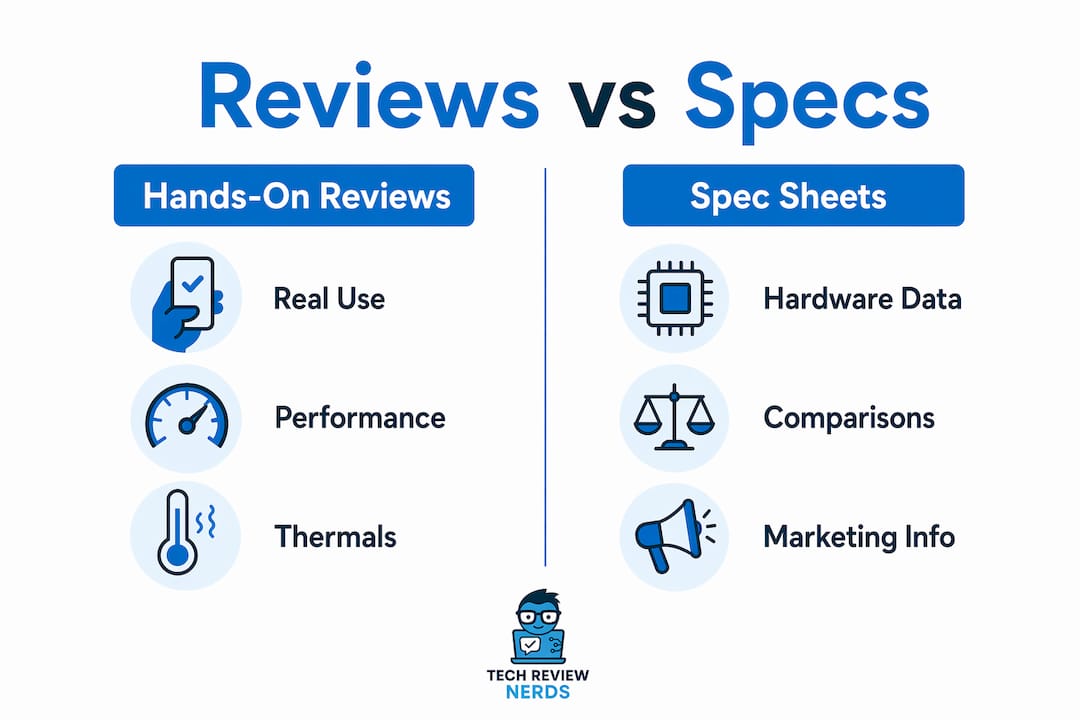
Spec sheets provide static, measurable hardware baselines, while hands-on reviews interpret those numbers into real-world performance insights. That distinction sounds simple, but it changes everything about how you should use each source.
A spec sheet tells you a laptop has a 72Wh battery. A hands-on review tells you that battery lasts five hours under normal office use, not the ten hours the manufacturer advertises. A spec sheet lists a 1080p IPS display. A review tells you the panel washes out badly in sunlight and the hinge wobbles after two weeks. These are not minor details. They are the difference between a good purchase and a frustrating one.

Spec sheets exist primarily for product comparison at the point of sale. They are structured to help you filter options quickly, not to describe the ownership experience. Hands-on reviews, by contrast, are built around the ownership experience. Sites like RTINGS use lab-measured testing to bridge the gap, combining quantitative measurements with real-world context. Reviewers like Bill Bennett have written extensively about why anecdotal, workflow-focused insights often serve consumers better than raw benchmark numbers alone.
The two sources are complementary, not competing. Specs screen products in or out of your budget and requirements. Reviews tell you whether the product actually delivers on those specs in daily use.
What hands-on reviews reveal that specifications cannot
Hands-on reviews expose the qualitative layer of a product that no number on a spec sheet can capture. Professional reviewers typically spend 10–15 hours testing across multiple scenarios, running repeated benchmarks and living with the device over several days. Issues that only emerge after extended use, like thermal throttling under sustained load, creaking chassis panels, or software bugs that appear after the first update, show up in reviews and nowhere else.
Here are the key areas where hands-on testing consistently outperforms spec reading:
- Heat management. A laptop spec sheet lists a CPU’s TDP, but only a review tells you whether the cooling system actually handles it. Many thin and light laptops throttle their processors under sustained load, dropping performance well below what the chip is rated for.
- Software experience. Interface responsiveness, bloatware behavior, and driver stability are invisible on spec sheets. A device with impressive hardware can feel sluggish if the software is poorly optimized.
- Build quality and ergonomics. Flex in the keyboard deck, hinge tension, trackpad feel, and port placement all affect daily use. None of these appear in a spec sheet.
- Battery life under real conditions. Actual battery life varies significantly based on screen brightness, active apps, and wireless radios. Lab-tested figures rarely reflect what you experience at your desk or on a flight.
- Long-term reliability signals. Reviewers who use a device for a week often catch early signs of durability issues, fan noise under load, or software instability that a five-minute store demo never would.
The real-world testing process also captures something harder to quantify: whether a device fits naturally into a workflow. Processor speed is often irrelevant for common tasks. What matters is how the device responds when you have 20 browser tabs open, a video call running, and a large file downloading simultaneously.
Pro Tip: When reading a hands-on review, look specifically for sections on sustained performance and thermal behavior. These are the areas most likely to reveal gaps between advertised specs and real-world results.
Why spec sheets mislead more than most buyers realize
Specifications often function as marketing tools rather than engineering disclosures. Full PDF spec sheets offer better transparency than product page summaries, which replace concrete measurements with marketing adjectives. Words like “immersive,” “powerful,” and “all-day battery” carry no technical meaning.
The battery life claim is the most common source of confusion. Manufacturers test under ideal conditions: low screen brightness, no active applications, Wi-Fi disabled. Standard lab tests run under conditions that no real user replicates. The result is a headline number that can be two to three times higher than what you actually experience.
CPU tier labels create a similar problem. Consider these common misconceptions:
- “i7 is always faster than i5.” A lower-tier CPU in a well-cooled chassis regularly outperforms a higher-tier chip in a thin design that throttles under load. Thermal management is often the limiting factor, not the chip tier itself.
- “More RAM means better performance.” For most everyday tasks, 16GB and 32GB deliver identical results. The bottleneck is usually storage speed or software optimization, not memory capacity.
- “Higher resolution means better display.” Panel type, color accuracy, and brightness matter far more than pixel count for most users. A 1080p OLED display beats a 4K TN panel in almost every practical scenario.
- “Spec sheet storage speed is what you get.” The “SSD lottery” is a real phenomenon. Some manufacturers ship the same laptop model with different SSD brands depending on supply availability, and performance varies depending on which components are actually installed in your unit.
“Specs serve as a baseline, but marketing language can distract from important engineering limits. Hands-on reviews reveal the real user experience.” — WU120, How to Read a Laptop Spec Sheet 2026
The safest approach is to treat spec page summaries as a starting filter, not a final verdict. Always look for the full spec sheet when available, and cross-reference every major claim against at least one independent review.
How to combine reviews and spec sheets when evaluating products
The most reliable purchase decisions come from a three-source strategy: manufacturer specs, professional hands-on reviews, and user community feedback. Cross-referencing these three sources reduces the risk of being misled by any single data point. Each source catches what the others miss.
| Source | Strengths | Limitations |
|---|---|---|
| Manufacturer spec sheet | Precise hardware figures, model comparisons | Marketing language, idealized conditions |
| Professional hands-on review | Real-world performance, build quality, software behavior | Short testing window, reviewer bias risk |
| User community feedback | Long-term reliability, edge case issues | Anecdotal, variable quality |
Sites like RTINGS and NotebookCheck are worth bookmarking. RTINGS uses standardized lab measurements for displays and audio, giving you objective data that complements subjective review impressions. NotebookCheck runs consistent CPU and GPU benchmarks across hundreds of laptop models, making cross-model comparisons reliable. Reddit communities like r/laptops and r/hardware surface real owner experiences that professional reviewers rarely capture.
Watch for warning signs that a review is superficial. A review that simply restates spec sheet numbers without testing them is not a hands-on review. It is a spec sheet with a byline. Genuine reviews include thermal testing results, battery life measured under specific workloads, and commentary on software behavior. The signs of biased product reviews are worth learning before you trust any single source.
Software dependencies are another factor that specs cannot address. Cloud performance, app optimization, and operating system integration increasingly determine how a device feels to use. A laptop with modest specs running a well-optimized operating system can outperform a higher-spec machine running bloated software.
Pro Tip: Before buying, search the exact model name plus “long-term review” or “after 6 months” on YouTube. Owners who have lived with a device for months surface reliability issues that launch-day reviews miss entirely.
When to rely more on reviews versus specs by product type
The right balance between reviews and specs shifts depending on what you are buying. Some product categories demand hands-on testing above almost everything else. Others are straightforward enough that specs tell most of the story.
Prioritize hands-on reviews for these product types:
- Smartphones. Camera quality, UI responsiveness, and battery management are all software-dependent. Devices like smartphones and AI assistants rely on latency and UI intuition that spec sheets cannot measure. A side-by-side comparison of Siri and Google Gemini, for example, reveals response quality differences that no spec number predicts.
- Gaming laptops. Thermal performance under sustained GPU load, display refresh rate consistency, and fan noise under stress are all critical and all invisible on spec sheets. A gaming laptop that throttles its GPU after ten minutes of play is useless regardless of its listed specs.
- Smart home devices and AI assistants. Software optimization increasingly dictates overall device performance for these categories. The hardware is almost secondary to how well the software integrates with your existing ecosystem.
- Ultrabooks and thin laptops. Thermal constraints in slim chassis mean that the gap between advertised and real performance is widest here. Reviews consistently reveal throttling behavior that specs never hint at.
Specs offer sufficient guidance for these categories:
- Basic peripherals. A mechanical keyboard with Cherry MX switches, a USB hub with specific port counts, or a monitor with a listed panel type and refresh rate are well-described by their specs. The hardware is standardized enough that surprises are rare.
- External storage. Sequential read and write speeds, interface type, and capacity are reliable spec metrics for SSDs and hard drives. Independent benchmark sites validate these figures consistently.
- Wired networking equipment. Routers and switches with listed port speeds and protocol support behave predictably according to their specs in most home environments.
The usage context matters as much as the product category. An office laptop used exclusively for email and documents is far less sensitive to thermal throttling than the same machine used for video editing. Matching your evaluation method to your actual use case is the most practical thing you can do before buying.
Key takeaways
Hands-on reviews and spec sheets answer different questions, and using both together is the only reliable way to evaluate a tech product before buying.
| Point | Details |
|---|---|
| Specs are a starting filter | Use manufacturer specs to narrow options by budget and hardware requirements, not as a final verdict. |
| Reviews expose what specs hide | Thermal throttling, software bugs, and real battery life only appear through extended hands-on testing. |
| Three-source strategy works best | Cross-reference manufacturer specs, professional reviews, and community feedback to reduce purchase regret. |
| CPU tier labels can mislead | Thermal management often matters more than chip tier; a well-cooled i5 can outperform a throttled i7. |
| Match your method to the product | Software-heavy devices like smartphones demand hands-on reviews; basic peripherals are well-described by specs alone. |
What I’ve learned from years of reading both
I’ve made the mistake of buying on specs alone, and I’ve paid for it. A few years back, I picked up a thin laptop with an impressive CPU tier and a solid battery capacity figure. On paper, it looked like a great deal. In practice, the machine ran hot enough to throttle within minutes of any demanding task, and the advertised battery life was achievable only with the screen at minimum brightness and nothing running. The spec sheet was technically accurate. It just told me nothing useful.
What I’ve found is that the most dangerous spec is battery life, and the most underrated review section is thermal testing. Manufacturers are not lying when they publish their battery figures. They are just testing under conditions that have nothing to do with how you actually use a laptop. A reviewer who runs a real-world battery test at 150 nits brightness with a browser and a document open gives you something you can actually plan around.
I also think consumers underestimate how much software now shapes the hardware experience. Two laptops with identical specs can feel completely different if one ships with a clean operating system and the other is loaded with background processes. That gap only shows up in a hands-on review. The benchmark testing methodology matters too. A reviewer who runs a single benchmark pass is not giving you reliable data. Repeated runs under thermal load tell a very different story.
My honest advice: never skip the community feedback step. Reddit threads and owner forums surface issues that even thorough professional reviews miss, simply because they represent hundreds of real-world use cases instead of one reviewer’s experience. Developing the habit of checking all three sources takes maybe fifteen extra minutes per purchase decision. That investment pays off every time.
— K. Connors
Find trusted reviews and spec analysis at Techreviewnerds
Techreviewnerds publishes independent, hands-on reviews of laptops and everyday gadgets that combine real-world testing with honest spec analysis. Every review goes beyond the marketing page to tell you what a device actually does under normal use conditions.

Whether you are shopping for a new daily driver or trying to decode a confusing spec sheet, the laptop reviews at Techreviewnerds cover the models that matter most in 2026, with thermal testing, battery life results, and build quality assessments included. The gadget category covers smart home devices, audio gear, and everyday tech with the same no-bias approach. If you want to go deeper on benchmarks, the laptop benchmark testing guide breaks down exactly what each test measures and what it means for your workflow.
FAQ
What is a hands-on review in tech?
A hands-on review is an evaluation of a product based on direct, extended use rather than manufacturer-provided specifications. Reviewers test across multiple real-world scenarios to assess performance, build quality, and software behavior.
Why do specs often differ from real-world performance?
Specs are measured under ideal, controlled conditions that rarely match everyday use. Battery life, CPU performance, and display quality all degrade under normal conditions like high brightness, active apps, and sustained workloads.
How do I know if a tech review is genuinely hands-on?
A genuine hands-on review includes thermal testing results, real-world battery measurements under specific workloads, and observations about software behavior. Reviews that only restate spec sheet numbers without independent testing are not hands-on evaluations.
Does a higher CPU tier always mean better performance?
A higher CPU tier does not guarantee better real-world performance. Lower-tier CPUs in well-cooled chassis regularly outperform higher-tier chips in thin designs where thermal throttling limits sustained output.
When should I trust specs over reviews?
Specs are reliable for standardized hardware categories like external storage, wired networking equipment, and basic peripherals where performance is consistent and well-documented by independent benchmark sites.