
Choosing a laptop means matching your daily workload, budget, and must-have features to a device that actually delivers. Get that match right, and you avoid buyer’s remorse. Get it wrong, and you’re stuck with a machine that either can’t keep up or cost far more than your tasks required. The 2026 minimum standard for a primary-use Windows machine is 16GB of RAM and an NVMe SSD. Knowing benchmarks like those before you shop puts you in control from the start.
How to choose a laptop: start with your use case and budget
The single most useful question you can ask before buying is: what will I actually do on this machine every day? A student writing papers and joining video calls needs something very different from a video editor rendering 4K footage or a gamer pushing frame rates. Defining your primary use case first prevents you from overspending on specs you’ll never use or underspending on hardware that bottlenecks your work.

Matching use case to budget tier
Budget tiers in 2026 break down clearly: entry-level machines run under $500, mid-range laptops fall between $800 and $1,500, and high-performance devices start above $2,000. Each tier reflects a real performance jump, not just a price difference.
| Budget tier | Price range | Best for |
|---|---|---|
| Entry-level | Under $500 | Web browsing, documents, light streaming |
| Mid-range | $800–$1,500 | Students, remote workers, casual creators |
| High-performance | Above $2,000 | Gamers, video editors, developers |
Entry-level machines handle basic tasks well, but they often cut corners on display quality, build materials, and storage. Mid-range is where most buyers find the best balance of performance and price. High-performance machines justify their cost only when your workload genuinely demands them.
Students, for example, benefit most from lightweight 13- or 14-inch laptops with 16GB RAM and a 512GB SSD, prioritizing battery life and portability over raw processing power. That profile fits squarely in the mid-range tier and covers nearly every academic task without overpaying. If you’re a student, Techreviewnerds has a dedicated guide on picking a college laptop that digs into exactly this.
Pro Tip: Write down your three most common daily tasks before you shop. If none of them involve video editing, 3D rendering, or gaming, you almost certainly don’t need a machine above $1,200.
What specs matter most when selecting a laptop?
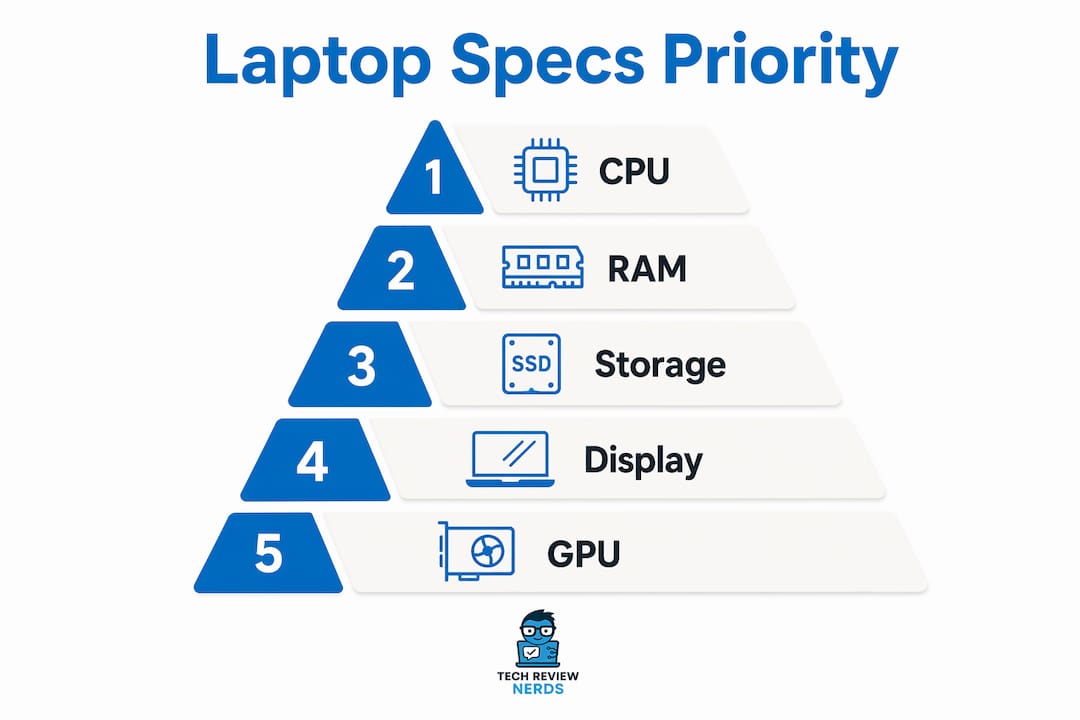
Technical specifications are where most buyers get lost. Marketing language inflates numbers, and spec sheets rarely tell you how a machine actually feels to use. The key features of laptops that matter most are CPU performance, RAM, storage type, and GPU capability. Each one affects a different part of your experience.
CPU: the engine under the hood
The processor determines how fast your laptop handles tasks. For most buyers, a mid-range CPU from Intel’s Core series or AMD’s Ryzen line handles everyday work, web browsing, and even light photo editing without strain. You only need a top-tier chip if you’re compiling code, running simulations, or editing high-resolution video regularly.
RAM: how much is enough?
16GB of RAM is the minimum for smooth multitasking on a primary-use Windows machine in 2026. Running a browser with 15 tabs, a video call, and a document editor simultaneously will push 8GB to its limit. 8GB is sufficient only for extremely light tasks like basic web browsing and document editing.
Content creators, developers, and users running virtual machines should target 32GB. RAM upgradeability is a critical factor here. Soldered RAM cannot be expanded after purchase, so if the machine ships with 16GB and the RAM is soldered to the motherboard, that’s your ceiling forever.
Pro Tip: Before buying, search the exact model name plus “RAM soldered” or “RAM upgradeable.” This one check can save you from a machine that becomes obsolete in two years.
Storage: NVMe SSD is non-negotiable
Experts recommend a minimum 512GB NVMe SSD for modern use in 2026. A 256GB drive fills up faster than most buyers expect once the operating system, apps, and a few months of files accumulate. Power users and creatives should target 1TB from the start.
NVMe SSDs load applications and files dramatically faster than older SATA SSDs or hard drives. The speed difference is noticeable from the first boot. If a machine in your budget only offers a 256GB drive, factor in the cost of an upgrade or external storage before committing.
GPU: only pay for what you need
Integrated graphics handle web browsing, video streaming, and office work without issue. A dedicated GPU becomes necessary for gaming, 3D modeling, and video rendering. If gaming is your goal, Techreviewnerds covers desktop replacement gaming laptops in detail, including which GPU tiers actually justify the price.
Does portability, display, and battery life matter for your lifestyle?
Physical design choices affect how a laptop fits into your daily life more than most buyers realize. A machine that’s perfect on paper can feel miserable to carry around or stare at for eight hours.
Screen size and display quality
Screen sizes follow a practical pattern. A 13- or 14-inch display prioritizes portability and is the right call for commuters and students. A 15- or 16-inch screen balances portability with workspace. Anything 17 inches or larger functions as a desktop replacement and is genuinely heavy to carry.
Display resolution should start at 1080p as an absolute minimum. Anything lower looks noticeably soft on modern screens. OLED panels deliver richer contrast and color accuracy, which matters for photo and video work. Higher refresh rates (90Hz, 120Hz, or 165Hz) make motion smoother and are worth paying for if you game or simply want a more fluid experience.
Touchscreens and 2-in-1 convertibles add flexibility for note-taking and sketching, but they add weight and typically reduce battery life. They’re worth the trade-off for students who handwrite notes or professionals who present frequently.
Battery life: ignore the spec sheet
Manufacturer battery claims are consistently optimistic. Real-world usage delivers roughly 20–30% less battery life than advertised figures. A laptop marketed as offering 15 hours may realistically last 10–11 hours under normal use with a browser, email, and occasional video.
Savvy buyers check trusted reviews that reflect real-world testing rather than relying on spec sheets. Look for reviews that test battery life with screen brightness at 150–200 nits and a mix of browsing and productivity tasks. That’s the number that actually matters.
Pro Tip: Keyboard comfort is just as important as battery life for daily use. If possible, type on the keyboard in a store before buying. A bad keyboard makes every long work session feel like a chore.
What build quality factors affect how long your laptop lasts?
A laptop’s price tag does not guarantee its longevity. Build quality varies significantly even within a single manufacturer’s lineup, and a $1,200 machine with poor thermal management or a flimsy hinge can fail before a $700 machine built with better materials.
Repairability and upgrade options
Repairability and upgrade options contribute far more to long-term value than premium pricing alone. A laptop with user-accessible RAM and SSD slots lets you extend its useful life by years. One with everything soldered and glued shut becomes a throwaway the moment a component fails or falls behind.
MIL-STD-810H certification is a durability standard used by the military that many business-class laptops carry. It means the machine has been tested against drops, temperature extremes, humidity, and vibration. It’s not a guarantee of indestructibility, but it signals that the manufacturer built the chassis to handle real-world stress.
Keyboard and webcam quality
A good keyboard is essential for writers and frequent typists. ThinkPad and HP EliteBook keyboards are recognized as industry gold standards for key travel, feedback, and layout consistency. Keyboard quality significantly affects comfort and productivity during long sessions. If you type for hours daily, this spec deserves as much attention as the CPU.
Webcam quality matters more than it did a few years ago. A 720p webcam looks noticeably poor on video calls compared to a 1080p unit. Many mid-range and premium machines now include 1080p webcams as standard, and it’s worth confirming before you buy.
Battery replacement planning
Plan for battery degradation. Most laptop batteries hold around 80% of their original capacity after 300–500 charge cycles, which typically means 3–4 years of daily use. Check whether the battery is user-replaceable or requires a service center visit. A machine with a replaceable battery can stay useful for years longer than one that requires a full teardown to swap it out.
Key Takeaways
Choosing the right laptop comes down to matching your use case, budget, and key specs before you ever look at a product page.
| Point | Details |
|---|---|
| Start with your use case | Define your three most common tasks before comparing any specs or prices. |
| 16GB RAM is the 2026 minimum | Anything less will bottleneck multitasking on a primary Windows machine. |
| Verify battery life with real reviews | Manufacturer claims run 20–30% higher than real-world results. |
| Check RAM and SSD upgradeability | Soldered components cap your machine’s lifespan from day one. |
| Build quality beats brand name | Repairability and keyboard quality matter more than premium pricing alone. |
The spec obsession trap I see buyers fall into every time
I’ve watched a lot of people buy the wrong laptop, and the pattern is almost always the same. They spend weeks comparing benchmark scores, obsessing over CPU rankings, and chasing the highest number on a spec sheet. Then they end up with a machine that’s technically impressive but uncomfortable to use for eight hours, runs hot under load, or dies after four hours off the charger.
Overbuying based on benchmark scores instead of actual daily needs is the most common purchasing mistake I see. Mid-range laptops often deliver better long-term productivity and comfort than costly premium models, because manufacturers put more thought into thermals, keyboard feel, and battery capacity when they’re not racing to hit a performance headline.
My honest advice: spend 20 minutes writing down exactly what you do on a computer every day. Then buy the cheapest machine that handles those tasks well, with 16GB RAM and a 512GB NVMe SSD as your floor. Put the money you save into a machine with a great keyboard, a bright display, and a battery that actually lasts a full workday.
The laptop benchmark tests that matter are the ones that simulate real tasks, not synthetic stress tests designed to make a chip look good in a press release. I’d rather trust a machine that scores well on a real-world productivity test than one that tops a synthetic benchmark but throttles under sustained load.
Brand loyalty is another trap. Quality varies wildly within a single manufacturer’s lineup. A budget model from a premium brand can be worse than a mid-range model from a less glamorous one. Focus on the specific model, not the logo on the lid.
— K. Connors
Techreviewnerds has the laptop reviews worth reading
Finding trustworthy, hands-on laptop reviews takes time you probably don’t have. Techreviewnerds publishes independent, real-use reviews across every budget tier, from entry-level machines to high-performance workstations.

The Techreviewnerds laptop hub covers the full range of buying decisions, with updated 2026 guides organized by use case, budget, and key specs. Whether you’re buying your first laptop or upgrading after four years, the reviews there reflect actual daily use, not spec-sheet summaries. If you’re focused on value, the best mid-range picks guide is a strong starting point for finding quality without overpaying.
FAQ
What is the minimum RAM for a laptop in 2026?
16GB of RAM is the minimum for a primary-use Windows laptop in 2026. 8GB is sufficient only for very light tasks like basic web browsing and document editing.
How do I know if a laptop’s battery life claim is accurate?
Manufacturer claims typically run 20–30% higher than real-world results. Check reviews that test battery life under realistic conditions like web browsing and multitasking at normal screen brightness.
What storage size should I look for when buying a laptop?
A 512GB NVMe SSD is the recommended minimum for 2026. A 256GB drive fills up quickly once the operating system, apps, and files accumulate, so budget for at least 512GB from the start.
Does the laptop brand matter more than the specs?
Brand matters less than the specific model’s build quality, CPU, RAM, display, and keyboard. Quality varies significantly within a single manufacturer’s lineup, so evaluate each model on its own merits.
What screen size is best for a student laptop?
A 13- or 14-inch display is the best fit for most students. It balances portability and battery life without sacrificing enough screen space to make studying uncomfortable.