

Picking a gaming laptop under budget is defined as selecting a machine that delivers playable frame rates and solid build quality without exceeding your spending limit, typically between $600 and $1,000. The GPU is the single most important component in any gaming laptop, and getting that choice right determines whether your money goes far or gets wasted on marketing hype. A balanced build with a mid-range GPU, a capable CPU, 16GB of RAM, a fast SSD, and a 144Hz display gives you the most real-world gaming value at any budget tier. This guide cuts through the noise and gives you a clear, practical framework for choosing a capable machine without overspending.
What hardware specs matter most when picking a budget gaming laptop
The GPU is the foundation of any gaming laptop build. GPU tier comes first, followed by display refresh rate and resolution. That priority order matters because no amount of extra RAM or a faster CPU will compensate for a weak graphics card when you are trying to run modern titles at smooth frame rates.

For budget gaming laptops in 2026, GPUs like the RTX 4050 and RTX 4060 are the practical sweet spot. These GPU tiers handle esports titles at 1080p with high frame rates and manage most AAA games at medium to high settings. The key word is “tier,” not just model name. Two laptops can carry the same GPU label but perform very differently based on power limits, which is covered in the next section.
The CPU matters, but not as much as marketing suggests. Mid-range CPUs like Core i5 or Ryzen 5 pair well with budget GPUs and avoid bottlenecks without inflating the price. Spending extra on a Core i9 or Ryzen 9 in a budget build is money that would serve you better in the GPU or display.
RAM and storage are the next priorities. 16GB DDR4 or DDR5 is the practical minimum for gaming in 2026, and you should check whether the slots are upgradeable before buying. For storage, 512GB to 1TB SSD is the right target. A 256GB drive fills up fast when modern games routinely exceed 50GB each.
The display is where many budget buyers make a costly mistake. A 1080p 144Hz IPS panel outperforms a 4K screen at the same price point for gaming. Higher resolution demands more GPU power, and budget GPUs simply cannot sustain 4K frame rates. A fast, color-accurate 1080p screen feels better in practice than a slow 4K panel that drops frames constantly.
| Spec | Entry-level tier ($600–$750) | Mid-budget tier ($750–$1,000) |
|---|---|---|
| GPU | RTX 4050 (80W+ TGP) | RTX 4060 (100W+ TGP) |
| CPU | Core i5 / Ryzen 5 | Core i5 / Ryzen 7 |
| RAM | 16GB DDR5 (upgradeable) | 16GB DDR5 (upgradeable) |
| Storage | 512GB NVMe SSD | 512GB–1TB NVMe SSD |
| Display | 1080p 144Hz IPS | 1080p 144Hz or 1440p IPS |
| Cooling | Dual fan, 2 heat pipes | Dual fan, 3+ heat pipes |
Pro Tip: Before buying, search the specific laptop model plus “TGP” or “wattage” to find the actual GPU power limit. A 65W RTX 4060 performs closer to an RTX 4050 than a full-power version.
How do you read benchmarks and specs beyond marketing claims?
Marketing specs oversell performance. The spec sheet tells you the GPU model name. It rarely tells you the power limit, the sustained clock speed under load, or whether the cooling system can maintain performance after 30 minutes of gaming. Real benchmarks from independent reviewers fill that gap.
The most important concept to understand is TGP, or Total Graphics Power. Laptop GPU performance varies substantially based on TGP limits set by manufacturers to fit thermal and battery constraints. An RTX 4060 running at 80W delivers noticeably less performance than one running at 115W, even though both carry the same name on the box. Always verify TGP before committing to a purchase.
Thermals are equally critical. Sustained cooling performance directly affects frame rate stability during long gaming sessions. A laptop that runs well for the first ten minutes but throttles under heat will frustrate you in any game that lasts longer than a quick match. Look for reviews that include sustained load temperature tests, not just peak benchmarks.
For display specs, pay attention to response time and color accuracy alongside refresh rate. A 144Hz panel with poor color accuracy and slow pixel response still feels muddy in fast games. IPS panels generally offer better color and response than VA panels at the same price, which matters for competitive gaming.
Upgradeability is a practical factor that many buyers overlook. Check whether the RAM slots are accessible and whether a second M.2 slot exists for storage expansion. A laptop that lets you add RAM later gives you a longer useful life without requiring a full replacement.
Pro Tip: Use laptop benchmark tests from independent sources to compare sustained frame rates, not just peak scores. Peak numbers look great in ads but rarely reflect what you experience in a two-hour gaming session.
Step-by-step process to pick a gaming laptop under budget
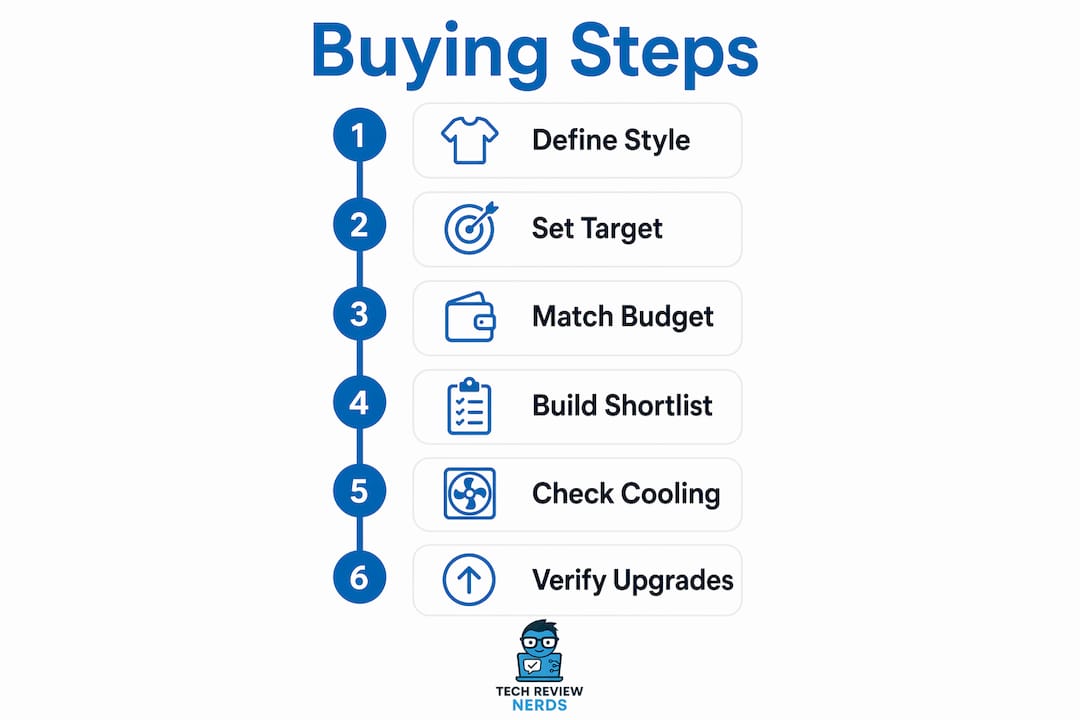
A structured approach saves you from impulse purchases and spec confusion. These six steps apply whether you are buying your first gaming laptop or upgrading from an older machine.
Step 1: Define your gaming style and target titles.
Esports games like Valorant, CS2, and Rocket League are far less demanding than AAA titles like Cyberpunk 2077 or Elden Ring. Knowing what you play most determines how much GPU power you actually need.
Step 2: Set a realistic performance target.
For esports at 1080p, 144fps or higher is achievable on an RTX 4050. For AAA titles at 1080p, 60fps on medium settings is a reasonable goal for the same GPU. Setting this target prevents you from overpaying for performance you will not use.
Step 3: Match your budget tier to known GPU and CPU combinations.
Entry-level builds in the $600–$750 range typically pair an RTX 4050 with a Core i5 or Ryzen 5. Mid-budget builds in the $750–$1,000 range step up to an RTX 4060 with a Core i7 or Ryzen 7. Knowing these pairings helps you spot when a deal is genuine or when a machine is overpriced for its specs.
Step 4: Use benchmarks to build a shortlist.
Search for real-world gaming benchmarks for the specific models you are considering. Techreviewnerds publishes hands-on laptop reviews that go beyond spec sheets and show you what a machine actually delivers in use. Shortlist two or three models that consistently hit your performance target.
Step 5: Verify cooling and display quality from reviews.
Confirm that the display is an IPS panel with at least 144Hz. Confirm that the cooling system sustains performance under load. A machine that throttles after 20 minutes is not a gaming laptop. It is a machine that games for 20 minutes.
Step 6: Check upgrade paths before finalizing.
Confirm RAM slot access and M.2 slot availability. A laptop with two RAM slots and a spare M.2 slot gives you room to grow. One that solders RAM or has no expansion options locks you into its launch configuration permanently.
| Priority | Esports-focused build | AAA-focused build |
|---|---|---|
| GPU | RTX 4050 (80W+) | RTX 4060 (100W+) |
| Display | 1080p 144Hz+ IPS | 1080p 144Hz IPS |
| RAM | 16GB (upgradeable) | 16GB (upgradeable) |
| CPU | Core i5 / Ryzen 5 | Core i5 / Ryzen 7 |
| Storage | 512GB NVMe | 512GB–1TB NVMe |
| Cooling priority | Moderate | High |
For a tested example of what a well-balanced budget gaming laptop looks like in practice, the ASUS TUF Gaming F15 review at Techreviewnerds shows exactly how these spec priorities play out in real gaming sessions.
Common pitfalls to avoid when buying an affordable gaming laptop
The biggest mistake budget buyers make is choosing a GPU by name without checking its power limit. An RTX 4060 at 60W is not the same product as an RTX 4060 at 115W. Manufacturers are not required to advertise TGP prominently, so this detail gets buried. Always find it before buying.
Overspending on the CPU is the second most common error. Budget gamers frequently overspend on CPU when a mid-range processor would have served them equally well. Games are GPU-bound at 1080p in the vast majority of cases. A Core i9 in a budget laptop usually means the GPU or display took a cut to stay within price.
Chasing a 4K screen on a budget build is a trap. 4K screens under $1,000 typically pair with GPUs that cannot run games at native 4K resolution. You end up gaming at 1080p anyway, but on a panel that was not optimized for it, often with worse color accuracy and slower response times than a dedicated 1080p display.
Ignoring thermal design is a mistake that only reveals itself after purchase. A laptop with inadequate cooling throttles its GPU and CPU under sustained load, which means frame rates drop exactly when the game gets intense. Reviews that include thermal testing are the only reliable way to catch this before buying.
“The most common regret I hear from budget gaming laptop buyers is not about the GPU they chose. It’s about the thermals they ignored. A machine that throttles under load is a machine that disappoints every time you sit down to play.”
RAM upgrade limitations are another overlooked issue. Some budget laptops solder one RAM stick and leave one slot open. Others solder both. A machine with soldered RAM cannot be upgraded, which shortens its useful life significantly as games grow more memory-hungry.
Pro Tip: Check budget laptop features that genuinely affect long-term satisfaction. Cooling quality, RAM upgradeability, and display panel type matter more over two years of ownership than the CPU model printed on the box.
Key Takeaways
Picking a capable gaming laptop under budget comes down to prioritizing GPU power, display quality, and thermal performance over raw spec numbers or brand prestige.
| Point | Details |
|---|---|
| GPU is the top priority | Choose by verified TGP wattage, not just model name, to get real performance. |
| 16GB RAM is the baseline | Confirm RAM slots are accessible so you can upgrade as games demand more memory. |
| 1080p 144Hz beats 4K | A fast IPS panel at 1080p delivers better gaming than a slow 4K screen at the same price. |
| Thermals determine longevity | A laptop that throttles under load will disappoint in every long gaming session. |
| Benchmarks over spec sheets | Real-world frame rate tests reveal what a laptop actually delivers, not what it claims. |
Why balanced specs beat peak numbers every time
I’ve tested a lot of gaming laptops across price ranges, and the pattern is consistent. The machines that disappoint are almost never the ones with the weakest GPU on paper. They are the ones that looked impressive on a spec sheet but fell apart under real conditions.
I think the single most underrated factor in a budget gaming laptop is the cooling system. A well-cooled RTX 4050 running at full power for two hours straight will outperform a throttled RTX 4060 that drops to 60% performance after 15 minutes of load. That gap is real, and it shows up in every gaming session.
The display is the second thing I always check. I’ve used laptops with technically impressive specs that felt awful to game on because the panel had poor color accuracy and a slow response time. A 144Hz IPS display with good color coverage makes every game feel more alive. It is not a luxury at this price range. It is a baseline worth protecting.
My honest advice on timing: watch for sales in november and january. Retailers discount gaming laptops aggressively during those windows, and you can often step up a GPU tier for the same price you would have paid for a lower model at launch. Patience at the right moment is worth more than any coupon code.
If you buy a laptop with accessible RAM slots, upgrade to 32GB yourself within the first year. The cost is low, the performance difference in modern AAA titles is real, and it extends the useful life of the machine by at least two years. That is the kind of upgrade that makes a budget build feel like it punches above its weight.
— K. Connors
Techreviewnerds has the budget gaming laptop research you need
Finding a gaming laptop that genuinely performs within your budget takes more than a quick spec comparison. Techreviewnerds publishes hands-on, independent reviews built around real gaming benchmarks, not manufacturer talking points.

The laptop reviews and buying guides at Techreviewnerds cover the full range from entry-level builds to mid-range powerhouses, with updated picks for 2026 that reflect current GPU availability and pricing. Each review tests sustained performance, display quality, and thermal behavior so you know exactly what you are getting before you spend a dollar. If you are ready to compare options across budget tiers, the desktop replacement gaming laptop guide gives you a clear framework for understanding the trade-offs at every price point.
FAQ
What is the best GPU for a gaming laptop under $800?
The RTX 4050 is the most practical GPU for gaming laptops under $800 in 2026, handling esports titles at 144fps and most AAA games at 1080p medium to high settings. Always verify the TGP wattage is 80W or higher for full performance.
How much RAM does a budget gaming laptop need?
16GB DDR4 or DDR5 is the minimum for gaming in 2026. Check that at least one RAM slot is accessible so you can upgrade to 32GB later as game requirements increase.
Does a 4K display make sense on a budget gaming laptop?
No. Budget GPUs cannot sustain 4K frame rates in modern games, and 4K panels at this price point often have slower response times and weaker color accuracy than a good 1080p 144Hz IPS display.
Why does TGP matter when choosing a budget gaming laptop?
TGP, or Total Graphics Power, determines how much power the GPU receives under load. Two laptops with the same GPU model can perform very differently if one runs at 65W and another at 115W. Always check TGP before buying.
When is the best time to buy a budget gaming laptop?
November and january typically offer the deepest discounts on gaming laptops. Retailers clear inventory during these periods, and stepping up a GPU tier for the same price as a lower model is common during major sales events.