
For most U.S. homes in 2026, Wi-Fi 7 (IEEE 802.11be) is worth upgrading to only if you have a multi-gig internet plan, run a NAS or do heavy local file transfers, or you’re serious about cloud gaming and XR. If none of those apply, your Wi-Fi 6 setup is almost certainly not the bottleneck. WBA Phase 2 residential trials showed Multi-Link Operation (MLO) cutting application-layer latency by 35–48% and reducing MAC-layer jitter by up to 40% in a single-family home, which is genuinely impressive. But most U.S. ISP plans still cap out around 1 Gbps, and Wi-Fi 6 handles that with headroom to spare.
Upgrade now if you:
- Have a multi-gig (2.5 Gbps+) internet plan or a fast local NAS
- Play competitive online games or use VR/XR headsets regularly
- Run 10+ simultaneous devices and notice congestion or jitter
Wait if you:
- Have a 1 Gbps or slower ISP plan and no heavy local transfer needs
- Own mostly Wi-Fi 6 or older client devices
- Replaced your router within the last two years
Table of Contents
- What does Wi-Fi 7 bring to the table?
- What do real-world tests and field trials actually show?
- Which devices and routers actually support Wi-Fi 7 in the U.S.?
- Is Wi-Fi 7 worth it for your home? A practical decision checklist
- How to improve your network without a full Wi-Fi 7 overhaul
- Key Takeaways
- The case for patience, and when to ignore it
- Find tested Wi-Fi router picks at Techreviewnerds
- Useful sources
- FAQ
What does Wi-Fi 7 bring to the table?
Wi-Fi 7, standardized as IEEE 802.11be (also called Extremely High Throughput, or EHT), targets two things simultaneously: much higher peak throughput and meaningfully lower, more deterministic latency. According to MathWorks’ technical overview, the theoretical PHY peak reaches 46 Gbps, compared with Wi-Fi 6’s 9.6 Gbps, though real-world numbers land far below that ceiling for any single device.
The headline features that change what wireless can do at home:
- Multi-Link Operation (MLO): — The standout feature. A device can simultaneously use two or three bands (2.4, 5, and 6 GHz) at once, letting the radio aggregate bandwidth and, more importantly, route around interference on any single band.
- Multi-Resource Unit (MRU) allocation: — Gives the router more flexibility in assigning spectrum to devices, reducing wasted airtime in mixed-device environments.
On the standards timeline: the IEEE ratified 802.11be in 2024, and the Wi-Fi Alliance began its Wi-Fi 7 certification program, so certified hardware is now widely available rather than early-adopter-only. That maturity matters when you’re spending $300–$600 on a router.
What do real-world tests and field trials actually show?
The short answer: Wi-Fi 7’s biggest gains appear under interference and multi-device stress, not in clean single-client speed runs. That’s a meaningful distinction for real homes, which are rarely interference-free.
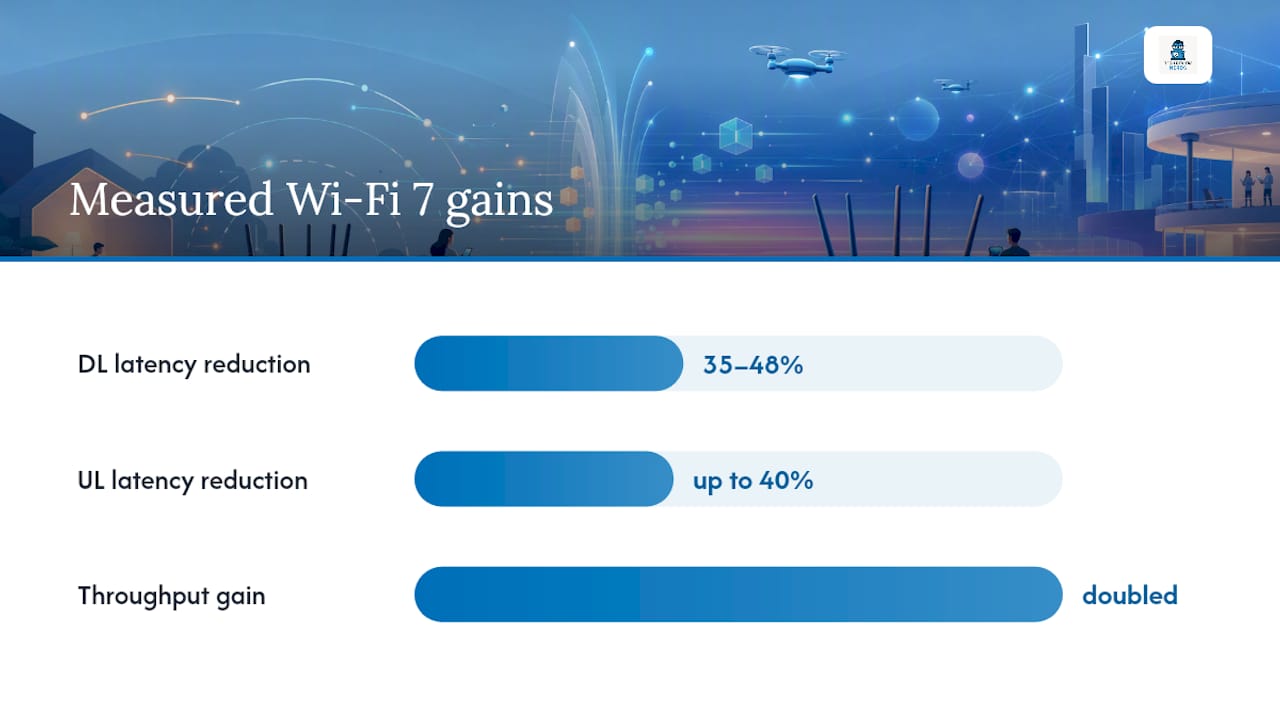
WBA Phase 2 enterprise field trials (AT&T, Ruckus, Intel) measured MLO’s impact directly:
| Condition | No-MLO | With MLO | Improvement |
|---|---|---|---|
| DL latency reduction | Baseline | Measured | 35–48% |
| UL latency reduction | Baseline | Measured | up to 40% |
The residential trial results from the WBA/CableLabs/Intel Phase 2 report are even more striking for home users: under heavy 6 GHz interference, MLO doubled aggregated throughput and cut application-layer latency by 35–48%.
Key finding: MLO’s reliability benefit is the real story. As XDA Developers notes, MLO doesn’t necessarily make your internet connection faster when your ISP is the bottleneck, but it makes the connection dramatically more consistent, which is exactly what competitive gaming and XR demand.
CNET’s lab testing recorded aggregate throughput of 3,169 Mbps across three bands for top Wi-Fi 7 routers, and concluded that tri-band models with a dedicated 6 GHz radio are necessary to realize the major gains. A dual-band Wi-Fi 7 router won’t deliver the same results.
Which devices and routers actually support Wi-Fi 7 in the U.S.?
Wi-Fi 7 certified hardware is now widely available, but client device support is still catching up. The Wi-Fi Alliance’s certification program launched in 2024, and most flagship smartphones and laptops released in 2024–2026 include Wi-Fi 7 chipsets (Qualcomm FastConnect 7800, MediaTek Filogic 380, Intel BE200).
Before buying, run through this checklist:
- Ethernet ports: For backhaul or wired desktop connections, the router should have at least one 2.5G port; 10G is better for NAS setups. Check your port selection on work laptops if you’re connecting via cable.
On pricing: Wi-Fi 7 routers have come down considerably from their 2023 launch prices. Entry-level single-unit Wi-Fi 7 routers now start around $150–$200, while tri-band mesh kits with wired backhaul support sit in the $300–$600 range. Prices will continue to fall through 2026 as more chipsets reach mainstream tiers.
Is Wi-Fi 7 worth it for your home? A practical decision checklist
The top three signals that mean you should upgrade now: you have a multi-gig internet plan, you do heavy local file transfers or run a NAS, or you play competitive online games and XR regularly. If all three are true, Wi-Fi 7 will deliver a noticeable difference. If none are true, it probably won’t.
Work through this step-by-step:
- Check your ISP plan speed. If it’s 1 Gbps or below, your router is not the bottleneck. Wi-Fi 7’s speed gains won’t show up on internet-facing tasks. If it’s 2.5 Gbps or higher, Wi-Fi 7 is the only standard that can deliver that wirelessly.
- Audit your client devices. If your newest phone, laptop, and gaming device are all Wi-Fi 6 or older, you won’t activate MLO or 320 MHz channels regardless of the router. Upgrading the router alone gives you backward compatibility, not Wi-Fi 7 performance.
- Assess your home layout. Single-floor, open-plan homes benefit most from a single Wi-Fi 7 tri-band router. Multi-floor or large homes need a mesh system with wired backhaul to realize the 6 GHz gains.
- Count your simultaneous devices. If you regularly have 20+ devices active at once (smart home, streaming, gaming, work-from-home), Wi-Fi 7’s MRU scheduling and MLO will reduce congestion noticeably.
- Identify your latency-sensitive applications. Cloud gaming, XR, and video calls benefit from MLO’s jitter reduction even when raw speed isn’t the issue. BGR confirms that most homes are bottlenecked by ISP plans and device support, so latency is often the more compelling argument than speed.
- Set your budget. If a quality Wi-Fi 7 tri-band router costs $350 and your current Wi-Fi 6 router is six months old, the math rarely works out. If your router is three or more years old and due for replacement anyway, the incremental cost to step up to Wi-Fi 7 is modest.
Cost-benefit considerations and timing:
- Early adopters with multi-gig plans and Wi-Fi 7 client devices: upgrade now, the hardware is mature and certified.
- Households with 1 Gbps plans and mostly Wi-Fi 6 devices: wait until your next router replacement cycle, then buy Wi-Fi 7 as the baseline.
- Budget-conscious buyers: a Wi-Fi 6E tri-band router is still an excellent choice at lower cost and will serve most homes well through 2027–2028.
How to improve your network without a full Wi-Fi 7 overhaul
Several inexpensive or incremental fixes often deliver most of the perceived benefit for common home setups, without the cost of a full Wi-Fi 7 upgrade.
Effective alternatives worth trying first:
- Upgrade to a tri-band Wi-Fi 6E mesh system. Adding the 6 GHz band via Wi-Fi 6E gives you less congested spectrum and 160 MHz channels, which closes a large portion of the gap with Wi-Fi 7 for internet-facing tasks.
- Add wired backhaul between mesh nodes. A single Ethernet cable between your primary router and a satellite node eliminates the wireless backhaul penalty entirely, often doubling effective throughput to distant rooms. Pairing this with a quality modem and mesh setup ensures the hardware chain doesn’t become the new bottleneck.
- Enable QoS (Quality of Service) and per-device bandwidth rules. Most modern routers let you prioritize gaming consoles, work laptops, or streaming devices over background IoT traffic. This alone can eliminate perceived lag during peak household usage.
- Move high-use devices closer to the access point, or run a short Ethernet cable. A wired connection to a gaming PC or NAS removes Wi-Fi variability entirely and costs nothing if you already have cable.
- Update router firmware. Manufacturers regularly push performance improvements, bug fixes, and new features (including MLO activation on some Wi-Fi 7 routers) via firmware. Running outdated firmware is one of the most common and easily fixed causes of poor Wi-Fi performance.
Pro Tip: The closest you can get to wired-like reliability without Wi-Fi 7 is a tri-band Wi-Fi 6E mesh with wired Ethernet backhaul between nodes, QoS enabled for your priority devices, and your gaming or streaming gear on a short Ethernet run to the nearest node. This setup costs less than a premium Wi-Fi 7 router and outperforms a Wi-Fi 7 router with wireless backhaul in most real-home tests.
Key Takeaways
Wi-Fi 7’s most meaningful home upgrade is MLO-driven reliability and latency reduction, not raw speed, and most U.S. households only see the full benefit with a multi-gig ISP plan and Wi-Fi 7 client devices.
| Point | Details |
|---|---|
| MLO is the real win | WBA trials showed 35–48% latency reduction and up to 40% jitter reduction in residential settings with MLO active. |
| Speed gains depend on your ISP plan | Wi-Fi 7’s throughput advantages are largely irrelevant if your ISP plan is 1 Gbps or below. |
| Client devices matter as much as the router | A Wi-Fi 7 router paired with Wi-Fi 6 clients delivers Wi-Fi 6 performance to those devices. |
| Wi-Fi 6E mesh is a strong alternative | A tri-band Wi-Fi 6E mesh with wired backhaul closes most of the gap for internet-facing tasks at lower cost. |
| Techreviewnerds tested picks | Techreviewnerds’ hands-on router reviews identify which Wi-Fi 7 routers actually implement MLO and 320 MHz channels in firmware, not just on the box. |
The case for patience, and when to ignore it
Most Wi-Fi 7 coverage focuses on the headline speed numbers, and that framing does readers a disservice. The 46 Gbps theoretical peak is a PHY-layer maximum that no consumer device will approach. What actually changes your experience at home is MLO’s effect on jitter and reliability, and that benefit is real, measurable, and most visible in exactly the scenarios that frustrate people most: a gaming session that stutters when someone starts streaming, a video call that drops packets when the microwave runs, an XR headset that hitches under interference.
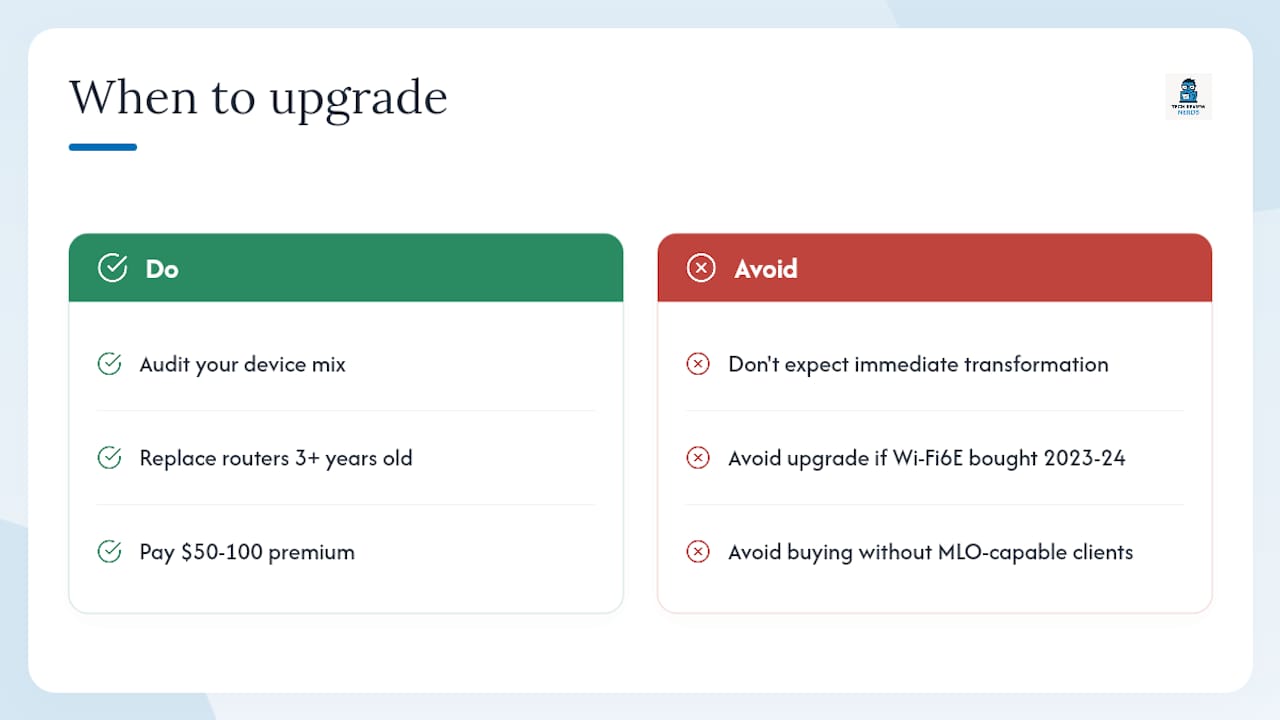
The honest caveat is that MLO requires both the router and the client device to support it. If your laptop or phone is Wi-Fi 6, you’re getting backward compatibility, not Wi-Fi 7 performance. That’s not a reason to avoid Wi-Fi 7 routers, since they’re the right long-term buy, but it is a reason to audit your device mix before spending $400 on a router expecting an immediate transformation.
I think the most underrated argument for upgrading now is the replacement cycle logic. If your current router is three or more years old, you’d be replacing it anyway. At current prices, the step up from a Wi-Fi 6E router to a Wi-Fi 7 router is often $50–$100. That’s a reasonable premium for a standard that will remain current through the decade. The readers who should genuinely wait are those who bought a quality Wi-Fi 6E router in 2023 or 2024 and have no multi-gig plan on the horizon.
Find tested Wi-Fi router picks at Techreviewnerds
Sorting through router specs is time-consuming, and marketing claims don’t always match firmware reality. Techreviewnerds cuts through that with independent, hands-on evaluations that test whether MLO is actually active, whether 320 MHz channels are enabled, and how routers perform under real multi-device stress rather than ideal lab conditions.

The best Wi-Fi routers roundup covers tested picks across price tiers, from budget Wi-Fi 6E mesh kits to premium Wi-Fi 7 tri-band systems, with clear guidance on which households each router actually fits. For deeper dives into individual models, the router reviews section includes full throughput, latency, and range data. If you’re also weighing a new laptop with a built-in Wi-Fi 7 adapter, the laptop buying guide covers what to look for in client-side wireless specs.
Useful sources
- Overview of Wi‑Fi 7 (IEEE 802.11be) — MATLAB & Simulink
- I Used to Tell People to Skip Wi‑Fi 7 Routers. CNET’s Lab Testing Changed My Mind — CNET
- WiFi 7 Explained: Is It Worth Upgrading in 2026? | Technerdo
- Wi‑Fi 7 explained and whether it’s worth upgrading — BGR
- Arista Wi‑Fi 7 white paper
- Wi‑Fi 7’s MLO doesn’t make your connection faster but makes it more reliable — XDA Developers
FAQ
Is Wi-Fi 7 worth it over Wi-Fi 6 in 2026?
For most homes, yes, if you have a multi-gig ISP plan, Wi-Fi 7 client devices, or latency-sensitive use cases like competitive gaming and XR. If your plan is 1 Gbps or below and your devices are Wi-Fi 6, the practical difference is small.
Does Wi-Fi 7 penetrate walls better than Wi-Fi 6?
No. Wi-Fi 7’s 6 GHz band and 320 MHz channels actually penetrate walls less effectively than 5 GHz or 2.4 GHz. For multi-floor homes, a mesh system with wired backhaul is the better solution regardless of standard.
Is Wi-Fi 7 overkill for a typical home?
For a household with a 1 Gbps plan and mostly Wi-Fi 6 devices, yes, it’s more than you need today. The upgrade makes more sense as a long-term investment when replacing an aging router, or immediately if you have a multi-gig plan or heavy local transfer needs.
Is Wi-Fi 6 still good in 2026?
Absolutely. Wi-Fi 6 handles 1 Gbps internet plans comfortably, supports 20+ simultaneous devices efficiently via OFDMA and MU-MIMO, and remains the standard on the majority of client devices sold today. Wi-Fi 6E adds the 6 GHz band and is an excellent choice for anyone not ready to step up to Wi-Fi 7.