

Thermal Design Power, or TDP, is defined as the maximum amount of heat a laptop CPU produces under normal operating conditions, measured in watts, and it directly shapes how a budget laptop performs, how long its battery lasts, and how loud its fans run. If you’ve ever wondered why two laptops with the same “Intel Core i7” label feel completely different in practice, TDP is usually the reason. Understanding this single metric cuts through the marketing noise faster than any spec sheet comparison. For budget laptop buyers especially, knowing what TDP means is the difference between a smart purchase and a frustrating one.
What does TDP mean for budget laptops?
TDP, short for Thermal Design Power, is the maximum heat output a CPU is designed to generate under sustained workloads, and it guides how manufacturers build the cooling system around that chip. Intel and AMD both publish TDP figures for every processor they make, and laptop designers use those numbers to size heatsinks, fans, and chassis vents accordingly. The watt figure you see next to a processor name is not a measure of raw speed. It is a thermal ceiling that defines how aggressively the chip can run before heat becomes a problem.
For budget laptops, this matters more than it does for premium machines. A $1,500 laptop from Dell or ASUS can afford a thick copper heatsink, dual fans, and a chassis with generous airflow. A $400 laptop cannot. So the TDP of the CPU inside a budget device directly determines how much performance the machine can actually deliver before it starts throttling itself to stay cool.

TDP typically ranges from 10 to 15W for ultrabooks, 15 to 35W for mainstream laptops, and 35 to 45W or higher for gaming and workstation machines. Those ranges are not arbitrary. They reflect real trade-offs between performance, heat, battery draw, and the physical size of the cooling solution the laptop can fit inside its chassis.
Pro Tip: When you look up a laptop’s CPU on Intel ARK or AMD’s product pages, the TDP figure listed there is the chip’s rated thermal ceiling. Cross-reference it with the laptop’s actual cooling design before drawing any conclusions about real-world speed.
How TDP affects laptop performance and thermals
Higher TDP allows a CPU to run at faster clock speeds for longer periods, which translates directly into better performance on demanding tasks like video editing, compiling code, or running multiple browser tabs with heavy web apps. Lower TDP chips are designed to operate within tighter thermal budgets, which means they pull back clock speeds more quickly under load to stay within safe temperature limits.
The mechanism that enforces this ceiling is called thermal throttling. If cooling cannot dissipate heat at the rate the CPU generates it, the processor automatically reduces its clock speed to bring temperatures down. This is not a malfunction. It is a built-in protection system. But for a budget laptop user running a video call while exporting a document, throttling feels like the machine suddenly hitting a wall.
Budget laptops feel this effect more acutely for a few reasons:
- Thin chassis designs leave little room for large heatsinks or dual-fan setups, so heat builds up faster.
- Single-pipe cooling systems, common in sub-$500 laptops, struggle to move heat away from the CPU quickly enough during sustained workloads.
- Cheaper thermal paste and lower-quality fan bearings degrade faster, worsening heat management over time.
- Budget devices often share the same CPU die between the processor and integrated graphics, meaning both compete for the same thermal headroom.
The result is that a budget laptop with a 15W CPU may perform well for the first 30 to 60 seconds of a demanding task, then drop noticeably in speed as the chip throttles. A laptop with a 45W CPU and a proper cooling solution sustains that performance far longer. The gap between peak and sustained performance is one of the most underreported metrics in budget laptop reviews, and TDP is the starting point for understanding it.
Pro Tip: Search for “sustained CPU performance” benchmarks when reading reviews, not just peak benchmark scores. Sites that run Cinebench R23 multi-core loops for 10 minutes reveal far more about real-world throttling than a single-run score.
Why TDP numbers can be misleading
TDP is a manufacturer guideline, not a fixed contract. OEMs frequently set sustained power limits below the chip’s official TDP to hit noise targets, extend battery life, or fit the CPU into a thinner chassis. This is where the gap between the spec sheet and the real world opens up.
The two power limits you need to know are PL1 and PL2:
- PL1 (sustained power limit): This governs how much power the CPU can draw during extended workloads. It is the number that most closely corresponds to TDP behavior. OEMs often set PL1 lower than the chip’s rated TDP, sometimes significantly so.
- PL2 (burst power limit): This governs short performance spikes, like launching an application or opening a large file. PL2 is typically much higher than PL1 and explains why a laptop can feel snappy in brief tasks but sluggish during longer ones.
- Boost duration: The time a CPU can hold PL2 before dropping back to PL1 varies by OEM firmware. Some laptops hold the burst for 28 seconds. Others drop to PL1 in under 10 seconds.
- Chassis tuning: Two laptops using the exact same Intel Core i5-1235U or AMD Ryzen 5 7530U can perform very differently because one OEM set PL1 at 28W and another set it at 15W.
- Marketing name vs. power class: CPU model suffixes like U, HS, H, and HX tell you more about real performance than the i5 or i7 label. A Core i7-1255U is a 15W chip. A Core i7-12700H is a 45W chip. The “i7” label on both creates a false equivalence that budget shoppers fall for constantly.
This last point is where budget laptop buyers get burned most often. Low-TDP i7 chips in budget laptops can perform worse than higher-TDP i5 chips in better-optimized machines. The marketing name sounds premium. The actual power budget does not match that impression.
Comparing TDP ranges in budget laptops
Choosing the right TDP class depends entirely on what you plan to do with the laptop. Here is how the three main ranges break down in practice.
| TDP range | Typical use case | Battery life estimate | Performance ceiling |
|---|---|---|---|
| 10 to 15W | Web browsing, documents, light media | Up to 12 hours | Limited for multitasking or sustained loads |
| 15 to 35W | Mainstream productivity, light creative work | 6 to 10 hours | Solid for everyday tasks, moderate multitasking |
| 35W and above | Gaming, video editing, heavy software | 3 to 5 hours | Strong sustained performance with adequate cooling |
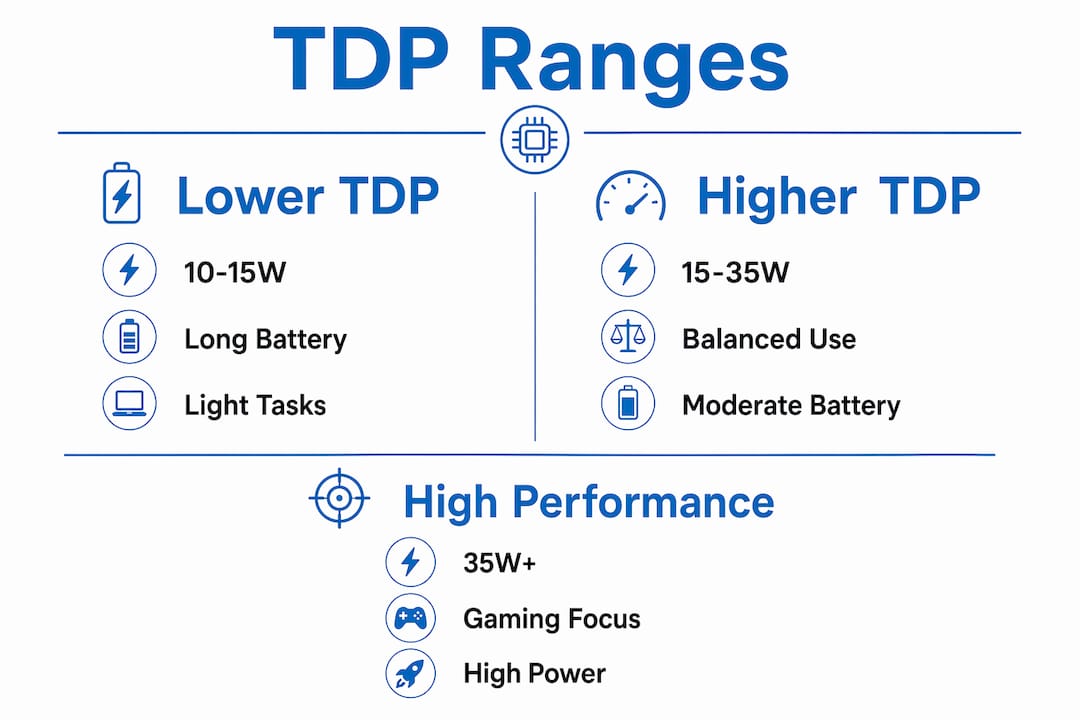
Laptops with 10 to 15W CPUs can achieve up to 12 hours of battery life on light tasks, making them ideal for students or commuters who prioritize portability. The trade-off is that these chips struggle with anything beyond basic productivity. Running a Zoom call while editing a spreadsheet and streaming music can push a 10W chip to its thermal limit.
The 15 to 35W range is where most mainstream budget laptops live, and it represents the best balance for the average user. 15W TDP CPUs can sustain 8 to 12 hours on light tasks, while chips tuned toward the 28 to 35W end of this range handle more demanding work before throttling. If you are a college student, a remote worker, or someone who uses their laptop for a mix of tasks throughout the day, this is the TDP range to target.
At 35W and above, you are looking at gaming-oriented budget laptops. The ASUS TUF Gaming F15 is a good example of a budget gaming machine that pairs a higher-TDP CPU with a cooling system designed to handle it. Battery life drops to 3 to 5 hours under load, but sustained performance is meaningfully better. These laptops are heavier and louder, but they deliver on the performance promise in a way that 15W machines simply cannot.
Pro Tip: If battery life is your top priority, look for laptops with AMD Ryzen processors in the 15 to 28W range. AMD’s efficiency architecture tends to deliver better performance per watt than comparable Intel chips at the same TDP, which means more real-world speed without sacrificing runtime.
How budget laptop design limits real TDP performance
The TDP rating on a chip only tells you what the processor can theoretically handle. The laptop’s physical design determines how close to that ceiling it can actually operate. Budget laptops routinely compromise on cooling to hit a price point, and those compromises have direct consequences for the user.
Fan design, heatsink size, and chassis airflow directly influence a laptop’s ability to manage heat at its rated TDP. A budget laptop with a single fan, a small aluminum heatsink, and minimal vent cutouts will throttle a 28W chip down to 15W behavior within minutes of sustained load. The chip is capable of more. The chassis simply cannot support it.
Here is what to look for when assessing a budget laptop’s thermal design:
- Fan count: Dual-fan setups manage heat more effectively than single-fan designs, especially during sustained workloads.
- Vent placement: Bottom vents that face a flat desk surface restrict airflow. Side or rear vents are more effective in real use.
- Chassis material: Aluminum dissipates heat better than plastic, though most budget laptops use plastic to cut costs.
- Thermal paste quality: Budget laptops sometimes use lower-grade thermal interface materials that degrade faster, worsening heat transfer over time. This is one reason a slow laptop can get worse with age.
- Chassis thickness: Thinner budget laptops have less internal volume for cooling components, which limits how aggressively the CPU can run.
The practical advice here is straightforward. Do not buy a budget laptop based on TDP specs alone. Read reviews that test sustained workloads, not just peak benchmarks. Look for thermal throttling data. Check whether reviewers note fan noise under load, because a loud fan is often a sign that the cooling system is working at its limit. Two laptops with the same CPU SKU can behave very differently based on their cooling systems and thermal management firmware, so the model name matters as much as the chip inside it.
Key takeaways
TDP is a thermal ceiling that defines how much heat a CPU generates, and in budget laptops, the cooling design determines how close to that ceiling the chip can actually run.
| Point | Details |
|---|---|
| TDP is a thermal guideline | It measures maximum heat output in watts, not raw speed or power consumption. |
| Budget cooling limits real TDP | Thin chassis and single-fan designs cause throttling well below the chip’s rated TDP. |
| PL1 and PL2 matter more than TDP | OEM power limit settings often determine actual performance more than the chip’s official TDP. |
| CPU suffixes reveal power class | U, H, HS, and HX suffixes tell you more about real performance than i5 or i7 labels. |
| Match TDP to your use case | 10 to 15W suits portability, 15 to 35W suits everyday work, 35W and above suits gaming. |
Why I think most budget laptop buyers are looking at the wrong number
I’ve spent a lot of time testing budget laptops, and the single most common mistake I see is people fixating on the CPU name while ignoring the power class and cooling design. Someone sees “Intel Core i7” on a $450 laptop and assumes it will perform like an i7. It will not. Not even close, in most cases.
The uncomfortable truth is that CPU power class and cooling capabilities are stronger indicators of real-world performance than marketing labels. A Lenovo V14 with a Ryzen 5 7520U at 15W will feel faster for everyday tasks than a competing model with a “Core i7” U-series chip running at a lower OEM-configured PL1. The numbers behind the name matter far more than the name itself.
What I tell people is this: treat TDP as a starting point, not a conclusion. It tells you roughly what thermal class the chip belongs to. Then you need to ask whether the laptop’s cooling system can actually support that TDP, and whether the OEM has configured the power limits to take advantage of it. Independent reviews that test sustained workloads give you that answer. A spec sheet never will.
I’ve reviewed laptops where the manufacturer advertised a 28W CPU but the actual sustained PL1 was set to 15W in firmware. The laptop felt sluggish under any real load, and the spec sheet gave no indication of that. That kind of gap is exactly why Techreviewnerds tests machines under real conditions rather than relying on what the box says.
If you are shopping for a budget laptop right now, prioritize reviews over specs. Look for thermal throttling data. Check the CPU suffix before you check the tier name. And remember that a well-cooled i5 will beat a throttled i7 every single time.
— K
Find the right laptop without the guesswork
Techreviewnerds has done the thermal testing so you don’t have to. Whether you need a lightweight machine for school or a productivity workhorse for remote work, the curated guides below cut through the spec sheet noise and tell you exactly how each laptop performs under real load.

The best laptops for work and school guide covers machines across every TDP class, with notes on sustained performance, fan noise, and battery life that go well beyond what any retailer listing will tell you. For students specifically, the best laptops for college students guide focuses on the 15 to 28W sweet spot where portability and real-world performance actually balance out. Both lists are updated regularly and reflect hands-on testing, not recycled press releases.
FAQ
What is TDP in a laptop processor?
TDP stands for Thermal Design Power and represents the maximum heat a CPU generates under normal workloads, measured in watts. It guides how manufacturers design the cooling system around the chip.
Does higher TDP mean better performance?
Higher TDP generally allows a CPU to sustain faster clock speeds for longer, but only if the laptop’s cooling system can support it. A high-TDP chip in a poorly cooled budget laptop will throttle and underperform a lower-TDP chip in a well-designed machine.
How does TDP affect battery life in budget laptops?
Battery life declines as TDP increases because higher-wattage chips draw more power. Laptops with 10 to 15W CPUs can reach up to 12 hours of battery life, while 45W chips typically last only 3 to 5 hours under similar conditions.
Why do two laptops with the same CPU perform differently?
Two laptops with the same CPU SKU can behave very differently because OEMs configure different PL1 and PL2 power limits in firmware, and their cooling systems vary in capacity. The chip is identical. The environment it operates in is not.
What TDP should I look for in a budget laptop?
For everyday tasks like browsing, documents, and video calls, a CPU in the 15 to 28W range offers the best balance of performance and battery life. For gaming or heavier creative work on a budget, look for 35W or higher paired with a laptop that has a dual-fan cooling setup.