
There are a lot of 27-inch 1440p monitors out there right now. I’ve tested quite a few over the years, and while many are good, only a handful truly balance gaming performance and everyday productivity without feeling like a compromise.
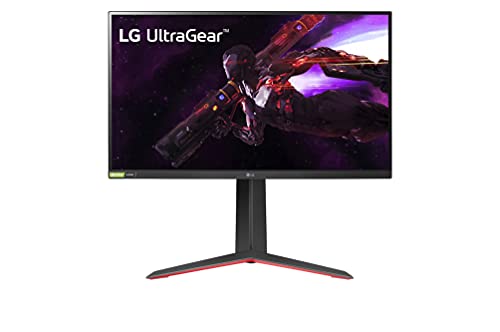
If I had to narrow it down to one model that consistently delivers for both, it would be the LG UltraGear 27″ QHD Gaming Monitor. It hits that sweet spot of speed, image quality, and usability that most people actually need. Not just impressive specs on paper, but a screen you can comfortably use all day and still enjoy at night when it’s time to game.
A fast 27-inch QHD gaming monitor with a Nano IPS panel, 165Hz refresh rate, 1ms response time, and G-SYNC and FreeSync Premium support for smooth, competitive gameplay.
Why 27-Inch 1440p Is Still the Sweet Spot
Before getting into the details, it’s worth explaining why this size and resolution combo continues to dominate in 2026.
At 27 inches, 1440p (2560×1440) looks sharp without forcing you into aggressive scaling like 4K often does. Text is crisp, icons look clean, and you get noticeably more workspace than 1080p. I’ve tried going back to 1080p on a 27-inch panel, and it feels soft and cramped almost immediately.
For gaming, 1440p is also much easier to drive than 4K. You can push high refresh rates with a mid-range or upper mid-range GPU without sacrificing visual quality. That balance is exactly where this LG UltraGear monitor shines.
Design and Build Quality
LG’s UltraGear line has a recognizable look. It’s clearly a gaming monitor, but it doesn’t scream for attention.
The 27-inch panel sits on a sturdy stand with height, tilt, and pivot adjustments. That flexibility matters more than people think. If you work at your desk for hours, being able to dial in the exact height reduces neck strain significantly. I always recommend prioritizing ergonomics, and this monitor delivers there.
The bezels are thin, which makes the screen feel modern and works well in dual-monitor setups. The back has subtle gaming accents, but nothing over the top. It looks just as appropriate in a home office as it does in a gaming room.
Display Quality for Work
For productivity, this monitor is genuinely comfortable to use.
The IPS panel provides wide viewing angles and strong color consistency. If you’re working with spreadsheets, documents, coding environments, or multiple browser windows, the extra resolution gives you breathing room. I regularly keep two full-sized windows side by side on a 1440p screen, and it feels natural rather than cramped.
Text clarity is excellent at this size and resolution. Small fonts stay sharp without scaling tricks. If you spend long stretches reading or editing, that matters more than flashy features.
Color accuracy is solid out of the box, and with minor calibration, it becomes good enough for light photo editing or content creation. It’s not a professional reference display, but for most creators and remote workers, it’s more than capable.
Gaming Performance
This is where the LG UltraGear really separates itself from basic office monitors.
With a high refresh rate and fast response times, motion looks smooth and controlled. In fast-paced games like shooters or racing titles, the difference between 60Hz and 144Hz or higher is obvious. Once you’ve gamed at higher refresh rates, it’s hard to go back.
Input lag is low, and the monitor supports adaptive sync, which helps eliminate screen tearing when your frame rate fluctuates. In real-world use, that means gameplay feels fluid instead of jittery.
I’ve found that it handles both competitive multiplayer games and cinematic single-player titles well. Fast scenes stay sharp, and darker environments retain detail without looking washed out. It’s not just fast, it’s visually pleasing too.
IPS vs VA: Why This Panel Works Well for Mixed Use
Some people debate IPS versus VA panels endlessly. In my experience, IPS is the safer choice if you want one monitor for everything.
This LG UltraGear uses an IPS panel, which means better color accuracy and more consistent viewing angles compared to most VA panels. If you ever shift in your chair or collaborate with someone looking at the screen from the side, colors stay stable.
VA panels can offer deeper blacks, but they sometimes struggle with motion smearing in fast games. Since this monitor is designed to balance gaming and work, IPS makes sense here. You get speed without sacrificing clarity.
Everyday Usability
Specs are important, but daily experience is what really matters.
The on-screen display is intuitive and easy to navigate. Switching between presets for work and gaming takes only a few clicks. There are features like black stabilizer and motion blur reduction that can help in certain games, but they’re optional. You don’t have to fiddle constantly to get a good picture.
Connectivity is also practical. With DisplayPort and HDMI inputs, it works smoothly with both desktop PCs and consoles. Setup is straightforward, and most modern systems recognize it instantly at full resolution and refresh rate.
I appreciate when a monitor just works without hours of tweaking. This one falls into that category.
Who This Monitor Is Best For
If you’re building or upgrading a gaming PC and want something that will last several years, this monitor makes sense. It pairs well with mid-range and high-end GPUs that can consistently deliver strong frame rates at 1440p.
It’s also ideal for hybrid users. If you work from home during the day and game at night, you don’t want to swap between a productivity screen and a gaming screen. This model handles both roles without feeling like a compromise.
It may not be the best choice for professional color grading or ultra-competitive esports players chasing 240Hz or 360Hz refresh rates. But for the majority of people, it hits the right balance.
Is It Worth It in 2026?
In short, yes.
4K monitors are more common now, but they still demand more GPU power and often cost more. For most gamers and general users, 1440p remains the practical choice. It delivers sharp visuals without punishing your hardware.
This LG UltraGear monitor fits perfectly into that reality. It offers the smoothness gamers want and the clarity professionals need, without unnecessary extras that drive up the price.
I’ve used plenty of monitors that look impressive in marketing materials but fall short in daily use. This one doesn’t. It feels reliable, responsive, and comfortable over long sessions.
Final Verdict
If you want the best single 27-inch 1440p monitor for both gaming and work in 2026, the LG UltraGear 27″ QHD Gaming Monitor is an easy recommendation.
It delivers strong image quality, smooth performance, solid ergonomics, and dependable build quality. Most importantly, it works well in real life. You can spend eight hours working on it and still enjoy gaming on it later without feeling like you need a different screen.
For most people, that balance is exactly what matters.