
If you’ve ever listened back to yourself on a Zoom recording and thought, “Do I really sound like that?”, you’re not alone. Built-in laptop microphones are convenient, but they rarely sound clear or professional. Voices come through thin, echoey, or buried under background noise. I ignored it for a while too, until I upgraded to a dedicated USB mic and realized how big the difference actually is.
If you want one simple, reliable solution under $150, the Logitech Blue Yeti USB Microphone is still one of the strongest options out there. It’s been around for years, and unlike a lot of tech products that fade away, it’s stuck around for a reason. It’s easy to use, sounds genuinely good, and works just as well for work calls as it does for streaming or casual content creation.
A plug-and-play USB microphone with clear, studio-style sound, multiple pickup patterns, and built-in controls, making it a reliable choice for gaming, streaming, podcasting, and everyday computer use.
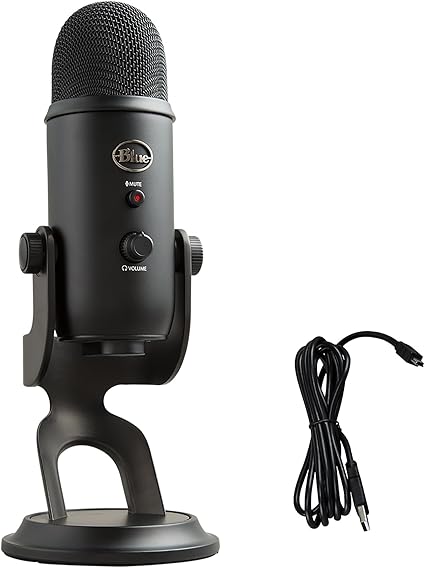
First Impressions and Build Quality
The first thing you notice about the Blue Yeti is that it feels substantial. It’s heavier than most people expect. The solid metal stand and sturdy body give it a premium feel right out of the box. This isn’t one of those lightweight plastic mics that shifts every time you bump your desk.
I’ve used cheaper USB mics in the past that felt flimsy or top-heavy. The Yeti sits firmly in place, which makes everyday use less frustrating. You can tilt it forward or backward to get the right angle, and the stand does a good job of keeping vibrations to a minimum.
It’s not tiny. If you’re working with a very small desk, you’ll notice it. But in my experience, the trade-off for that size is stability and better internal components. It looks clean and professional on camera, which is a small but real bonus if you’re on video calls often.
Setup Is About as Easy as It Gets
One of the biggest reasons the Blue Yeti remains popular is how simple it is to set up. You plug it into your computer with the included USB cable, select it as your microphone in Zoom, OBS, or whatever platform you’re using, and that’s it.
No drivers. No complicated software required. It works on both Windows and Mac without any extra steps. I’ve set this up for friends and coworkers who aren’t tech-savvy, and it’s consistently painless.
There’s also a built-in headphone jack on the mic itself. That means you can plug your headphones directly into the Yeti and hear your own voice in real time. This feature, called direct monitoring, is something most people don’t realize they need until they try it. It helps you adjust your speaking volume and mic position naturally, without guessing.
Sound Quality for Zoom Calls
For Zoom and video meetings, clarity matters more than anything. You want your voice to sound natural and easy to understand, not overly bass-heavy or harsh.
In cardioid mode, which is the setting most people will use, the Blue Yeti focuses on sound coming from directly in front of the microphone. This reduces some background noise and keeps your voice front and center. When positioned correctly about six to eight inches from your mouth, it produces a full, slightly warm tone that feels much more professional than any built-in mic.
Most people don’t realize that mic placement affects sound more than the mic itself. If you leave the Yeti sitting two feet away and crank the gain up, it will pick up room noise. But if you lower the gain and move it closer to your mouth, the difference is dramatic. In my experience, this simple adjustment alone can make you sound like you upgraded your entire setup.
Performance for Streaming and Content Creation
If you’re streaming on Twitch, YouTube, or recording voiceovers, the Blue Yeti gives you more flexibility than many other USB mics under $150.
One of its standout features is the multiple pickup patterns. On the back of the mic, you can switch between cardioid, omnidirectional, bidirectional, and stereo modes. For solo streaming, cardioid is usually best. But if you’re recording a podcast with someone sitting across from you, bidirectional can be useful. If you’re capturing a group discussion, omnidirectional has its place.
I’ve found that having these options makes the Yeti more versatile than simpler USB mics that only offer one pattern. You may not use all four modes daily, but it’s nice to have the flexibility without buying another microphone.
The sound itself is detailed and clear. It captures vocal nuance well, which helps your voice sound more natural and engaging on stream. It’s a condenser microphone, so it’s sensitive. That’s great for detail, but it also means you need a relatively quiet room for best results.
Controls That Actually Make Daily Use Easier
The Blue Yeti has physical controls that make a difference in everyday use. On the front, there’s a volume knob for your headphones and a dedicated mute button. On the back, you’ll find the gain control and the pickup pattern selector.
That mute button is more useful than it sounds. I’ve used it countless times during meetings when I needed to cough, type loudly, or deal with background noise quickly. It’s faster than scrambling to mute yourself in software.
The gain knob also allows you to fine-tune your levels without digging through audio settings on your computer. Once you dial it in, you rarely have to touch it again.
Common Mistakes People Make With the Blue Yeti
Because the Yeti is popular, there’s also a lot of mixed feedback online. In my experience, most complaints come down to setup mistakes rather than the mic itself.
The most common issue is using too much gain. People assume higher gain equals better sound. In reality, higher gain just makes the mic more sensitive to room echo and background noise. Lower gain with closer placement almost always sounds better.
Another mistake is speaking into the top of the mic. The Blue Yeti is a side-address microphone, which means you speak into the front of it, not the top. It sounds obvious once you know, but I’ve seen plenty of people get this wrong.
Room acoustics also matter. If you’re in a very echoey space with bare walls and hard floors, the mic will pick that up. Adding soft furnishings like curtains, rugs, or even a bookshelf behind you can noticeably improve sound quality.
Who This Microphone Is Best For
The Logitech Blue Yeti USB Microphone is ideal for people who want a reliable, do-it-all USB mic under $150 without getting into complicated audio gear.
It’s great for remote workers who want to sound clearer on calls, streamers who need solid voice quality without buying an interface, and beginners who want room to experiment with different recording setups.
If your room is extremely noisy, like constant traffic outside or loud mechanical equipment, a dynamic microphone might handle that better. But for most home offices and bedrooms, the Yeti performs very well when set up correctly.
Is It Still Worth Buying in 2026?
With so many USB microphones on the market, it’s fair to wonder if the Blue Yeti is still relevant. In my experience, yes, it absolutely is.
There are newer models with sleeker designs and fancy software integrations. But the Yeti continues to deliver dependable sound quality, useful features, and straightforward operation at a price that’s accessible to most people.
Sometimes the best choice isn’t the newest product. It’s the one that has proven itself over time. The Blue Yeti has done that. It remains widely available, consistently well-reviewed, and supported by a huge user base, which makes troubleshooting and setup advice easy to find.
Final Thoughts
If you want one USB microphone under $150 that handles streaming, Zoom calls, voice recordings, and even beginner podcasting without hassle, the Logitech Blue Yeti USB Microphone is a strong choice.
It’s simple to set up, flexible enough for different recording situations, and capable of producing clear, professional sound when used correctly. I’ve seen firsthand how much better people come across on calls and streams after upgrading from a built-in mic to something like this.
Focus on proper placement, keep the gain under control, and use the right pickup pattern. Do that, and the Blue Yeti can easily elevate the way you sound online without stretching your budget.