
Finding a genuinely good 1440p gaming monitor under $400 is harder than it sounds. On paper, a lot of models look similar. High refresh rates, fast response times, HDR support. But once you actually sit in front of them, the differences become obvious pretty quickly.
I’ve spent a lot of time gaming and working on 27-inch 1440p displays, and the LG UltraGear 27GP850-B is one that keeps coming up in conversations for a reason. It’s often recommended as a sweet spot monitor for competitive and casual gamers who want speed without sacrificing image quality. After using it for extended sessions, I get why it’s so popular.
This review walks through what the LG UltraGear 27GP850-B does well, where it falls short, and who it actually makes sense for if you’re shopping in this price range.
A fast 27-inch QHD gaming monitor with a Nano IPS panel, 165Hz refresh rate, 1ms response time, and G-SYNC and FreeSync Premium support for smooth, competitive gameplay.
Design and build quality
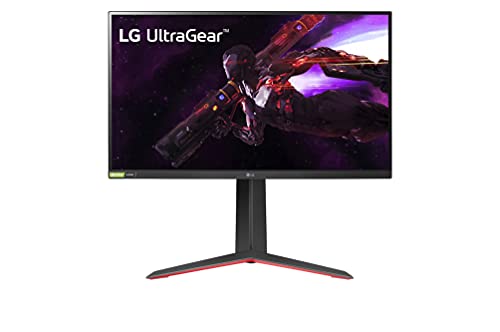
The design is very much LG UltraGear’s standard look. Matte black, clean lines, and just a hint of red on the stand so it doesn’t scream “gaming” from across the room. In my experience, this makes it easy to fit into both a gaming setup and a more professional desk without clashing.
Build quality feels solid for the price. The stand is sturdy and doesn’t wobble when you bump the desk, which is something I can’t say about every monitor in this range. Height, tilt, pivot, and swivel are all adjustable, and those adjustments actually feel smooth instead of stiff or flimsy.
The bezels are thin on three sides, which is great if you ever plan to run a dual-monitor setup. It’s not the thinnest monitor out there, but nothing about it feels cheap or poorly thought out.
Display quality and panel performance
This monitor uses a Nano IPS panel, and that’s where it starts to separate itself from a lot of cheaper 1440p options. Colors are vibrant without looking oversaturated, and viewing angles are excellent. If you’re coming from a standard IPS or TN panel, the jump is noticeable.
Out of the box, color accuracy is surprisingly good for a gaming monitor. I didn’t feel the need to tweak much beyond basic brightness and contrast adjustments. It covers a wide color gamut, which is nice not just for games, but also for content creation, photo editing, or just watching movies.
Brightness is solid for SDR use. It’s bright enough to handle a well-lit room without looking washed out. HDR, however, is more of a bonus feature than a true selling point. With HDR400 certification, you shouldn’t expect deep contrast or dramatic highlights. It’s usable, but I wouldn’t buy this monitor specifically for HDR performance.
Gaming performance and refresh rate
This is where the LG UltraGear 27GP850-B really shines. It supports up to 180Hz refresh rate when overclocked, and once you get used to that level of smoothness, it’s hard to go back. Even at the standard 165Hz, motion feels incredibly fluid.
Response times are excellent for an IPS panel. Ghosting and motion blur are minimal, especially when using LG’s faster response time settings without pushing them to the extreme. In fast-paced shooters and competitive games, everything feels responsive and precise.
Adaptive sync support is another big plus. The monitor works with both G-SYNC Compatible and FreeSync Premium, and in my testing, screen tearing was basically nonexistent. Variable refresh rate feels smooth across a wide range of frame rates, which is great if your GPU doesn’t always hold a steady 165 or 180 FPS.
Resolution and screen size sweet spot
At 27 inches, 1440p is a near-perfect balance. Text looks sharp, games have plenty of detail, and you don’t need an ultra-powerful GPU just to run modern titles smoothly. This is one of the main reasons monitors like this are so popular right now.
I’ve found that 1440p on a 27-inch screen gives you enough workspace for productivity without needing scaling, and games benefit from the extra clarity compared to 1080p. If you’re upgrading from a 24-inch 1080p monitor, the difference is immediate.
This resolution also makes high refresh rates more achievable. You’re not pushing your system as hard as you would with 4K, but you still get a big visual upgrade.
Connectivity and features
Port selection is straightforward but adequate. You get DisplayPort 1.4, HDMI ports, and a USB hub for connecting peripherals. Nothing fancy, but everything you actually need is there.
LG’s on-screen display is controlled by a joystick under the monitor, and it’s one of the better implementations I’ve used. Menus are easy to navigate, settings are clearly labeled, and you don’t have to fight with tiny buttons just to adjust brightness.
There are a few gaming-focused features like crosshair overlays and FPS counters. Personally, I rarely use them, but some players appreciate having those options built in.
Everyday use beyond gaming
While this monitor is marketed heavily toward gamers, it works surprisingly well for general use. Text clarity is good enough for long writing or browsing sessions, and the IPS panel makes it comfortable to look at for hours without noticeable eye strain.
If you do light photo or video editing, the color performance is more than acceptable for a non-professional display. It’s not a replacement for a high-end color-accurate monitor, but for a hybrid gaming and work setup, it holds its own.
The only thing I wouldn’t rely on is the built-in HDR. For movies or HDR content, it’s fine, but not transformative.
Downsides to be aware of
No monitor is perfect, and this one does have a few drawbacks. The contrast ratio is typical for IPS, which means blacks aren’t as deep as you’d get from a VA or OLED panel. In dark rooms, you may notice some glow or light bleed, depending on your unit.
HDR support, as mentioned earlier, is limited. It’s there, but it shouldn’t be a deciding factor. If true HDR performance matters to you, you’ll need to spend significantly more.
The stand, while sturdy and adjustable, does take up a fair amount of desk space. If you’re working with a small desk, you may want to consider a VESA mount instead.
Who this monitor is for
The LG UltraGear 27GP850-B makes the most sense for gamers who want high refresh rates, excellent motion clarity, and strong color performance without jumping into premium pricing. It’s especially well-suited for competitive gaming, but still looks great for single-player titles and everyday use.
If you’re coming from 1080p and want a noticeable upgrade without destroying your GPU budget, this monitor hits a really comfortable middle ground. It’s also a solid choice if you split your time between gaming and productivity.
On the other hand, if your priority is deep contrast, true HDR, or cinematic visuals above all else, you may want to look at VA or OLED alternatives, even though they’ll likely cost more.
Final verdict
After spending real time with it, I understand why the LG UltraGear 27GP850-B is often called one of the best 1440p gaming monitors under $400. It nails the fundamentals that actually matter: smooth performance, great colors, reliable build quality, and a refresh rate that still feels impressive even as standards rise.
It doesn’t try to be everything. Instead, it focuses on delivering a fast, clean, and enjoyable experience where it counts. For most gamers shopping in this price range, that’s exactly what you want.