
The most important laptop specifications in 2026 are RAM capacity, storage type, display quality, and battery capacity. These four specs determine how a laptop feels to use every single day, far more than processor branding or chassis design. Knowing what specs matter in a laptop before you buy saves you from paying a premium for numbers that look impressive on a box but deliver little real benefit. This guide breaks down each spec category with clear baselines, explains the nuances that most buyers miss, and helps you match specifications to your actual needs, whether you work from home, game on weekends, or both.
How much RAM do you really need in a 2026 laptop?
RAM is the single spec that most directly controls how smooth your laptop feels during normal use. It determines how many apps, browser tabs, and background processes your system can juggle without slowing down.
16GB is the absolute minimum for modern computing in 2026. Running 8GB causes bottlenecks the moment you open a few browser tabs alongside a productivity app. That sluggishness is not a software problem. It is a hardware ceiling.

For most buyers, 16GB handles everyday tasks comfortably. Students, remote workers, and casual users will find it sufficient for web browsing, video calls, document editing, and light media consumption. The experience stays fluid as long as you are not running demanding software simultaneously.
Creators, gamers, and power users need more headroom. Experts recommend 32GB or more for advanced multitasking and professional workflows. Video editors working in 4K, software developers running virtual machines, and gamers streaming while playing all benefit from 32GB. At 64GB, you are in workstation territory, which suits architects, 3D artists, and data professionals.
The generation of RAM matters as much as the amount. DDR5 RAM at 6400MHz or higher is the standard for 2026 laptops. DDR4 creates bottlenecks even when the capacity looks adequate on paper. If a laptop ships with DDR4 in 2026, treat it as a red flag for future performance.
RAM speed, latency, and upgradeability also affect gaming and professional app responsiveness beyond raw capacity. A fast 16GB DDR5 kit outperforms a slow 32GB DDR4 configuration in many real-world tasks.
- 16GB DDR5: Minimum for general use, web browsing, and light productivity
- 32GB DDR5: Recommended for gamers, content creators, and developers
- 64GB DDR5: Suited for 3D rendering, data science, and heavy virtual machine use
Pro Tip: Check whether the RAM is soldered to the motherboard before buying. Soldered RAM cannot be upgraded later. If a laptop ships with 16GB soldered RAM and you later need 32GB, you will need a new machine. Upgradeable RAM slots give you a longer useful life and better value over time. You can read more about how this affects long-term value in Techreviewnerds’ guide on laptop resale value.
What storage specs maximize speed and capacity?
Storage type affects how fast your laptop boots, how quickly apps open, and how responsive the whole system feels. Capacity determines how long before you run out of space.
512GB NVMe SSD is the standard minimum for 2026. A 256GB drive fills up quickly under normal use once you account for the operating system, apps, and a modest photo or video library. Buying a 256GB laptop in 2026 means you will be managing storage constantly, which gets old fast.
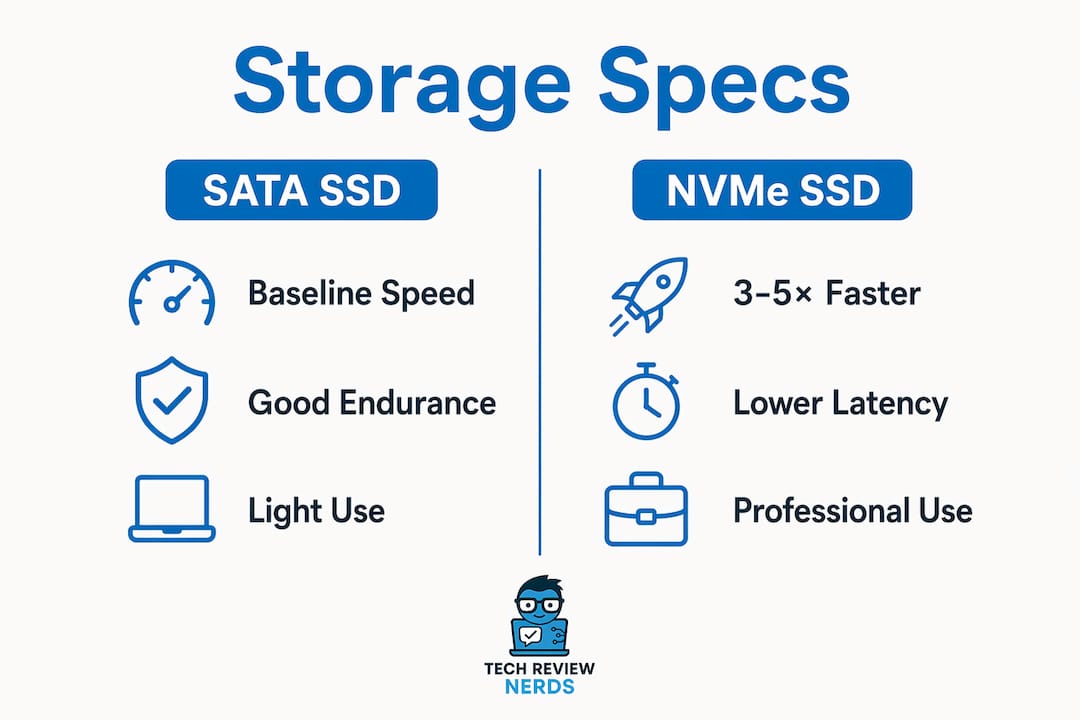
The type of SSD matters as much as the size. NVMe SSDs are 3–5 times faster than SATA SSDs and are critical for smooth application load times and system responsiveness. SATA SSDs were a meaningful upgrade over spinning hard drives, but NVMe is the clear standard now. Storage speed affects perceived system performance more than raw CPU specs for many everyday workflows.
Within NVMe drives, the NAND flash type creates another layer of difference. QLC SSDs have slower write speeds and reduced endurance compared to TLC SSDs. TLC NAND is preferable for longevity, especially if you write large files frequently. Budget laptops often use QLC to hit a lower price point, which is a trade-off worth knowing before you buy.
For media professionals and heavy users, 1TB is the practical minimum. Photographers, video editors, and musicians accumulate large files quickly. Running out of internal storage forces you to rely on external drives, which adds friction to every workflow.
| Storage Type | Speed vs. SATA | Endurance | Best For |
|---|---|---|---|
| SATA SSD | Baseline | Good | Light use, older systems |
| NVMe TLC SSD | 3–5x faster | Excellent | Most buyers in 2026 |
| NVMe QLC SSD | 3–5x faster | Moderate | Budget builds, light write loads |
Pro Tip: When reviewing a laptop’s spec sheet, look for the SSD model number and search it to identify the NAND type. Manufacturers rarely advertise QLC versus TLC directly, but the drive model reveals it. This one check can save you from a storage bottleneck two years down the road.
How does display quality affect productivity and comfort?
The display is the part of your laptop you interact with every second of use. A poor screen causes eye strain, washes out in bright rooms, and makes color-sensitive work unreliable.
1920×1200 at a 16:10 aspect ratio is the preferable baseline resolution for professional tasks. The extra vertical space compared to 1920×1080 lets you see more of a document, spreadsheet, or code file without scrolling. It is a small difference in numbers but a noticeable improvement in daily comfort.
For gamers and power users, 2560×1600 at 120Hz is the recommended target. The sharper pixel density makes text and fine detail noticeably crisper. The 120Hz refresh rate adds a layer of fluidity to motion that 60Hz simply cannot match, whether you are scrolling through a long document or playing a fast-paced game.
Brightness is a spec that budget shoppers often overlook. 300 nits is the minimum for comfortable indoor use, and 400 nits is better for bright office environments or near windows. Many budget laptops ship with panels below 250 nits, which look dim and washed out in normal lighting conditions.
Panel type shapes color accuracy and viewing angles. IPS panels deliver accurate colors and wide viewing angles, making them the standard for productivity and creative work. OLED panels go further with deeper blacks and more vivid color, though they carry a higher price and can show burn-in over time with static elements. TN panels are the weakest option, with narrow viewing angles and less accurate color, and they appear mostly in entry-level machines.
Pro Tip: A 4K display on a 15-inch laptop sounds appealing, but it comes with real trade-offs. The GPU works harder to push more pixels, which drains battery faster and can reduce frame rates in games. For most buyers, QHD+ at 120Hz delivers a better balance of sharpness and performance than 4K at 60Hz.
Battery capacity and real-world battery life
Battery specs are where manufacturer marketing diverges most sharply from real-world experience. Understanding what to look for protects you from disappointment.
Watt-hours (Wh) are a more reliable measure of real-world battery life than the hours advertised on the box. Manufacturer runtime estimates are often measured under ideal conditions, like low screen brightness and minimal background activity. Real use looks nothing like that.
A 60Wh battery is the reliable threshold for achieving 8 or more hours of productivity. Laptops with smaller batteries may hit that number in marketing materials but fall short during a normal workday. Anything below 50Wh should be treated with caution unless the laptop uses a very efficient processor.
Processor efficiency and screen technology both affect how far a battery goes. Laptops built around efficiency-focused processors, like ARM-based designs or Intel’s low-power cores, consistently outperform spec-equivalent machines with older thermal designs. An OLED screen draws more power than an IPS panel at the same brightness, which is worth factoring in if battery life is a priority.
- Under 50Wh: Expect 5–6 hours under real workloads
- 60–72Wh: Reliable 8+ hours for productivity tasks
- 80Wh+: Full-day use with headroom for heavier tasks
- Check the Wh rating, not the advertised hours, when comparing laptops
A common misconception is that a larger battery always means a heavier laptop. Some thin-and-light designs pack 70Wh+ batteries into sub-1.4kg chassis by using efficient components throughout. Weight and battery capacity are not as directly linked as they used to be. You can explore more on this topic through Techreviewnerds’ guide to top laptop battery sources.
Beyond basics: CPU, GPU, ports, and other features worth considering
Once RAM, storage, display, and battery are sorted, secondary specs shape the experience for specific use cases. These are the details that separate a good laptop from the right laptop for your needs.
CPU tier matters less than most buyers assume. Thermal design and power class heavily influence real-world CPU performance more than the marketing tier printed on the box. A higher-tier processor crammed into a thin chassis with poor cooling will throttle under load and perform worse than a mid-tier chip in a well-cooled machine. When evaluating a CPU, look at the TDP rating and read thermal performance data from hands-on reviews rather than relying on the chip name alone.
GPU selection depends entirely on what you plan to do. Integrated graphics handle most productivity tasks without issue. Discrete GPUs become necessary for gaming, 3D rendering, and video encoding. For gamers and creators who want capable performance without overspending, RTX 5060-level GPUs meet the needs of 90% of users in those categories. You can dig deeper into GPU-heavy configurations through Techreviewnerds’ desktop replacement gaming laptop guide.
Port selection is a practical spec that gets overlooked until it causes daily frustration. A useful 2026 laptop should include at least one USB-A port for legacy devices, one USB-C port with Power Delivery for charging, and HDMI 2.1 for external display output. Laptops that ship with only USB-C ports force you to carry a hub everywhere, which adds cost and a point of failure.
Refresh rate matters specifically for gamers. A 120Hz display makes motion feel fluid and reduces eye strain during long sessions. At 144Hz or 165Hz, the improvement is real but incremental. Beyond 240Hz, the gains are marginal for most players and come at the cost of battery life and price.
- CPU: Prioritize thermal design and TDP over marketing tier
- GPU: Integrated for productivity, discrete for gaming and creative work
- Ports: USB-A, USB-C with Power Delivery, and HDMI 2.1 as baseline
- Refresh rate: 120Hz minimum for gaming, 60Hz acceptable for pure productivity
Key Takeaways
The most important laptop specs in 2026 are RAM capacity and generation, NVMe SSD type and size, display resolution and brightness, and battery Wh rating, because these four directly determine daily performance and longevity.
| Point | Details |
|---|---|
| RAM minimum is 16GB DDR5 | 8GB causes bottlenecks; DDR4 underperforms even at higher capacities in 2026. |
| NVMe TLC SSD is the storage standard | NVMe drives are 3–5x faster than SATA; TLC NAND outlasts QLC for heavy use. |
| Display baseline is 1920×1200 at 300+ nits | More vertical space and adequate brightness prevent daily discomfort and eye strain. |
| Battery Wh beats advertised hours | A 60Wh+ rating predicts 8+ hours of real productivity more reliably than marketing claims. |
| CPU tier matters less than cooling | Thermal design determines real-world CPU output more than the chip’s marketing name. |
What buyers consistently get wrong about laptop specs
I’ve spent a lot of time testing laptops across price ranges, and the pattern I see most often is buyers fixating on CPU branding while ignoring the specs that actually shape the daily experience. Someone will choose a laptop because it has a higher-tier processor name, then wonder why it feels sluggish six months later. The answer is almost always RAM or storage, not the chip.
Many buyers overspend on top-tier CPUs when increasing RAM or upgrading to a better display would deliver more practical daily benefit. I think this happens because CPU names are easy to compare. “i7 vs. i5” feels like a clear decision. RAM generation, NAND type, and panel brightness require more research, so buyers skip them.
The other thing I notice is how much user comfort factors like keyboard feel and screen quality affect long-term satisfaction compared to raw specs. A laptop with a mediocre keyboard that you type on for eight hours a day will frustrate you far more than a slightly slower processor. Screen brightness in a bright office matters more than whether you have 16GB or 32GB RAM for most office workers.
My honest recommendation is to set your baseline specs first: 16GB DDR5 RAM, 512GB NVMe TLC SSD, a 1920×1200 display at 300+ nits, and a 60Wh+ battery. Then spend any remaining budget on comfort features like keyboard quality, build quality, and screen brightness rather than chasing a higher CPU tier. That approach produces a laptop that feels good to use every day, not just impressive on a spec sheet. The Techreviewnerds guide on why RAM matters for students covers this baseline thinking well for buyers on tighter budgets.
— K. Connors
Techreviewnerds has the spec breakdowns you need
Knowing which specs matter is the first step. Finding a laptop that actually hits those targets at a fair price is where most buyers get stuck.

Techreviewnerds publishes hands-on reviews built around real-world testing, not manufacturer spec sheets. Every review breaks down RAM performance, storage speed, display brightness, and battery life under actual use conditions. The laptop reviews and buying guides cover a wide range of price points, from budget picks to high-performance machines, so you can find options that match the spec baselines covered here. For buyers focused on value, the best mid-range laptop guide is a strong starting point to find machines that hit 2026 standards without overspending.
FAQ
What is the minimum RAM for a laptop in 2026?
16GB DDR5 is the minimum RAM for a laptop in 2026. 8GB causes noticeable bottlenecks during multitasking, and DDR4 underperforms even at higher capacities compared to DDR5.
Is NVMe SSD really better than a SATA SSD?
NVMe SSDs are 3–5 times faster than SATA SSDs, which translates directly into faster boot times and quicker app loading. For most buyers in 2026, NVMe is the expected standard, not a premium upgrade.
How do I know if a laptop’s battery life claim is accurate?
Check the battery’s Watt-hour (Wh) rating rather than the advertised hours. A 60Wh or higher rating reliably supports 8+ hours of real productivity, while manufacturer hour estimates are typically measured under unrealistic conditions.
Does display resolution affect battery life?
Higher resolutions like 4K require more GPU power to render, which increases battery drain. A QHD+ display at 120Hz typically offers a better balance of sharpness and battery efficiency than a 4K panel at 60Hz for most buyers.
What laptop specs matter most for gaming?
For gaming, the most important specs are a discrete GPU at the RTX 5060 level or above, 32GB DDR5 RAM, a display with at least 120Hz refresh rate, and an NVMe TLC SSD for fast game load times.