
RAM (Random Access Memory) is the spec that determines how smoothly a student laptop handles multiple apps, browser tabs, and video calls running at the same time. Most students and parents focus on processor speed or storage size when buying a laptop, but RAM is the true bottleneck for multitasking performance. A fast CPU cannot save a laptop that runs out of memory. Understanding why RAM matters for student laptops means understanding the difference between a machine that keeps up with academic demands and one that freezes mid-lecture.
Why RAM matters more than any other spec for student laptops
RAM functions as a laptop’s short-term working memory. Every open application, every browser tab in Chrome or Edge, every Microsoft 365 document, and every Zoom or Teams call occupies a slice of it. When that space fills up, the laptop starts moving data to the much slower internal storage to compensate. The result is lag, frozen screens, and the kind of sluggishness that makes a 30-minute study session feel twice as long.
Running out of RAM forces the system to swap data to storage as temporary space, causing measurable performance degradation. This matters because storage, even on fast NVMe SSDs, is orders of magnitude slower than RAM. No amount of processor speed fixes that bottleneck once it kicks in.

Student multitasking is more demanding than most people realize. A typical afternoon study session might involve a Google Docs essay, six research tabs in Firefox, a Spotify stream, a Slack channel for group projects, and a Zoom call with a study partner. That combination of Microsoft 365 apps, video conferencing, and browser tabs creates acute RAM demand early in a laptop’s academic life. The CPU barely breaks a sweat during that scenario. RAM is what buckles first.
There is also a less obvious factor worth knowing. Most student laptops use integrated graphics, meaning the GPU shares system RAM rather than having dedicated video memory. A typical 8 GB laptop may have only about 5.5 to 6 GB usable for applications once the integrated GPU takes its share. That gap between the number on the spec sheet and the memory actually available to your apps is real, and it matters when you are deciding between configurations.
How much RAM do students actually need for school?
The honest answer depends on what the student is studying and how they work, but there are clear thresholds worth knowing.
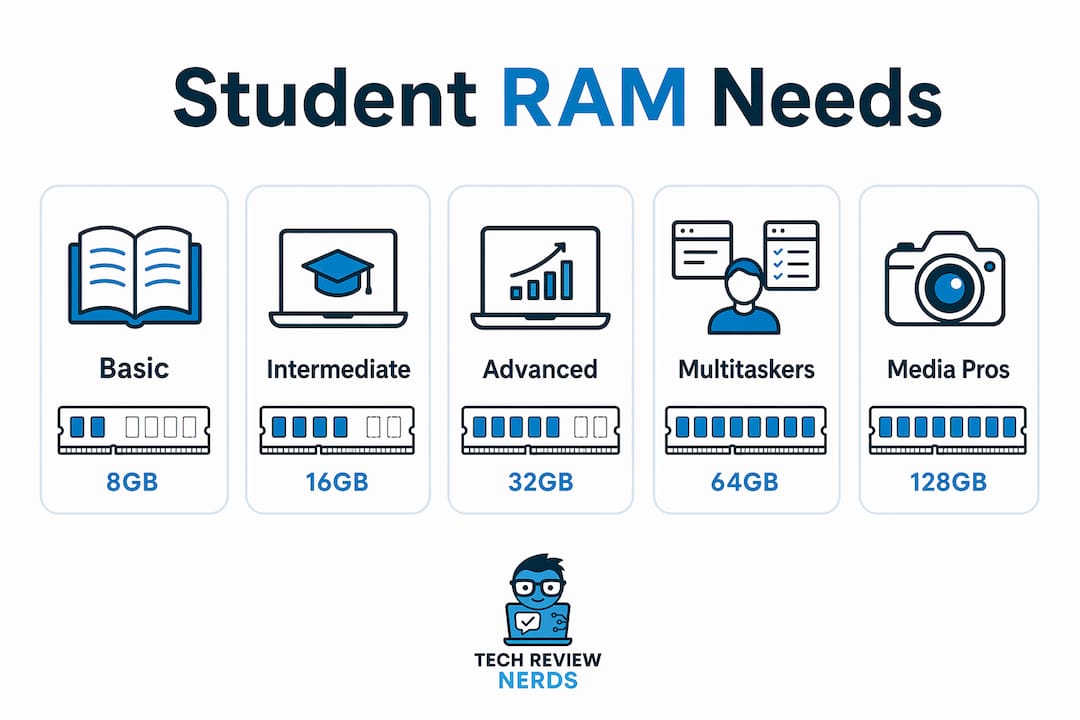
8 GB RAM covers the basics. It handles light browsing, Google Docs, video calls, and a handful of open tabs without major issues. HP’s 2026 guidance confirms 8 GB as sufficient for Chromebook workflows, where ChromeOS manages memory more efficiently than Windows. For students who primarily use web-based tools and keep their multitasking modest, 8 GB gets the job done.
16 GB RAM is the better choice for most Windows laptop users in 2026. Modern browsers and background apps can consume around 8 GB quickly, and 16 GB provides the headroom to prevent slowdowns during routine multitasking. Best Buy’s 2026 student specs guidance recommends 16 GB for coding, engineering, or large datasets. For any student who runs Python environments, uses AutoCAD, edits video in DaVinci Resolve, or works with large spreadsheets, 16 GB is not a luxury. It is the practical minimum.
Here is a quick comparison to make the decision clearer:
| Use Case | Recommended RAM | Why |
|---|---|---|
| Basic browsing, Google Docs, Zoom | 8 GB | Light multitasking with few simultaneous apps |
| Windows laptop, Microsoft 365, heavy research | 16 GB | Background processes fill 8 GB quickly |
| Coding, data science, engineering software | 16 GB | IDEs and datasets demand sustained memory |
| Video editing, media production | 16 GB or more | Rendering and preview require large memory pools |
| Chromebook users | 8 GB | ChromeOS memory management is more efficient |
The takeaway from this table is straightforward. If you are buying a Windows laptop for a student who does anything beyond light web browsing, 16 GB is the right call. The price difference between 8 GB and 16 GB configurations is often $50 to $100 at purchase. That gap is far smaller than the cost of replacing an underpowered machine two years into a four-year degree.
Pro Tip: When comparing laptops, look for the RAM speed specification alongside the capacity. DDR5 RAM, found in newer 2026 models, transfers data faster than DDR4, which adds a noticeable layer of responsiveness when multitasking heavily.
Is RAM more important than CPU speed for student laptops?
For the vast majority of student workloads, yes. A mid-range Intel Core i5 or AMD Ryzen 5 processor handles word processing, video calls, and web research without strain. The CPU is rarely the component holding a student laptop back. RAM is.
The reason comes down to how bottlenecks work. When a processor is underutilized but RAM is maxed out, the system slows to a crawl regardless of clock speed. You can have a fast processor sitting idle while the laptop struggles to swap data in and out of storage. That is the scenario students hit when they open too many tabs or run a few apps simultaneously on an 8 GB Windows machine.
RAM determines how many apps and browser tabs can stay open simultaneously, directly controlling multitasking smoothness. The CPU processes tasks; RAM holds them in a ready state. When RAM runs short, tasks that should be instant require the processor to wait for data to load from storage. The processor becomes a fast engine stuck behind a slow gate.
Here are the most common student scenarios where RAM, not CPU, is the limiting factor:
- Switching between a research paper in Word and 10 open Chrome tabs causes a noticeable pause before each tab reloads.
- Running a Python script in VS Code while a Zoom call is active causes audio stuttering or screen freezes.
- Opening a large Excel dataset alongside a browser and email client causes the entire system to slow, not just the spreadsheet.
- Leaving a laptop in sleep mode with many apps open and returning to find everything needs to reload from scratch.
Pro Tip: If you are shopping and a laptop’s CPU sounds impressive but the RAM is only 8 GB on a Windows machine, treat that as a red flag. A slightly slower processor with 16 GB RAM will outperform a faster chip with 8 GB in real student use.
What parents must know about RAM upgradeability before buying
This is the part of the laptop buying conversation that most people skip, and it is the one that causes the most regret. Many modern thin and light laptops, including popular student models from Dell, HP, Lenovo, and Apple, use soldered RAM. That means the memory chips are permanently attached to the motherboard. You cannot add more later.
HP’s own guidance carries a clear warning: buy it right the first day because many modern laptops cannot be upgraded after purchase. This is not a niche concern. Most Windows laptops in 2026 contain soldered RAM, making the initial purchase choice the one that lasts for the laptop’s entire lifespan. Many students and parents underestimate how much this limits usability over several years.
Here is a practical checklist to follow before committing to any student laptop purchase:
- Check the spec sheet for “soldered” or “onboard” RAM. If the listing says either, the RAM cannot be upgraded. Treat the listed amount as permanent.
- Search the model name plus “RAM upgrade” on forums like Reddit or Notebookcheck. Real users document whether a specific model allows memory expansion.
- Look for laptops with SO-DIMM slots. These are the removable memory modules that allow upgrades. They are less common in ultra-thin designs but still available in mid-range and business-class laptops.
- Compare the cost of upgrading at purchase versus buying a higher-RAM model outright. Manufacturers often charge a premium for RAM upgrades through their configurators. A third-party SO-DIMM upgrade can be cheaper if the slot is accessible.
- Factor in the academic timeline. A laptop bought for a four-year degree needs to handle software that will be more demanding in year three than it is today. HP frames RAM as a longevity spec, noting that software demands grow over time and a laptop should be specced for where the student is going, not just where they are starting.
The practical implication is this: if a laptop has soldered RAM and ships with 8 GB, that machine will always have 8 GB. If the student’s workload grows, the only option is a new laptop. Buying 16 GB upfront on a soldered machine costs less than replacing the device two years early. For parents thinking about long-term value, this is the single most important buying consideration beyond price.
You can also check resources like laptop repair guidance to understand when RAM limitations make repair or upgrade impractical and a new purchase becomes the smarter call.
Matching RAM to your field of study and multitasking habits
Not every student needs the same RAM configuration, and buying more than you need is not always the right move either. The key is matching the spec to how you actually work.
For humanities, social sciences, and general education students, the workload typically involves writing papers, conducting web research, attending online lectures, and using communication tools like Slack or Discord. This profile fits comfortably within 8 GB on a Chromebook or 16 GB on a Windows laptop. The multitasking is real but not extreme, and the software is not memory-intensive.
For STEM students, particularly those in computer science, data science, or engineering, 16 GB is the floor, not the ceiling. Running a local development environment in VS Code or PyCharm alongside a browser, documentation tabs, and a virtual machine can push past 12 GB of active memory use without much effort. Students working with machine learning frameworks like TensorFlow or PyTorch will feel the difference between 16 GB and 8 GB within their first semester.
For media production, architecture, and design students, the demands are even higher. Applications like Adobe Premiere Pro, Blender, and AutoCAD are memory-hungry by design. These students should look at 16 GB as a minimum and consider 32 GB if the budget allows, particularly for video editing workflows where preview rendering keeps large files in memory continuously.
For students who multitask heavily regardless of field, the pattern matters as much as the software. If you habitually keep 15 or more browser tabs open, run a music app in the background, have email and messaging apps always on, and switch between several documents throughout the day, 16 GB will serve you noticeably better than 8 GB even if none of your individual apps are demanding. The cumulative load is what fills RAM, not just the heaviest single application.
One practical consideration for students using laptops for coding or engineering is that the RAM requirement tends to grow as coursework advances. First-year assignments are lighter than final-year capstone projects. Buying adequate RAM at the start means the laptop grows with the student rather than against them.
Key takeaways
RAM capacity is the single most important spec for student laptop multitasking, and buying too little upfront on a soldered machine creates a problem with no affordable fix.
| Point | Details |
|---|---|
| RAM is the multitasking bottleneck | CPU speed rarely limits student performance; RAM capacity does, especially with many apps open. |
| 16 GB is the 2026 Windows standard | 8 GB fills quickly with background processes; 16 GB gives real headroom for academic workloads. |
| Soldered RAM cannot be upgraded | Most modern thin laptops have permanent RAM, so the purchase decision is final. |
| Integrated GPUs reduce usable RAM | A nominal 8 GB laptop may have only 5.5 to 6 GB available for apps due to shared video memory. |
| Match RAM to field of study | STEM and media students need 16 GB minimum; general students can manage with 8 GB on Chromebooks. |
Why I always tell people to buy more RAM than they think they need
I’ve tested a lot of student laptops over the years, and the pattern I keep seeing is the same. A student or parent picks a machine that handles everything fine at purchase, and by the second year of school, the laptop feels noticeably slower. The CPU hasn’t changed. The storage hasn’t changed. The software has gotten heavier, and the 8 GB of soldered RAM that seemed fine in September is now the ceiling the whole system is bumping against.
What I find frustrating about the current market is that manufacturers are shipping attractive, well-designed laptops with 8 GB of soldered RAM at price points that feel like good value. They are not bad machines. But the spec sheet is optimized for the sale, not for the student’s fourth year of university. The $80 difference between an 8 GB and 16 GB configuration at purchase is real money, but it is far less than the cost of buying a replacement laptop 18 months early.
My honest advice is to treat RAM as a non-negotiable spec rather than a nice-to-have upgrade. If you are looking at college student laptops and the base model ships with 8 GB on Windows, either configure up to 16 GB or look at a different model. The performance difference in year one is subtle. By year three, it is the difference between a laptop that keeps up and one that gets in the way.
I also think the Chromebook exception is worth repeating. ChromeOS genuinely manages memory more efficiently than Windows, and 8 GB on a Chromebook is a legitimate choice for students whose workflow lives in the browser. But the moment a student needs Windows-native software, that calculus changes entirely. Know what software your program requires before settling on a configuration.
— K. Connors
Find the right student laptop with the RAM specs that actually matter
Techreviewnerds tests laptops hands-on, with real student workloads, so the recommendations you find here are grounded in actual use rather than spec sheet comparisons. If you are trying to match a laptop to a specific RAM requirement and budget, the curated picks at Techreviewnerds cut through the noise.

Browse the best laptops for school and work to find options filtered by RAM configuration, from 8 GB Chromebooks to 16 GB Windows machines built for heavy multitasking. Every recommendation on the site reflects real testing, with no paid placements shaping the results. If you want a shortcut to the right spec for your budget, that is the place to start.
FAQ
How much RAM does a student laptop need in 2026?
Most students using Windows laptops need 16 GB of RAM to handle multitasking without lag. Chromebook users can manage with 8 GB due to ChromeOS’s efficient memory management.
Does RAM matter more than CPU speed for student laptops?
RAM is the more critical spec for multitasking performance. A fast CPU cannot compensate once RAM is maxed out, because the system is forced to use much slower storage as overflow memory.
Can you upgrade RAM in a student laptop after buying it?
Many modern thin and light laptops have soldered RAM that cannot be upgraded after purchase. Always check whether a model uses soldered or removable SO-DIMM memory before buying.
Why does my 8 GB laptop feel slower than expected?
Integrated graphics share system RAM, so a laptop listed at 8 GB may have only 5.5 to 6 GB available for applications. Combined with background processes, this leaves very little headroom for multitasking.
Is 16 GB of RAM enough for college students studying STEM?
16 GB covers most STEM workloads including coding, data analysis, and engineering software. Students working with machine learning frameworks or video production may benefit from 32 GB if the budget allows.